Table of Contents >> Show >> Hide
- Quick Answer: Can You Cancel an Uber Eats Order?
- How to Cancel an Uber Eats Order on Android, iPhone, or iPad
- Why Timing Matters So Much
- Will You Get a Refund After Canceling?
- What If the Cancel Option Is Missing?
- What to Do If You Entered the Wrong Delivery Address
- What Happens to Promo Codes and Uber Cash?
- What If the Order Was Canceled by Uber Eats, the Merchant, or the Driver?
- How to Ask for Help After a Bad Cancellation Experience
- Common Mistakes People Make When Canceling Uber Eats Orders
- Best Practices Before You Place an Uber Eats Order
- Final Thoughts
- Experiences People Commonly Have When Canceling an Uber Eats Order
- SEO Tags
We have all been there. You place an Uber Eats order, feel wildly confident for about twelve seconds, and then realize you picked the wrong restaurant, the wrong address, or enough garlic sauce to supply a small kingdom. The good news is that canceling an Uber Eats order is usually pretty simple. The less-fun news is that whether you get a full refund depends on when you cancel.
If you are using Android, an iPhone, or an iPad, the process is nearly the same. Uber Eats keeps the cancellation tools inside the active order screen, so you do not need to perform a dramatic app scavenger hunt. You just need to move quickly.
This guide explains exactly how to cancel an Uber Eats order, what happens to your money, when a cancellation fee may appear, and what to do if the app suddenly acts like the cancel button never existed. We will also cover real-world experiences and common mistakes so your next order does not turn into an expensive lesson with fries.
Quick Answer: Can You Cancel an Uber Eats Order?
Yes, you can cancel an Uber Eats order on Android, iPhone, or iPad, but the refund rules depend on the order status. In general, canceling is easiest before the restaurant or store accepts the order. Once the merchant has accepted it and started preparing your food, your chances of getting all your money back get much slimmer.
That is the whole game: speed. If you spot a mistake early, you usually have options. If the kitchen is already boxing up your burrito, the app may still let you cancel, but your refund might be partial or nonexistent.
How to Cancel an Uber Eats Order on Android, iPhone, or iPad
The steps below work for all three devices because the Uber Eats mobile interface is very similar across platforms.
Step 1: Open Uber Eats
Launch the Uber Eats app and sign in if needed. Tap the Orders section, then open your active or ongoing order. This is the order that is currently being prepared, accepted, or delivered.
Step 2: Go to the Order Tracking Screen
Once you open the order, you should see the tracking page. This is the screen that usually shows the restaurant name, your items, estimated delivery timing, and the current status of the order.
Step 3: Tap Help
Look for Help in the upper area of the screen. On some app versions, the cancel option appears directly on the order screen. On others, it sits inside the help flow. Uber clearly enjoys keeping life interesting, but you are still in the right place.
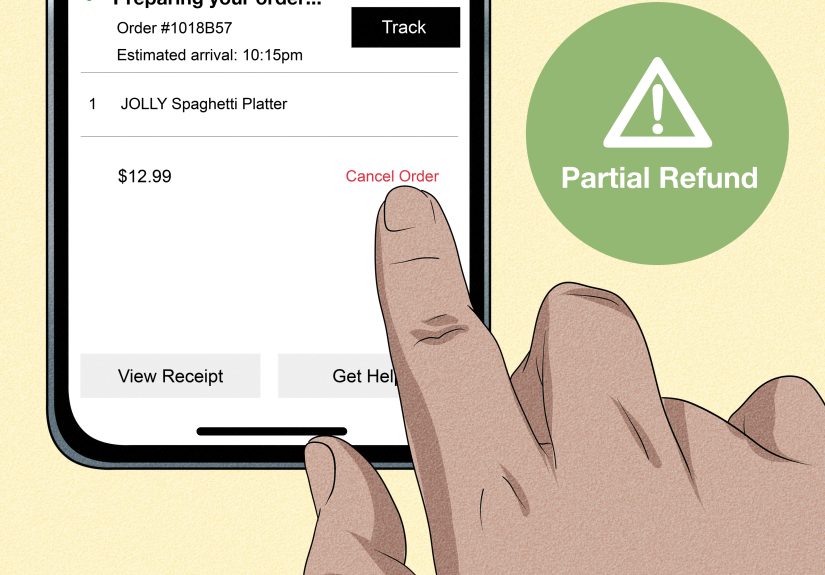
Step 4: Tap Cancel Order
Select Cancel Order. The app may ask you to confirm the cancellation and choose a reason, such as ordering by mistake, wrong address, or changed your mind. Pick the most accurate option and confirm.
Step 5: Check the Refund Message Carefully
Before you finalize the cancellation, Uber Eats may tell you whether you will receive a full refund, a partial refund, or possibly no refund at all. Read that message before tapping the final confirmation. This is not the time to speed-click like you are accepting cookie pop-ups.
Why Timing Matters So Much
Uber Eats generally allows free cancellation before the merchant accepts your order. That is the sweet spot. If the order has already been accepted, prepared, or picked up, the app may charge you some or all of the total.
Why? Because by that point, real people have already done real work. The restaurant may have started cooking. A courier may already be heading to the pickup. Uber Eats is basically saying, “You can cancel, but the sandwich has emotionally committed.”
In many cases, cancellation becomes more restrictive after the merchant accepts the order. For restaurant and store orders, a late cancellation charge can be as much as the price of the ordered items, and if delivery has already begun, you may also be charged for the delivery service already provided.
Will You Get a Refund After Canceling?
Sometimes yes, sometimes no, and sometimes “sort of” in the most modern-app way possible.
When You Are Most Likely to Get a Full Refund
- You cancel before the restaurant or store accepts the order.
- The cancellation is tied to a system issue, outage, or extreme delay.
- The merchant cannot fulfill the order.
- The app itself confirms a no-fee cancellation before you submit it.
When You Might Not Get a Full Refund
- The merchant already accepted and started preparing the order.
- A courier has already picked up the order.
- You cancel after the delivery is already in progress.
- The issue is a wrong address discovered too late in the process.
So if you are wondering, “Can I cancel my Uber Eats order and get my money back?” the honest answer is: yes, if you act fast enough. Uber Eats is not especially sentimental about late-stage cancellations.
What If the Cancel Option Is Missing?
This is one of the most frustrating parts of food delivery apps. You know you need to cancel, but the cancel button has mysteriously vanished like your confidence after ordering a family-sized dessert for one.
If the in-app cancel option is not available, it usually means one of these things:
- The merchant has already accepted the order.
- The order is too far along in preparation.
- The delivery is already underway.
- Uber wants you to use support instead of self-service cancellation.
When that happens, go back to the order screen and use the Help section to contact support. If the issue is urgent, explain it clearly and briefly. “Wrong address entered by mistake, need immediate cancellation” is more useful than “Hello, I have made choices.”
What to Do If You Entered the Wrong Delivery Address
A wrong address is one of the biggest reasons people try to cancel an Uber Eats order. If you catch the error very early, canceling and reordering may be the cleanest option. If the order has already been accepted, Uber Eats may direct you to contact the delivery person through the app instead.
That can work if the new address is nearby and the courier is willing or able to adjust. But if the address change is significant, do not assume it will be possible. Couriers operate on time, distance, and common sense, and all three have limits.
If the order is already deep in the process, you may have to choose between accepting the mistake or attempting support and hoping for mercy. This is why checking the delivery address before tapping Place Order is the food-delivery version of looking both ways before crossing the street.
What Happens to Promo Codes and Uber Cash?
If you used a promo code on a canceled Uber Eats order, the promotion is often returned to your account automatically. You can usually check that in the account area under promotions or coupons. If it does not show up right away, give it some time before assuming the coupon has entered the afterlife.
Uber Cash, gift card balances, or card refunds may take longer depending on the payment method and the type of cancellation. A refund confirmation inside the app does not always mean the money snaps back instantly. Banks and card issuers enjoy taking the scenic route.
What If the Order Was Canceled by Uber Eats, the Merchant, or the Driver?
Not every cancellation is your fault. Sometimes the restaurant is closed, an item cannot be fulfilled, the courier cannot complete the delivery, or the merchant cancels the order. In these cases, you are generally in a better position for a refund than if you canceled after the kitchen had already started cooking.
Still, details matter. For example, if a courier arrives and cannot reach you after making a reasonable effort, Uber Eats may decide you are not eligible for a refund. Translation: keep your phone nearby when your order is close.
How to Ask for Help After a Bad Cancellation Experience
If something feels off, use the Uber Eats Help Center through the app. This is especially important when:
- You were charged after canceling very quickly.
- The app promised a refund, but it never arrived.
- Your order never arrived, arrived wrong, or was canceled strangely.
- A promo code or credit was not returned properly.
When contacting support, be specific. Include the order, what happened, and what result you expected. Good support messages are clear, polite, and boring. This is not a place for a dramatic monologue.
Example:
I canceled within minutes because the wrong address was selected. The app indicated I should receive a refund, but I was still charged. Please review the order and refund status.
That message gives support exactly what they need. No poetry required.
Common Mistakes People Make When Canceling Uber Eats Orders
1. Waiting Too Long
The biggest mistake is hesitation. People stare at the order, wonder if they really selected the wrong location, text a friend, reopen the app, and then discover the restaurant has already accepted it. By then, the refund odds have dropped.
2. Assuming a Missing Cancel Button Means There Is No Help
Even if self-cancel is gone, support options may still be available. Check Help before giving up.
3. Ignoring the Confirmation Message
The app often tells you what charges may apply before you confirm. Read it. Future-you will appreciate the effort.
4. Not Checking Refund Timing
A cancellation confirmation and a completed bank refund are not always the same thing. Payment reversals can take time.
5. Mixing Up Order Cancellation With Uber One Cancellation
Canceling an order is not the same as canceling your Uber One membership. That is a completely different menu path and, if done by mistake, a wildly unhelpful plot twist.
Best Practices Before You Place an Uber Eats Order
If you want to avoid the cancellation dance entirely, use this tiny pre-order checklist:
- Double-check the delivery address.
- Confirm apartment number, gate code, or suite details.
- Review item quantity before checkout.
- Watch for duplicate items in the cart.
- Make sure you are ordering from the restaurant you actually meant to choose.
- Check estimated delivery time before placing the order.
It takes about ten seconds and can save you money, time, and the emotional discomfort of accidentally ordering six lemonades.
Final Thoughts
If you need to cancel an Uber Eats order on Android, iPhone, or iPad, the process is straightforward: open the active order, go to the tracking screen, tap Help, choose Cancel Order, and confirm. The real trick is not the tapping. The real trick is the timing.
Cancel early, and you may get away clean with a full refund. Cancel late, and the app may still let you back out, but your wallet may not escape with the same dignity.
The best strategy is simple: move fast, read the refund message before confirming, and contact support right away if the order status or refund result does not make sense. Uber Eats makes cancellation possible, but it definitely rewards people who catch mistakes before the food starts cooking.
Experiences People Commonly Have When Canceling an Uber Eats Order
One reason this topic keeps coming up is that canceling an Uber Eats order can feel very different depending on the exact moment you try to do it. Two people can make the same mistake and get totally different outcomes just because one notices it in thirty seconds and the other notices it three minutes later.
A common experience goes like this: someone places an order at home, then realizes the app used their work address from earlier in the day. They rush back into Uber Eats, find the active order, tap Help, and cancel before the restaurant accepts. In that case, the process usually feels easy, almost suspiciously easy, like the app is saying, “No problem, happens all the time.”
Another very common scenario is the duplicate-item disaster. Maybe the app lagged, maybe a finger slipped, maybe someone added two burrito bowls when they only meant one. If the mistake is caught immediately, canceling and reordering is often the fastest fix. If it is caught after the restaurant accepts the order, though, people are often surprised to learn that the refund may be partial or denied. That is usually the moment when optimism leaves the room.
Then there is the vanishing cancel button experience. This tends to cause the most panic because users assume the app is broken. In reality, it usually means the order has crossed into a later stage and self-service cancellation is no longer available. Many people end up contacting support, sometimes successfully, sometimes not, depending on how far along the order is and what reason they give.
Some users also report confusion around refunds. They cancel, see a message suggesting a refund was approved, and then expect the money to reappear instantly. When it does not, they assume the cancellation failed. Often the cancellation worked fine, but the refund is still moving through the payment system. That delay can feel longer when you are hungry and annoyed, which is admittedly the worst possible emotional combo.
There are also cases where the order is canceled by the merchant or the courier instead of the customer. People are usually calmer in those situations because the app tends to make it clearer that the issue was not on them. Still, frustration pops up when the customer has to reorder everything from scratch while their original craving window slowly closes. Nobody likes rebuilding a very specific taco order from memory.
Overall, the most successful cancellations usually share three things: the user notices the problem fast, acts fast, and reads the messages on the screen before confirming anything. The roughest experiences usually begin with delay, confusion, or the belief that the app will be more forgiving than it actually is. Uber Eats can absolutely let you cancel an order, but it is a lot more generous in the first moments than it is once the kitchen, courier, and payment system have all started doing their jobs.