Table of Contents >> Show >> Hide
- What Does “Learning Electronics” Really Mean?
- Step 1: Learn the Core Concepts First
- Step 2: Build a Beginner Electronics Toolkit
- Step 3: Practice Safety from Day One
- Step 4: Start with Small, Winnable Projects
- Step 5: Learn to Read Schematics
- Step 6: Use Simulation Without Avoiding Real Circuits
- Step 7: Learn Components by Function, Not by Memorizing Catalogs
- Step 8: Get Comfortable with Datasheets
- Step 9: Learn Soldering After Breadboarding
- Step 10: Move from Breadboards to PCB Design
- Step 11: Follow a 30-Day Electronics Learning Plan
- Common Beginner Mistakes and How to Avoid Them
- How to Actually Get Good at Electronics
- Experience Notes: What Learning Electronics Feels Like in Real Life
- Conclusion
Learning electronics can feel like walking into a room where every object is tiny, shiny, and mildly threatening. There are resistors with mysterious stripes, capacitors that look like little soda cans, wires everywhere, and someone on the internet casually saying, “Just use Ohm’s law,” as if Ohm personally left you a sticky note.
Good news: electronics is not magic. It is a learnable skill built from a few simple ideas, repeated practice, patient troubleshooting, and the occasional dramatic sigh when your LED refuses to blink. Whether your goal is to repair gadgets, build robots, understand circuit boards, design smart home projects, or finally know what a transistor actually does, the path is more approachable than it looks.
This guide explains how to learn electronics step by step, using expert-backed tips from engineering education, maker communities, circuit-simulation tools, safety organizations, and real-world component resources. You do not need to become an electrical engineer overnight. You just need a smart learning plan, a few basic tools, and the humility to accept that sometimes the problem is simply a loose jumper wire. It usually is.
What Does “Learning Electronics” Really Mean?
Electronics is the study and use of electrical energy to control, process, measure, and move information or power. In plain English, electronics is how we make electricity do useful tricks: light an LED, power a motor, sense temperature, charge a battery, amplify sound, display data, or run a microcontroller.
Beginners often think they must learn everything at once: circuit theory, soldering, programming, PCB design, embedded systems, analog electronics, digital logic, sensors, motors, wireless modules, and why smoke came out of the breadboard. Please do not do that to yourself. Electronics is best learned in layers.
Start with simple DC circuits. Learn what voltage, current, resistance, and power mean. Build small projects. Measure them with a multimeter. Then add components one at a time: LEDs, switches, potentiometers, capacitors, transistors, sensors, integrated circuits, and microcontrollers. Each piece becomes less scary when you have actually touched it, tested it, and made it misbehave in a controlled way.
Step 1: Learn the Core Concepts First
Before buying a giant box of components that looks like it belongs in a tiny robot grocery store, learn the basic vocabulary. Electronics becomes much easier once you understand these foundations:
Voltage, Current, and Resistance
Voltage is electrical pressure. Current is the flow of electric charge. Resistance limits that flow. These three ideas form the backbone of beginner electronics. Ohm’s law connects them: voltage equals current multiplied by resistance. You will use this constantly, especially when choosing resistors for LEDs, calculating current draw, or figuring out why a component is getting hotter than your laptop during a software update.
Power
Power tells you how much energy a circuit uses or converts over time. In electronics, power matters because components have limits. A resistor, transistor, voltage regulator, or LED can only handle so much before it overheats. Beginners often focus only on voltage, but power is where many “oops” moments live.
Series and Parallel Circuits
In a series circuit, components share the same current. In a parallel circuit, components share the same voltage. This sounds simple, but it explains a huge amount of circuit behavior. If you understand series and parallel connections, you can begin to predict what will happen before plugging anything in. Prediction is the difference between learning electronics and conducting tiny electrical surprises.
Analog vs. Digital Electronics
Analog electronics deals with continuously changing signals, such as audio, temperature, light level, and voltage from sensors. Digital electronics deals with signals represented as discrete states, usually HIGH or LOW, 1 or 0. Both worlds matter. A smart thermostat, for example, may read an analog temperature sensor, process the value digitally, and switch a relay or display.
Step 2: Build a Beginner Electronics Toolkit
You do not need a professional lab to start. A beginner electronics setup can fit on a small desk, dining table, or the mysterious corner of your room where old cables reproduce.
Essential Tools for Beginners
Start with a solderless breadboard, jumper wires, a digital multimeter, resistors, LEDs, push buttons, potentiometers, capacitors, a battery pack or low-voltage power supply, and a few basic sensors. Add a microcontroller board when you are ready to combine electronics with code.
A breadboard lets you build temporary circuits without soldering. It is perfect for testing ideas, making mistakes, and pulling everything apart when the circuit works only because your finger is touching one wire at a suspicious angle.
A multimeter is your best friend. Use it to measure voltage, resistance, continuity, and current. Learning to use a multimeter early will save you hours of guessing. Guessing is fun in party games, not in circuits.
Optional Tools That Make Life Easier
Once you have built a few projects, consider adding a temperature-controlled soldering iron, wire strippers, helping hands, heat-shrink tubing, small pliers, side cutters, an organizer box, and a bench power supply with current limiting. Current limiting is especially helpful because it can prevent beginner mistakes from becoming expensive beginner stories.
Step 3: Practice Safety from Day One
Electronics is fun, but electricity deserves respect. Beginners should start with low-voltage DC circuits, such as battery-powered projects or USB-powered microcontroller circuits. Avoid working directly with wall power unless you have proper training and supervision. Household mains voltage can injure or kill. It is not a beginner playground, no matter how confident a stranger on a forum sounds.
Inspect cords, power supplies, and tools before use. Do not use damaged wires or cracked insulation. Keep liquids away from your work area. Do not overload power strips. Use the correct multimeter category rating for the environment you are measuring. When in doubt, do not poke the circuit. The circuit is not lonely.
For most learners, the safest path is simple: learn on low-voltage circuits, use reputable power supplies, disconnect power before changing wiring, and double-check polarity before connecting batteries, capacitors, LEDs, and integrated circuits.
Step 4: Start with Small, Winnable Projects
The fastest way to learn electronics is to build things that are simple enough to finish but interesting enough to remember. Reading theory matters, but building teaches your hands, eyes, and instincts.
Project 1: Light an LED
This classic beginner project teaches polarity, current limiting, resistance, and power. Use a battery, resistor, and LED. Change resistor values and observe brightness. Measure voltage across the LED and resistor. Congratulations: you are now doing circuit analysis, but with more glowing.
Project 2: Add a Switch
Place a push button or toggle switch in the circuit. Learn how open and closed circuits work. Try placing the switch in different parts of the circuit and see whether behavior changes. Simple switches help you understand control, inputs, and logic.
Project 3: Use a Potentiometer
A potentiometer is a variable resistor. Use it to dim an LED or create an adjustable voltage divider. This teaches analog control, sensor-like behavior, and how changing resistance changes voltage or current.
Project 4: Read a Sensor
Connect a light sensor, temperature sensor, or distance sensor to a microcontroller. Print values to a serial monitor. Then use those values to control an LED, buzzer, or motor. This is where electronics starts feeling like invention instead of homework.
Project 5: Drive a Motor Safely
Motors need more current than microcontroller pins can safely provide. Learn to use a transistor, diode, and external power source. This project teaches switching, protection, and the important lesson that microcontroller pins are not tiny superhero power outlets.
Step 5: Learn to Read Schematics
A schematic is a map of a circuit. It does not show where parts physically sit; it shows how they are electrically connected. At first, schematics look like someone invented a secret alphabet during a thunderstorm. Keep going. The symbols become familiar quickly.
Learn the symbols for batteries, ground, resistors, capacitors, diodes, LEDs, switches, transistors, integrated circuits, motors, and connectors. Then compare a schematic to a real breadboard build. Ask yourself: Which points are connected? Where is the current path? What happens when the switch opens? Where should I measure voltage?
Reading schematics is one of the most valuable electronics skills because it lets you understand tutorials, datasheets, repair diagrams, and open-source hardware projects. It also makes you look impressively calm while staring at tiny symbols. That is not the main reason to learn it, but it helps.
Step 6: Use Simulation Without Avoiding Real Circuits
Circuit simulation tools are excellent for learning. They let you test ideas, change component values, and see waveforms without burning anything. Simulation is especially useful for understanding voltage dividers, filters, op-amp circuits, transistor switching, and timing circuits.
However, simulation should not replace physical building. Real circuits include loose wires, noisy sensors, tolerance differences, breadboard limitations, and human error. A simulated circuit never forgets to connect ground. A beginner does. Frequently.
The best approach is to combine both: simulate first, build second, measure third. When the real circuit behaves differently from the simulation, do not panic. That gap is where real learning happens.
Step 7: Learn Components by Function, Not by Memorizing Catalogs
There are thousands of electronic components. Do not try to memorize them like vocabulary words before a final exam. Learn what each major family does.
Resistors
Resistors limit current, divide voltage, set timing behavior, and pull signals up or down. They are humble, cheap, and everywhere. Respect the resistor.
Capacitors
Capacitors store and release electrical energy. They smooth power, filter signals, block DC, pass AC, and create timing effects. Also, electrolytic capacitors have polarity, and they are not shy about complaining when installed backward.
Diodes and LEDs
Diodes allow current to flow mainly in one direction. LEDs are diodes that emit light. Use resistors with LEDs unless the circuit already includes current control.
Transistors
Transistors act like electronic switches or amplifiers. Beginners often use them to control motors, relays, buzzers, LED strips, and other loads that need more current than a microcontroller pin can provide.
Integrated Circuits
Integrated circuits, or ICs, contain many components inside one package. They can amplify signals, regulate voltage, store data, process logic, generate timing pulses, control motors, and perform countless other tasks. Learn to read datasheets because ICs come with rules, and they are written down for a reason.
Step 8: Get Comfortable with Datasheets
Datasheets are not bedtime stories, unless your bedtime routine is unusually intense. Still, they are essential. A datasheet tells you what a component is, how to connect it, what its limits are, and what performance to expect.
When reading a datasheet, focus on the practical sections first: pinout, absolute maximum ratings, recommended operating conditions, typical application circuits, electrical characteristics, and package information. Do not worry if you do not understand every graph at first. Nobody becomes a datasheet whisperer in one afternoon.
For example, if you are using a temperature sensor, the datasheet can tell you its supply voltage, output type, accuracy, wiring diagram, and conversion formula. If you are using a transistor, it can tell you maximum current, voltage rating, gain, pin arrangement, and power dissipation.
Step 9: Learn Soldering After Breadboarding
Breadboards are great for learning, but soldering turns temporary circuits into durable projects. Start soldering after you understand basic wiring and can build a few working circuits.
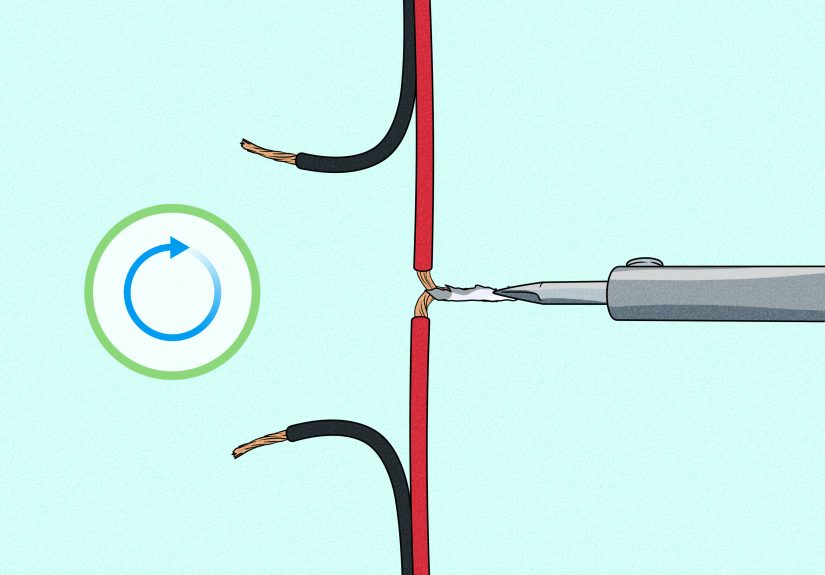
Use a temperature-controlled soldering iron, good lighting, ventilation, solder, flux if needed, and scrap practice boards. Learn to make shiny, smooth joints that heat both the pad and the component lead. Avoid giant solder blobs. They may look confident, but they are usually hiding a problem.
Practice soldering headers, wires, resistors, and simple kits before moving to delicate components. Desoldering is also worth learning because electronics rewards courage but demands repair skills.
Step 10: Move from Breadboards to PCB Design
Once you have a working breadboard project, you may want to design a printed circuit board. PCB design teaches schematic capture, component footprints, routing, grounding, connectors, mechanical constraints, and manufacturing files.
Start with a simple board: an LED flasher, sensor breakout, small power distribution board, or microcontroller accessory. Use beginner-friendly PCB software, follow tutorials, and order a few prototype boards only after checking the schematic and layout carefully.
A good beginner PCB goal is not to create the next smartphone. It is to make a small board that works, teaches you the workflow, and does not require tweezers, a microscope, and three cups of coffee to assemble.
Step 11: Follow a 30-Day Electronics Learning Plan
A structured plan keeps you moving. Here is a beginner-friendly 30-day roadmap:
Days 1–5: Foundations
Learn voltage, current, resistance, power, Ohm’s law, series circuits, and parallel circuits. Build an LED circuit and measure voltages with a multimeter.
Days 6–10: Components
Experiment with resistors, capacitors, switches, potentiometers, diodes, and LEDs. Build a dimmer, a simple timing circuit, and a polarity test circuit.
Days 11–15: Schematics and Troubleshooting
Practice reading schematics. Rebuild circuits from diagrams. Learn continuity testing, voltage checks, and common breadboard mistakes.
Days 16–20: Microcontrollers
Connect a microcontroller board. Blink an LED, read a button, read a sensor, and display values in a serial monitor.
Days 21–25: Output Devices
Control buzzers, motors, relays, servos, or LED strips. Learn why external power and transistor drivers matter.
Days 26–30: Mini Project
Build a complete project, such as a light-activated night lamp, desk temperature monitor, plant moisture reminder, simple alarm, or motorized fan controller. Document what worked, what failed, and what you would improve.
Common Beginner Mistakes and How to Avoid Them
Every electronics learner makes mistakes. The trick is to make small, safe, educational mistakes instead of smoky, expensive ones.
Forgetting a Common Ground
Many circuits fail because separate parts do not share a ground reference. If a sensor, microcontroller, and external power supply need to communicate, they usually need a common ground.
Reversing Polarity
LEDs, electrolytic capacitors, batteries, and many modules care deeply about polarity. Check positive and negative connections before powering the circuit.
Skipping Current-Limiting Resistors
LEDs need current control. Without it, they may shine brightly for a brief, heroic moment and then retire permanently.
Trusting Wire Colors Too Much
Red often means positive and black often means ground, but wire colors are not laws of physics. Always verify connections.
Changing Wiring While Powered
Disconnect power before rearranging circuits. This habit prevents accidental shorts and protects components.
How to Actually Get Good at Electronics
To get good at electronics, do three things repeatedly: build, measure, and explain. Build a circuit. Measure what it does. Explain why it behaves that way. If your explanation is wrong, congratulationsyou found the lesson.
Keep a notebook or digital log. Write down component values, wiring changes, measurements, symptoms, and fixes. Take photos of working breadboards before changing them. Future you will be grateful, because future you will not remember which orange wire was “definitely important.”
Join communities, read tutorials, watch demonstrations, and compare multiple explanations. Some people learn best from videos. Others prefer textbooks. Many need both, plus a breadboard and the emotional support of snacks.
Experience Notes: What Learning Electronics Feels Like in Real Life
Learning electronics is rarely a smooth movie montage where components click into place while inspiring music plays. It is more like cooking from a recipe where half the ingredients are invisible and one of them can only be measured with a multimeter. That may sound frustrating, but it is also what makes electronics addictive. Every working circuit feels like a tiny victory over chaos.
The first experience many beginners have is the LED moment. You connect a battery, resistor, and LED, and the light turns on. It is simple, but it feels powerful. You did not just read about electricityyou controlled it. Then you swap the LED direction and it stops working. Suddenly polarity is not a boring word in a textbook. It is the difference between “behold, light!” and “why are you like this?”
Another common experience is the breadboard mystery. You follow a tutorial perfectly, or so you think, and nothing works. You check the code, replace the LED, accuse the resistor of betrayal, and eventually discover one jumper wire is in the wrong row. This is not failure. This is training. Electronics teaches attention to detail in a way few hobbies do. One tiny connection can change everything.
As you progress, you begin to develop intuition. You learn that a floating input causes weird behavior. You learn that motors can reset microcontrollers when they draw too much current. You learn that sensors need stable power, capacitors can smooth noisy supplies, and “it worked yesterday” is not a diagnostic category. Slowly, the chaos becomes patterns.
Soldering brings its own rite of passage. The first solder joint may look like a dull gray mountain. The second may accidentally connect two pins. Eventually, with practice, your joints become clean and reliable. There is something deeply satisfying about turning a fragile breadboard experiment into a solid project that can be moved without falling apart like a sandwich in a backpack.
The biggest lesson from real electronics experience is patience. Circuits do not care how excited you are. They care about connections, values, limits, and physics. When a project fails, the best response is not panic. It is methodical curiosity: Is power present? Is ground connected? Is the part oriented correctly? Is the code sending the expected signal? Is the component rated for this current? Troubleshooting is not a punishment; it is the main skill.
Another valuable experience is learning when not to overcomplicate things. Beginners often want to build a voice-controlled, solar-powered, Wi-Fi-enabled robot dog as project number two. Ambition is wonderful, but electronics rewards stepping stones. Build the LED. Then the sensor. Then the motor driver. Then the wireless connection. Complex projects are just simple projects stacked carefully on top of each other, preferably not in a way that catches fire.
Finally, learning electronics changes how you see the world. A remote control, phone charger, kitchen timer, doorbell, thermostat, and toy robot stop being sealed mysteries. You begin to notice buttons, sensors, connectors, power supplies, displays, motors, and circuit boards everywhere. Everyday objects become less magical but more impressive. You realize that someone designed every little behavior: the blink, the beep, the delay, the dimming, the charging light.
That is the real reward. Electronics gives you the ability to understand, repair, customize, and invent. You start with a blinking LED. You end up with a new way of thinking.
Conclusion
Learning electronics is not about memorizing every component or becoming an engineer before touching a wire. It is about building a foundation, practicing safely, making small projects, measuring results, reading schematics, and learning from mistakes. Start with voltage, current, resistance, and simple circuits. Add components gradually. Use simulations, tutorials, datasheets, and real measurements. Build projects that solve tiny problems, then make them better.
Most importantly, stay curious. Electronics rewards the person who asks, “What happens if I change this?” and then measures the answer. With patience and practice, the jumble of wires becomes a languageand eventually, you get to speak it fluently.