Table of Contents >> Show >> Hide
- Introduction: The Mystery of the “Private Video” Message
- What Is a Private YouTube Video?
- Private vs. Unlisted vs. Public Videos
- Can You Access a Private YouTube Video Without Permission?
- How to Watch a Private YouTube Video the Right Way
- Why Creators Use Private Videos
- Common Reasons You Cannot Access a Private YouTube Video
- Are “Private YouTube Video Viewer” Tools Real?
- What About Old Private Videos or Deleted Private Videos?
- How Creators Can Share Private Videos Safely
- How to Ask for Access Without Sounding Suspicious
- Private Video Scams: What to Watch Out For
- SEO Perspective: Why This Topic Gets So Much Search Traffic
- Practical Examples
- Best Practices for Viewers
- Best Practices for Creators
- 500-Word Experience Section: Real-World Lessons About Private YouTube Videos
- Conclusion: So, Is It Possible?
Note: This article discusses only legitimate, permission-based ways to view private YouTube videos. It does not explain or encourage bypassing privacy settings, hacking accounts, using shady “viewer” tools, or sneaking through digital back doors like a raccoon in a hoodie.
Introduction: The Mystery of the “Private Video” Message
You click a YouTube link. You expect a cooking tutorial, a class recording, a business presentation, or maybe that one family birthday video where Uncle Dave tries to dance and loses a shoe. Instead, YouTube gives you the cold little message: “This video is private.” Suddenly, the video feels like a locked treasure chest.
So, is it possible to access private videos on YouTube? The honest answer is simple: yes, but only if the video owner gives you permission. A private YouTube video is intentionally restricted. It is not meant to be found through search, watched through a shared public link, embedded freely on websites, or accessed by random viewers. YouTube designed the private setting so creators can control exactly who sees the content.
That means there is no legitimate magic trick, secret URL format, browser extension, third-party website, or “YouTube private video unlocker” that should be trusted. If a site claims it can open private YouTube videos without permission, it is waving more red flags than a referee at a chaotic dodgeball tournament.
In this guide, we will break down what private videos are, how they differ from unlisted and public videos, why you may be unable to watch one, how to request access correctly, and how creators can share videos safely. We will also look at common scams, privacy mistakes, and real-world experiences that help explain why YouTube’s private video system exists in the first place.
What Is a Private YouTube Video?
A private YouTube video is a video that only selected people can watch. Unlike public videos, private videos do not appear in YouTube search results, on a channel’s video tab, in recommendations, or in general browsing areas. The creator decides who gets access, usually by allowing specific Google accounts to view the video.
This privacy setting is useful for many situations. A teacher may want to share a lecture with only certain students. A company may upload a training video for a small internal team. A creator may want feedback from editors before publishing a polished version. A family may upload a wedding video and keep it away from the entire internet, including strangers, bots, and that one cousin who comments “FIRST” on everything.
Private videos are not the same as hidden videos. They are intentionally protected. If your account is not on the approved list, you cannot watch the video just because you have the link. The link may take you to the video page, but YouTube will still block playback.
Private vs. Unlisted vs. Public Videos
Understanding YouTube privacy settings is important because many people confuse “private” and “unlisted.” They sound similar, but they work very differently.
Public Videos
Public videos are available to everyone. They can appear in search results, recommendations, playlists, channel pages, and external embeds. If someone wants maximum visibility, public is the setting they choose.
Unlisted Videos
Unlisted videos are not shown publicly on a channel or in standard YouTube search results, but anyone with the link can usually watch them. This makes unlisted videos useful for semi-private sharing, such as sending a draft to a client, posting a webinar replay to a newsletter, or sharing a tutorial with a small group.
However, unlisted does not mean truly private. If someone forwards the link, posts it in a forum, includes it in a public playlist, or shares it in a group chat, others may be able to watch it. Unlisted is more like “not advertised,” while private is closer to “locked.”
Private Videos
Private videos require direct permission. Having the URL is not enough. You must be signed in with a Google account that the creator has approved. This is the setting to use when the content is sensitive, personal, confidential, or simply not meant for broader sharing.
Can You Access a Private YouTube Video Without Permission?
No. You should not try to access a private YouTube video without permission. If a video is private, the creator has chosen to limit its audience. Trying to bypass that choice is not only disrespectful, but it may also put your own account, device, and personal information at risk.
Some websites claim they can help you “unlock private YouTube videos.” In reality, these sites usually fall into one of several suspicious categories. Some are clickbait pages filled with ads. Some ask you to complete endless surveys. Some try to collect your Google login details. Some push malware downloads disguised as tools. Others simply waste your time, which is rude, although slightly less dramatic than stealing your password.
The safest rule is this: if the owner did not invite you, you cannot legitimately watch the video. The correct path is to ask the creator for access or request that they change the video to unlisted or public if appropriate.
How to Watch a Private YouTube Video the Right Way
If you believe you should have access to a private YouTube video, there are legitimate steps you can take.
1. Make Sure You Are Signed Into the Correct Google Account
This is the most common issue. Many people have more than one Google account: personal, school, work, brand, or old accounts from the ancient era when usernames had too many underscores. If the creator invited your work email but you are signed into your personal Gmail account, YouTube will still block the video.
Sign out and sign back in using the exact email address that received access. If you are using multiple accounts in the same browser, switch accounts carefully before opening the video link again.
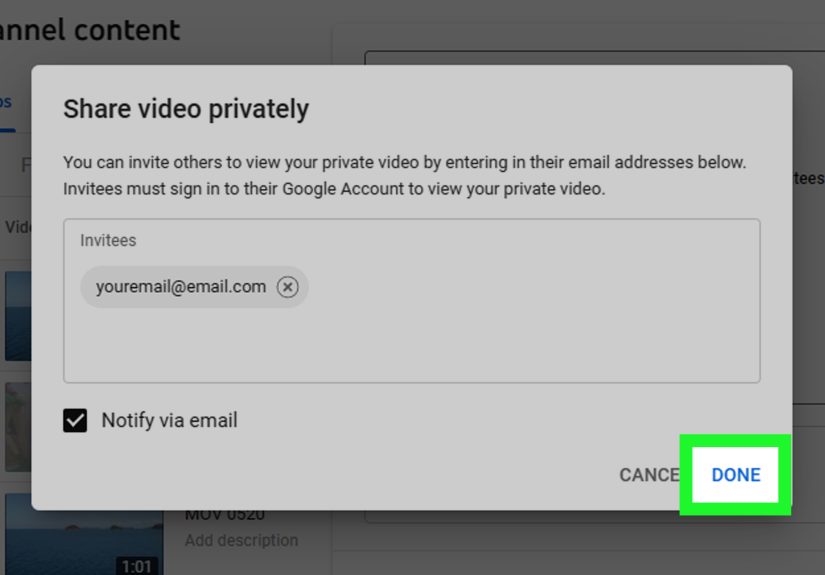
2. Ask the Creator to Add Your Email Address
The video owner must grant access to the correct Google account. If you see a private video message, contact the creator and politely ask them to add your email address. Be specific. Include the email you want them to use, because “add me” is not helpful when you own three Gmail accounts and one of them is from middle school.
3. Check Whether the Video Was Meant to Be Unlisted
Sometimes creators accidentally choose “private” when they meant “unlisted.” This happens often in schools, offices, churches, clubs, and project teams. If the creator wants anyone with the link to view the video, they may need to switch it from private to unlisted.
For example, a coach sharing a team highlight reel may choose unlisted because players and parents can open the link without individual approval. But a business sharing confidential training should use private or another secure hosting option, because unlisted links can still be forwarded.
4. Request a Fresh Invitation
If you were invited but still cannot watch, ask the owner to remove and re-add your account. There may be a typo in the email address, an access issue, or confusion between Google accounts. One missing letter in an email address can turn a simple video share into a tiny detective novel.
5. Use the YouTube App or a Supported Browser
Most private video access problems are account-related, but browser issues can also happen. Try opening the video in the YouTube app, a different browser, or a private browsing window where you sign in fresh. Also check whether cookies, extensions, or strict privacy tools are interfering with your Google login session.
Why Creators Use Private Videos
Private videos are not only for secret projects or dramatic movie-style reveals. They are a practical tool for everyday privacy and content management.
Internal Reviews
Creators often upload private drafts before publishing a final version. Editors, sponsors, managers, or collaborators can review the content first. This helps catch mistakes before the internet does what the internet does best: notice the tiny typo in the corner and ignore the other 99% of the work.
Education and Training
Teachers, tutors, and trainers may use private videos for classes, workshops, or employee onboarding. A private setting helps prevent the content from spreading beyond the intended audience.
Family and Personal Archives
Not every video belongs in public search results. Weddings, school performances, memorial videos, baby videos, and family events may be meaningful to a small group but too personal for the wider web.
Business Confidentiality
Companies may use private videos for sales demos, internal announcements, product previews, or team instructions. However, businesses handling sensitive information should think carefully about whether YouTube is the right platform, since enterprise-grade video hosting may offer stronger controls, analytics, access logs, and compliance features.
Common Reasons You Cannot Access a Private YouTube Video
Seeing the “private video” message does not always mean someone intentionally blocked you. Here are the most common causes.
You Were Not Added
The simplest explanation is also the most common: the owner did not add your account. A private link alone does not grant permission.
You Are Signed Into the Wrong Account
If access was given to one email address but you are using another, YouTube will deny access. Always verify the exact account.
The Creator Changed the Privacy Setting
A video may have been public or unlisted before, then later changed to private. This can happen when creators reorganize content, remove outdated information, protect copyrighted material, or limit access after an event ends.
The Video Was Deleted or Restricted
Sometimes a video is no longer available for reasons unrelated to privacy. It may have been deleted, removed, made private during editing, or restricted because of policy, copyright, or account issues.
The Link Came From a Playlist or Embedded Page
A private video may still appear as a blank or unavailable item inside a playlist or embedded page. That does not mean the video is broken; it means your account lacks permission.
Are “Private YouTube Video Viewer” Tools Real?
Be extremely skeptical of any tool that claims to view private YouTube videos without permission. Legitimate access depends on YouTube’s account-based permission system. A random website cannot override that system for you.
Many of these tools use tempting language like “unlock,” “recover,” “view hidden videos,” or “watch private YouTube content free.” That wording is designed to attract curious users. Once you click, you may be pushed toward surveys, suspicious downloads, fake login pages, browser extensions, or pages that keep redirecting you until your patience packs a suitcase and leaves.
A good rule for online safety is: if a website promises access to something you are not allowed to access, the product is probably you. Your data, login details, device security, or attention may be the real target.
What About Old Private Videos or Deleted Private Videos?
People sometimes ask whether old private YouTube videos can be found through archives, search engines, cached pages, or old links. In most cases, no. If a YouTube video is private, search engines should not provide normal playable access to it. If a video was once public, there may be traces such as titles, thumbnails, descriptions, or references on other sites, but that does not mean the actual video can be watched.
Deleted videos are even more limited. If the uploader removed the video, regular viewers cannot restore it. The only reliable copy would come from the owner, someone who legally downloaded it when allowed, or the original project files.
This is especially important for creators. YouTube is not a complete backup system for your life’s work. If a video matters, keep your original files stored safely in more than one place. Future you will be grateful, probably while drinking coffee and whispering, “Thank goodness I listened.”
How Creators Can Share Private Videos Safely
If you are the video owner, choosing the right privacy setting matters. The best choice depends on how sensitive the content is and who needs to watch it.
Use Public for Maximum Reach
Choose public if the goal is discoverability, views, search traffic, subscriber growth, and sharing. Public videos are best for tutorials, entertainment, reviews, educational content, product explainers, and anything meant for a broad audience.
Use Unlisted for Limited Sharing
Choose unlisted when the video does not need to appear on your channel or in search, but you are comfortable with anyone who gets the link watching it. This works well for casual sharing, client previews, event replays, portfolio samples, and lead magnets.
Use Private for Controlled Access
Choose private when only specific people should watch. This is better for confidential videos, personal family content, internal reviews, or limited educational material.
Do Not Use YouTube Alone for Highly Sensitive Content
If the video contains confidential business data, legal information, medical information, student records, or private customer details, consider a dedicated secure video platform or internal file-sharing system. YouTube is excellent for many things, but it is not always the best vault for sensitive material.
How to Ask for Access Without Sounding Suspicious
If you need access to a private video, keep your request simple and professional. Here is a good example:
Hello, I tried to open the YouTube video link, but it says the video is private. Could you please add this Google account for access: [email protected]? Thank you.
That message works because it explains the problem, gives the exact account, and does not sound like you are trying to break into Fort Knox with a paperclip.
Do not ask the creator for their login. Do not request that they “turn off privacy” if the content is sensitive. Do not send them links to third-party unlocker tools. A polite access request is faster, safer, and far less likely to make people clutch their laptop protectively.
Private Video Scams: What to Watch Out For
Private video sharing can also be abused by scammers. For example, a scammer may send a message claiming that a private video contains important YouTube policy information, monetization updates, copyright warnings, or account alerts. The goal may be to make creators click a link, download a file, or enter login details on a fake page.
Be careful with unexpected messages involving private videos, especially if they create urgency. Scammers love phrases like “act now,” “your account will be deleted,” “payment required,” or “download this document.” Real security habits are boring but powerful: check the sender, avoid suspicious links, go directly to YouTube Studio instead of clicking email buttons, and turn on two-step verification for your Google account.
If something feels off, slow down. The internet rewards curiosity, but it also occasionally leaves banana peels on the floor.
SEO Perspective: Why This Topic Gets So Much Search Traffic
The phrase “access private videos on YouTube” attracts search traffic because it sits at the intersection of curiosity, confusion, and frustration. Some users are trying to watch a legitimate video for school or work. Others are trying to recover old content. Some simply do not understand the difference between private and unlisted. And yes, a few are hoping for a shortcut that does not exist.
For publishers, the best way to cover this topic is to answer the search intent clearly without encouraging unsafe behavior. Readers need practical guidance: what private means, why access fails, how to request permission, how creators can share content correctly, and which scams to avoid. That provides real value while staying respectful of privacy and platform rules.
Practical Examples
Example 1: A Student Cannot Watch a Lecture
A teacher uploads a lecture as private and adds the class email list. One student cannot watch it. The most likely issue is that the student is signed into a personal Google account instead of the school account. The fix is to sign in with the invited school email or ask the teacher to add the correct account.
Example 2: A Client Cannot Review a Video Draft
A video editor sends a private YouTube link to a client. The client forwards it to two colleagues, but they cannot open it. That is normal. Private access does not travel with the forwarded link. The editor must add each person’s Google account or switch the video to unlisted if broad link sharing is acceptable.
Example 3: A Family Video Should Stay Personal
A family uploads a wedding video and wants only relatives to watch. Private may be the right choice if access should be tightly controlled. If the family is comfortable with relatives forwarding the link, unlisted may be easier. The decision depends on how private the family wants the video to remain.
Best Practices for Viewers
If you are trying to watch a private video, follow a clean and safe process. First, confirm that you are signed into the correct Google account. Second, ask the uploader for access. Third, avoid third-party tools that promise to unlock private videos. Fourth, be cautious with unexpected private video invitations, especially if they ask you to download files or enter login information.
Most access problems are solved with a short email, not a secret tool. The boring solution is often the correct one, which is annoying but also wonderful because it usually works.
Best Practices for Creators
If you upload videos to YouTube, choose your privacy setting before sharing the link. If the video is meant for everyone, make it public. If it is meant for people with the link, make it unlisted. If it is meant for specific people only, make it private.
Also, keep a record of who needs access. For teams, schools, and organizations, it may be better to use shared group emails or a managed workspace system where access is easier to control. For sensitive content, consider whether YouTube has the right level of privacy for your needs.
500-Word Experience Section: Real-World Lessons About Private YouTube Videos
In real life, private YouTube videos create confusion because the error message feels simple, but the reasons behind it can vary. One of the most common experiences is the “wrong account” problem. Someone receives a private video link for work, clicks it during lunch, and YouTube blocks access. They message the sender, saying the video is broken. Ten minutes later, everyone discovers the person was signed into a personal Gmail account instead of the company account. The video was never broken; the browser was just wearing the wrong ID badge.
Another common situation happens with schools and online classes. A teacher uploads a lesson, sets it to private, and sends the link to students. Half the class can view it. The other half cannot. Panic begins. Students assume YouTube is down, the teacher assumes the upload failed, and someone’s parent suggests restarting the Wi-Fi router because that is the ancient family remedy for all technology. Usually, the issue is access management. The teacher may have added only some accounts, or students may be using different emails from the ones registered for class.
In business settings, private videos often appear during review cycles. A marketing team may upload an advertisement draft privately before launch. The agency sends the link to the client, but the client forwards it to legal, product, and leadership. Those people cannot open it because they were never granted access. This is actually a good thing. It proves the privacy setting is doing its job. However, it also shows why teams should plan sharing workflows before deadlines get dramatic and everyone starts writing emails with too many exclamation points.
Families experience a softer version of the same issue. A parent uploads a graduation video as private and shares it with relatives. Grandma cannot open it because she does not know which Google account she is using. An uncle opens it on his TV but not on his phone. A cousin asks why it is not on Instagram. The lesson is simple: privacy is valuable, but convenience matters too. For families, unlisted may sometimes be easier if the content is not highly sensitive. For more personal videos, private is safer, but everyone needs clear instructions.
The biggest lesson is that private YouTube videos are not mysterious once you understand the system. They are permission-based. If you are allowed in, you can watch. If not, the door stays closed. That may feel inconvenient, but it protects creators, families, teachers, businesses, and viewers from accidental oversharing. In a world where one link can travel faster than gossip at a neighborhood barbecue, a locked door is not a problem. Sometimes, it is the whole point.
Conclusion: So, Is It Possible?
Yes, it is possible to access private videos on YouTube, but only through legitimate permission from the video owner. A private video is designed to be restricted to selected viewers, and having the link is not enough. If you cannot watch a private video, the best solution is to sign into the correct Google account or ask the creator to grant access.
Do not trust websites, apps, browser extensions, or downloads that claim to unlock private YouTube videos. They are not reliable, and they may put your account or device at risk. Respecting privacy is not just the ethical choice; it is also the safest one.
For creators, the key takeaway is to choose the right privacy setting. Public is for reach. Unlisted is for link-based sharing. Private is for controlled access. When used correctly, YouTube’s privacy options can make video sharing flexible, secure, and much less chaotic than a group chat trying to plan dinner.