Table of Contents >> Show >> Hide
- Introduction: When an Eyeball Teaches Better Engineering Than a Textbook
- What Is Design-For-Assembly?
- Why Screwless Eyeballs Are Such a Good DFA Example
- The Core DFA Lessons Hidden Inside the Eyeball
- Specific Examples of DFA Thinking in a Screwless Eye Mechanism
- The Trade-Offs: Screwless Does Not Mean Problem-Free
- Why This Matters Beyond Animatronics
- Design-For-Assembly Checklist Inspired by Screwless Eyeballs
- The User Experience Starts Before the User Ever Sees the Product
- Experiences and Practical Reflections: What Screwless Eyeballs Teach Builders in the Real World
- Conclusion: The Best Assembly Step Is the One You Designed Away
Note: This article is an original, publication-ready synthesis based on real design-for-assembly principles, animatronic eye mechanism examples, snap-fit design practices, and modern product engineering knowledge.
Introduction: When an Eyeball Teaches Better Engineering Than a Textbook
At first glance, “screwless eyeballs” sounds like either a Halloween prop gone rogue or the kind of phrase that makes an engineer pause mid-coffee. But behind the wonderfully odd title sits a serious design lesson: products are not finished when they work; they are finished when they can be assembled easily, repeatedly, and without turning the builder into a tiny-screw archaeologist.
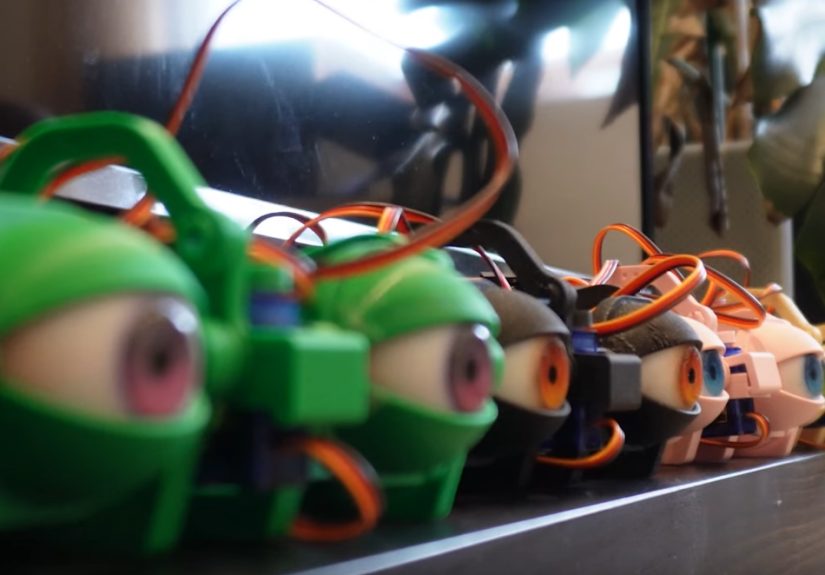
The topic comes from the world of 3D-printed animatronics, where realistic eye mechanisms use servos, linkages, pivots, printed frames, and control electronics to mimic lifelike movement. Traditional animatronic eyes can be beautiful, expressive, and mechanically clever. They can also be packed with screws, nuts, brackets, washers, and delicate alignment steps. In other words, they can look alive while making the person assembling them feel slightly less alive.
The screwless eyeball concept flips that experience. Instead of relying on many separate fasteners, the mechanism uses clever geometry, snap-fit features, self-locating parts, and simplified linkages to reduce assembly effort. That makes it a compact, memorable example of design-for-assembly, often shortened to DFA. DFA is the engineering discipline of designing products so they are faster, cheaper, safer, and more reliable to put together.
Whether you are building a robot face, an electronics enclosure, a consumer gadget, a medical device, or a plastic toy that absolutely must survive a toddler’s personal quality-control department, the lesson is the same: assembly is not an afterthought. Assembly is part of the design.
What Is Design-For-Assembly?
Design-for-assembly is a practical approach to product development that asks one powerful question: How can this product be made easier to assemble without hurting its function? The answer usually involves reducing part count, eliminating unnecessary fasteners, making components self-aligning, improving access for tools, using common parts, and designing features that naturally guide the assembler toward the correct result.
In classic DFA thinking, every separate part has to justify its existence. Does it need to move independently? Does it require a different material? Must it be separate for maintenance, replacement, or manufacturing? If the answer is no, the part may be a candidate for combination, elimination, or redesign. This is where many products quietly lose weight, cost, and drama.
DFA matters because every extra part brings hidden baggage. A screw is not just a screw. It is a purchased component, an inventory item, a picking operation, a tool requirement, a torque specification, a possible mistake, and sometimes a customer complaint waiting politely in the wings. Multiply that by dozens of fasteners, and the design has created an assembly tax.
Why Screwless Eyeballs Are Such a Good DFA Example
An animatronic eye mechanism is a tiny mechanical theater. The eyeball needs to rotate smoothly. The eyelids may need to blink. Servos must transfer motion through linkages. Pivots must be secure but not stiff. The frame must hold everything in alignment. And because the finished object is supposed to look natural, the mechanism has to be compact enough to hide behind a face, mask, robot shell, or creature head.
That is already a lot of pressure for a small assembly. Add a pile of miniature screws and nuts, and suddenly the project becomes less “robotics magic” and more “why is this M2 nut hiding under my keyboard?”
A screwless version attacks the problem from the assembly side. Instead of asking the builder to fasten every tiny joint manually, the design bakes more function into the printed parts. Pivots may become molded or printed features. Linkages can be retained by snap geometry. Frames can use tabs, sockets, clips, and self-locating shapes. The result is not merely fewer screws; it is a different design philosophy.
The Big Shift: From Hardware-Dependent to Geometry-Dependent
Traditional assemblies often depend on external hardware to hold parts together. A screw clamps. A nut retains. A washer spaces. A bracket locates. Each item does one job, and the assembler must add it correctly.
In a DFA-focused screwless design, geometry does more of the work. A printed peg can become a pivot. A slot can provide alignment. A flexible tab can retain a moving part. A chamfer can guide insertion. A stop feature can prevent over-travel. The hardware bill shrinks because the product itself becomes smarter.
This does not mean screws are bad. Screws are useful, strong, serviceable, and familiar. The problem is not the existence of screws; the problem is using them by habit when the design could solve the same function more elegantly.
The Core DFA Lessons Hidden Inside the Eyeball
1. Reduce the Part Count Before Optimizing Anything Else
The first and most famous DFA principle is simple: fewer parts usually mean easier assembly. A product with fewer parts generally requires less handling, less storage, fewer suppliers, fewer instructions, fewer inspections, and fewer chances for error.
In a screw-heavy animatronic eye, small fasteners may be used to mount servos, retain linkages, create pivots, and clamp parts together. If the redesign can replace several of those functions with integrated printed features, assembly becomes dramatically easier. The builder spends less time sorting hardware and more time completing the actual mechanism.
Part reduction also improves consistency. A snap-fit joint either clicks into position or it does not. A tiny screw, by contrast, can be under-tightened, over-tightened, cross-threaded, lost, stripped, or installed with the confidence of someone assembling furniture at 1 a.m.
2. Eliminate Fasteners When the Product Geometry Can Do the Job
Screws and nuts are often convenient during prototyping because they are flexible and forgiving. Need to hold something? Add a screw. Need a pivot? Add a screw. Need an adjustable joint? Add a screw and maybe another screw because optimism has limits.
But when a design matures, fasteners deserve a second look. Can a living hinge work? Can a cantilever snap-fit retain the part? Can two components slide together with a locking tab? Can a printed boss serve as a rotational axis? Can a clip replace a bracket?
For plastic and 3D-printed parts, snap-fit design is especially important. Snap-fits can reduce the need for separate fasteners, speed up assembly, and produce cleaner-looking products. They are common in electronics housings, automotive interiors, toys, packaging, and consumer devices. When designed carefully, they can also support disassembly and repair.
3. Make Parts Self-Locating
One of the biggest enemies of smooth assembly is alignment. If the builder has to hold three parts in midair while inserting a screw through a hidden hole, the design is not being friendly. It is asking for a third hand, and most humans remain disappointingly under-equipped in that department.
Self-locating parts reduce that burden. Bosses, grooves, pins, pockets, tapered openings, keyed shapes, and matching profiles can guide components into position before fastening or snapping occurs. In an animatronic eye, this might mean servo mounts that naturally seat in the frame, linkage arms that only fit one way, or pivots that drop into sockets without guesswork.
Self-location improves speed, but it also improves quality. If a part can only assemble in the correct orientation, the design has prevented a mistake before it happens. This is a form of mistake-proofing, sometimes called poka-yoke in manufacturing circles.
4. Design for Human Hands, Not Just CAD Screens
CAD software makes every part look calm, centered, and perfectly lit. Real assembly happens with fingers, tools, gravity, friction, shadows, filament fuzz, and the occasional snack crumb. DFA forces the designer to think about how the part will actually be handled.
Can the assembler pick it up easily? Is there enough clearance for fingers? Can the part be inserted without bending something fragile? Does it require a special tool? Is the assembly sequence obvious? Are left and right parts easy to confuse?
Small animatronic mechanisms are particularly unforgiving because the components are compact. A linkage may be only a few millimeters wide. A pivot may sit close to a servo horn. A wire may need to route through a tight gap. If assembly requires tweezers, patience, and a formal apology to the laws of physics, the design probably needs another iteration.
5. Consider Strength Direction and 3D Printing Orientation
Screwless design often relies on flexible tabs, snap hooks, clips, and printed pins. That means the material and manufacturing process matter. A snap feature that works beautifully in injection-molded nylon may fail if printed in brittle resin or oriented poorly in FDM printing.
For 3D-printed parts, layer orientation affects strength. A clip printed so its stress pulls across layer lines may break sooner than the same clip printed with continuous material along the bending direction. A printed pivot must also resist wear and bending. The best DFA redesign does not simply remove screws; it replaces them with features that survive real assembly forces and repeated motion.
This is where design-for-assembly overlaps with design-for-manufacturing. A part must be easy to assemble, but it must also be printable, moldable, machinable, or otherwise economical to produce. A gorgeous snap-fit that cannot be printed reliably is not a solution. It is a tiny sculpture of wishful thinking.
Specific Examples of DFA Thinking in a Screwless Eye Mechanism
Integrated Pivots
A classic eye linkage may use screws as pivot shafts. The screw passes through a linkage and into a frame or nut, creating a rotating joint. It works, but every pivot adds hardware and assembly time. A DFA version can use printed posts, ball-and-socket details, captured pins, or snap-on linkages. This reduces hardware while making the assembly sequence faster.
Snap-In Servo Mounts
Servos are often mounted with screws. For prototypes, that is practical. In a refined design, the frame can include servo pockets, retaining clips, or strap-like features that hold the servo body securely. The servo becomes a press-fit or snap-fit component rather than a screw-fastened one.
Keyed Linkages
Small linkages can be confusing when several look similar. A keyed linkage design prevents incorrect installation by using unique shapes, asymmetric holes, or orientation-specific tabs. This keeps the build process intuitive and reduces troubleshooting later.
Modular Subassemblies
A screwless animatronic eye may be easier to build if it is divided into logical modules: eye sphere, servo frame, linkage cluster, eyelid assembly, and controller board. Good DFA does not always mean one giant part. Sometimes it means grouping parts so each subassembly can be tested before final integration.
The Trade-Offs: Screwless Does Not Mean Problem-Free
It is tempting to treat screwless assembly like engineering enlightenment. Remove screws, hear angels, ship product. Reality is more practical. Screwless features introduce their own design constraints.
Snap-fits need flexible material and proper strain control. Clips can fatigue. Tabs may break if users apply force in the wrong direction. Integrated pivots can wear. Press-fit parts may be difficult to repair. Tolerances must be carefully managed, especially when home 3D printers vary in calibration, filament behavior, and dimensional accuracy.
That is why good DFA is not anti-fastener. It is pro-purpose. If a screw improves serviceability, strength, adjustability, or safety, keep it. If the screw only exists because nobody redesigned the joint, challenge it.
Why This Matters Beyond Animatronics
Screwless eyeballs may be quirky, but the lesson applies everywhere. A smart thermostat, a drone, a laptop hinge, a wearable device, a kitchen appliance, and a medical diagnostic cartridge all face the same assembly questions. How many parts must be handled? How many operations require tools? How many opportunities exist for error? How easily can the product be repaired or recycled?
In high-volume manufacturing, shaving even a few seconds from assembly time can create major savings. In small-batch production, easier assembly can reduce labor bottlenecks and improve consistency. For open-source hardware and maker projects, DFA can make the difference between a project that people admire online and one they actually build at home.
That last point is important. A design can be technically brilliant and still fail as a shared project if ordinary builders cannot assemble it. Good documentation helps, but good geometry helps more. The best instruction manual is the one the part almost does not need.
Design-For-Assembly Checklist Inspired by Screwless Eyeballs
Ask These Questions Before Finalizing a Mechanism
- Can any two parts be combined without sacrificing movement, material needs, or serviceability?
- Can a screw, nut, washer, or bracket be replaced by integrated geometry?
- Can the part locate itself before it is fastened or snapped into place?
- Can the component only be installed in the correct orientation?
- Is there enough finger and tool access during assembly?
- Will the design tolerate normal manufacturing variation?
- Can fragile snap features survive both assembly and daily use?
- Is the product still repairable if a part wears out?
This checklist is short, but it has teeth. Run it against almost any design and it will reveal hidden complexity. Sometimes the result is one fewer screw. Sometimes it is a total architecture change. Either way, the product gets better because the assembly process is treated as a design requirement, not a punishment assigned to future humans.
The User Experience Starts Before the User Ever Sees the Product
Most people think user experience begins when someone opens an app or touches a product. Engineers know it starts earlier. It starts when the assembler tries to build the product correctly. If assembly is confusing, inconsistent, or fragile, those problems eventually reach the customer as defects, delays, cost increases, or poor reliability.
Screwless eyeballs show how an internal engineering decision can affect the entire lifecycle. Easier assembly helps the maker. Fewer parts help inventory. Better alignment helps performance. Fewer fasteners improve aesthetics. Faster building encourages more experimentation. Repair-aware design supports longer product life.
And yes, the final eyeball still gets to move around in a delightfully uncanny way, which is a nice bonus if your product roadmap includes “make robot stare into soul.”
Experiences and Practical Reflections: What Screwless Eyeballs Teach Builders in the Real World
Anyone who has built a small mechanical project knows the emotional arc. At first, everything is exciting. The CAD model looks sharp. The parts are printed. The servos are on the table. The coffee is heroic. Then assembly begins, and suddenly the project becomes a negotiation between your fingers and several tiny objects that clearly joined forces while you were not looking.
This is where the screwless eyeball lesson feels personal. In many hobby robotics projects, the hardest part is not understanding the electronics or writing the first control sketch. The hardest part is making the physical mechanism go together cleanly without binding, cracking, wobbling, or requiring constant adjustment. A design that reduces fasteners and self-aligns during assembly feels less like a luxury and more like someone finally respected your afternoon.
A practical builder quickly learns that every screw has a personality. One strips. One disappears. One is slightly too short. One is long enough to interfere with a moving linkage. One requires a tool angle that would make a dentist uncomfortable. When a redesign removes these failure points, it does more than save minutes. It lowers frustration, makes the build repeatable, and helps more people succeed on the first try.
In educational settings, this matters even more. Students learning robotics, product design, or mechatronics benefit from assemblies that demonstrate mechanical principles without burying them under hardware management. A snap-fit animatronic eye can teach linkage motion, servo control, mechanical constraints, tolerances, and iteration. If the class spends half the session searching for nuts on the floor, the learning objective has quietly rolled under the table with them.
For makers sharing files online, DFA can also improve community adoption. A project that looks impressive but takes hours of delicate assembly may receive admiration. A project that looks impressive and can be built reliably receives remixes, upgrades, videos, classroom use, and real momentum. The easier the first build, the larger the creative ecosystem around it.
There is also a maintenance lesson. Screwless does not automatically mean disposable. A thoughtful snap-fit design can be serviceable if tabs are accessible, clips are not overstressed, and wear parts are replaceable. The best screwless assemblies consider the second opening, not just the first closing. That is a mark of mature design.
The biggest experience-based takeaway is that good assembly design feels almost invisible. Nobody cheers when a part naturally slides into place, because it feels obvious. But that obviousness is engineered. It comes from chamfers, clearances, asymmetry, stops, snap forces, material choices, and repeated testing. The designer did the hard thinking so the builder does not have to do hard guessing.
Screwless eyeballs are memorable because they package this lesson in a strange and charming form. They remind us that great design is not always about adding more features. Sometimes it is about removing the little sources of pain: one screw, one bracket, one alignment headache, one unnecessary step at a time.
Conclusion: The Best Assembly Step Is the One You Designed Away
Screwless eyeballs are more than a clever animatronics trick. They are a compact lesson in how engineering improves when designers think beyond function and consider the hands that must build the product. By reducing part count, replacing unnecessary fasteners with integrated features, making parts self-locating, and respecting real manufacturing limits, a mechanism becomes easier to assemble and more reliable in use.
Design-for-assembly is not about making products simplistic. It is about making them elegant. A screwless animatronic eye still has complex motion, expressive behavior, and mechanical precision. What it loses is avoidable assembly friction. That is the magic: not less capability, but less unnecessary work.
For engineers, makers, product designers, and curious builders, the message is clear. Before adding another screw, ask whether the design itself can do the job. Before writing another assembly instruction, ask whether the part can guide the user naturally. Before accepting complexity, ask whether it is functional complexity or just inherited clutter.
Because sometimes, the path to better design is staring right at you. In this case, quite literally.