Table of Contents >> Show >> Hide
- What Is the Blackberry Pi?
- Why Pocket Linux Still Feels Exciting
- The Hardware: Small Parts, Big Personality
- Design Inspiration: BlackBerry Meets ZX Spectrum
- What Can You Actually Do With a Pocket Linux Computer?
- How Blackberry Pi Compares With Beepy, PinePhone, and Other Mobile Linux Ideas
- The SEO-Friendly Big Idea: Desktop Linux Is Not Just for Desks
- Limitations: The Pocket Has Rules
- Who Is the Blackberry Pi For?
- Experience Notes: Living With the Idea of Blackberry Pi
- Conclusion: A Tiny Computer With a Big Open-Source Heart
Blackberry Pi Puts Desktop Linux In Your Pocket sounds like the kind of headline a retro-computing fan might whisper into a 3D printer at midnight. Yet the idea is wonderfully real: take the spirit of a classic BlackBerry-style keyboard, add a Raspberry Pi Zero W, squeeze in a small display, battery power, and a custom case, and suddenly you have a pocket-sized Linux computer that feels part cyberdeck, part handheld terminal, and part “why did phones ever abandon real buttons?”
The Blackberry Pi project, created by maker Zhou Xu, is not trying to replace a modern smartphone. It is not chasing flagship cameras, app-store drama, or a glass rectangle so slippery it seems designed by a soap company. Instead, it asks a more interesting question: what would a genuinely portable desktop Linux device look like if it were built for tinkering, typing, remote access, field notes, and pure maker joy?
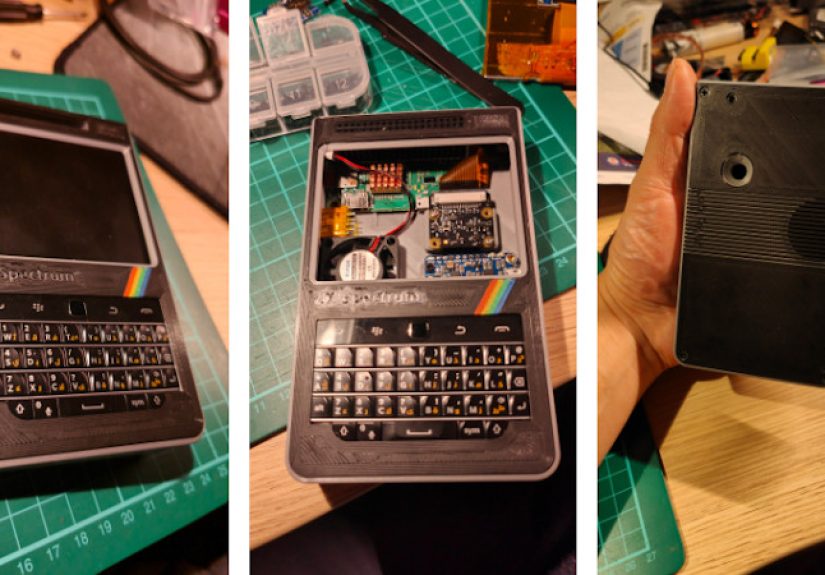
The answer is tiny, chunky, clever, and deeply charming. It brings together desktop Linux, Raspberry Pi hardware, a BlackBerry-style keyboard, a 320×240 LCD screen, a LiPo battery, and a 3D-printed case with retro character. It is the kind of device that makes Linux fans grin before they even know what they would use it for. Then, five minutes later, they have seventeen ideas.
What Is the Blackberry Pi?
The Blackberry Pi is a custom handheld Linux computer built around a Raspberry Pi Zero W. The project uses a small color display, a compact physical keyboard, portable power hardware, and a 3D-printed enclosure to create a device that fits the “pocket desktop” dream better than many commercial gadgets ever have.
At its core, this is a do-it-yourself mobile Linux machine. It runs real Linux software because, unlike a standard phone interface, it is built from single-board computer hardware rather than a locked-down mobile ecosystem. That means the device can be used for terminal work, lightweight scripting, SSH access, text editing, radio experiments, camera projects, and other tasks where flexibility matters more than polished app icons.
The project’s personality comes from its input method. Touchscreens are fine for scrolling, tapping, and accidentally opening three apps while trying to wipe dust off the display. But for real typing, a tactile keyboard still has magic. The Blackberry Pi borrows that old-school thumb-typing energy and combines it with the open-ended world of Linux.
Why Pocket Linux Still Feels Exciting
Linux has technically been in pockets for years. Android uses the Linux kernel, and millions of people carry it every day without thinking of themselves as Linux users. But for many open-source fans, Android does not feel like “desktop Linux in your pocket.” The familiar command-line tools, package managers, window environments, and hackable user space are either missing, hidden, restricted, or wrapped in layers of mobile-specific design.
That is why projects like Blackberry Pi, Beepy, PinePhone, postmarketOS, and Ubuntu Touch continue to attract attention. They represent a different idea of mobile computing: not just consuming apps, but controlling the machine. The appeal is not only nostalgia. It is ownership. A pocket Linux computer invites you to open a terminal, edit a config file, connect to a server, write a script, test hardware, and learn by breaking things in ways that are usually recoverable.
In a world where most phones feel sealed, synced, and subscription-ready, the Blackberry Pi feels refreshingly unfinished in the best possible way. It is not a product pretending to be effortless. It is a project proudly admitting that effort is half the fun.
The Hardware: Small Parts, Big Personality
Raspberry Pi Zero W: The Tiny Brain
The Raspberry Pi Zero W is a natural fit for a pocket Linux build. It is small, affordable, widely supported, and capable enough for lightweight Linux tasks. Its 1GHz single-core CPU and 512MB of RAM will not make it a video-editing workstation, but that is not the mission. This is a compact terminal-friendly machine, not a lunchbox pretending to be a gaming tower.
The Zero W also includes wireless LAN, Bluetooth, a microSD card slot, mini HDMI, USB On-The-Go, a 40-pin GPIO header, and a CSI camera connector. For a handheld maker project, that combination is excellent. You can connect peripherals, experiment with hardware, run a Linux distribution, and still keep the device small enough to carry.
Some builders may consider upgrading to a Raspberry Pi Zero 2 W for more performance, but the original design’s use of the Zero W reflects a practical truth: pocket Linux does not always need brute force. For SSH, writing notes, running command-line tools, logging data, or controlling small projects, modest hardware can feel surprisingly capable.
A 320×240 LCD: Not Huge, But Usable
The Blackberry Pi uses a 320×240 LCD screen, which sounds tiny if your daily driver phone has more pixels than your first laptop. But small displays are part of the charm and the challenge. A pocket Linux computer is not about opening thirty browser tabs and pretending everything is fine. It is about focused interaction.
Text-based interfaces shine on small screens. Terminal sessions, simple editors, dashboards, logs, scripts, and status tools are all at home here. The limited resolution nudges the device toward purposeful computing. You do not doom-scroll on a Blackberry Pi. You do things. That alone feels almost rebellious.
BlackBerry-Style Keyboard: The Star of the Show
The keyboard is what turns this from “small Raspberry Pi with a screen” into something memorable. The project uses a compact BlackBerry-style keyboard module, giving the device a tactile input system that makes sense for a handheld computer.
Physical keyboards matter because they create confidence. You can type commands without covering half the screen. You can feel key positions without staring at your thumbs. You can work in a terminal with fewer mistakes. And, perhaps most importantly, you get the satisfying clicky experience that modern touchscreen slabs abandoned in the name of minimalism.
The BlackBerry influence also gives the device cultural weight. BlackBerry phones became iconic because they were built for communication. The Blackberry Pi takes that history and redirects it toward open computing. It is less corporate email warrior, more backyard Linux wizard.
Portable Power: The Battery Question
A pocket computer is only truly pocketable if it can run without being tethered to a wall. The Blackberry Pi design includes a LiPo battery and charging/boost hardware such as the Adafruit PowerBoost 1000C. This kind of board can take power from a lithium battery and provide the steady 5V output that small electronics need.
Battery-powered Raspberry Pi builds require careful planning. Screen brightness, wireless usage, CPU load, and attached peripherals all affect runtime. A 2500mAh battery is enough to make the project genuinely portable, but users should think of it as a field tool rather than an all-day laptop replacement. In other words, bring expectations, not miracles.
Camera and Expansion Possibilities
The project also includes support for a Raspberry Pi Camera Module 2 NoIR, which uses an 8-megapixel Sony IMX219 sensor. That opens the door to imaging experiments, low-light projects with the right illumination, nature observation, documentation, or simply the maker satisfaction of adding one more feature because the case still had room.
Thanks to the Raspberry Pi ecosystem, expansion is the real superpower. GPIO access, USB options, camera support, wireless networking, and Linux software make the Blackberry Pi more than a novelty. It is a pocket-sized development platform.
Design Inspiration: BlackBerry Meets ZX Spectrum
Part of the Blackberry Pi’s appeal is visual. The design draws inspiration not only from BlackBerry handsets but also from classic microcomputers such as the Sinclair ZX Spectrum. That retro influence matters because handheld computers are emotional objects. A good maker project does not merely function; it tells a story.
The Blackberry Pi looks like it belongs in an alternate timeline where smartphones evolved from hobby computers instead of media consumption rectangles. It has a little bulk, a little weirdness, and a lot of character. The 3D-printed case reinforces that personality. It says, “Someone made this because they wanted it to exist,” which is still one of the best reasons to make anything.
What Can You Actually Do With a Pocket Linux Computer?
Use It as a Portable Terminal
The most obvious use case is terminal work. A Blackberry Pi can become a small SSH machine for connecting to servers, Raspberry Pi projects, home lab systems, or networked devices. With a physical keyboard and Linux tools, it becomes far more practical than trying to type commands on a phone touchscreen.
Write Notes and Code Snippets
For writers, students, developers, and tinkerers, a pocket Linux device can work as a distraction-resistant note machine. Open a terminal editor, write plain text, draft a checklist, log observations, or capture code snippets. No notifications from shopping apps. No infinite feed. Just you, a keyboard, and the blinking cursor judging your spelling.
Control DIY Electronics
Because the Raspberry Pi ecosystem supports GPIO and hardware interfaces, the Blackberry Pi can also act as a portable controller for electronics experiments. It can be used to monitor sensors, trigger scripts, test small devices, or serve as a field console for maker projects.
Experiment With Radio, Cameras, and Field Tools
Zhou Xu’s project was partly motivated by field testing, including antenna-related experimentation. That is where this form factor shines. A battery-powered Linux handheld is easier to carry outdoors than a laptop, and it can run specialized software for observation, logging, and diagnostics. Used responsibly, it becomes a compact field workstation.
How Blackberry Pi Compares With Beepy, PinePhone, and Other Mobile Linux Ideas
The Blackberry Pi sits in a lively family of pocket Linux experiments. SQFMI’s Beepy, for example, combines a tactile keyboard and display with Raspberry Pi compatibility. Pine64’s PinePhone and PinePhone Pro aim more directly at open-source smartphone hardware. postmarketOS focuses on extending the life of mobile devices with free and open-source software, while Ubuntu Touch offers a mobile Linux operating system designed around privacy and freedom.
The difference is that Blackberry Pi is proudly project-like. It is not trying to become everyone’s main phone. It does not need carrier support, polished telephony, or a mass-market app catalog. Its value is in being hackable, understandable, repairable, and personal. That makes it closer to a cyberdeck than a smartphone.
Think of it this way: PinePhone asks, “Can we make an open Linux phone?” Beepy asks, “Can we make a tiny keyboard computer kit?” Blackberry Pi asks, “What if I built the pocket Linux machine I actually want?” All three questions are worth asking.
The SEO-Friendly Big Idea: Desktop Linux Is Not Just for Desks
The phrase desktop Linux in your pocket captures the project’s central promise. The desktop part is not about screen size. It is about control. Desktop Linux means access to familiar tools, open software, scripting, file systems, package management, and the ability to shape the device around your workflow.
That is why the Blackberry Pi feels important even as a niche build. It reminds us that personal computing can still be personal. Not every device has to be optimized for streaming, advertising, or app engagement. Some devices can be optimized for curiosity.
For makers, Raspberry Pi fans, Linux users, and retro hardware enthusiasts, the Blackberry Pi is a delightful proof of concept. It shows that a pocket-sized Linux computer does not have to be imaginary, expensive, or corporate-approved. It can be printed, soldered, assembled, configured, and improved one weekend at a time.
Limitations: The Pocket Has Rules
Of course, the Blackberry Pi has limitations. The small screen is not ideal for modern web browsing. The Raspberry Pi Zero W is modest hardware. Battery life depends heavily on usage. Heat management may become more important if a faster board is used. The case design, wiring, display configuration, and power system all require patience.
This is not a beginner-friendly consumer gadget. It is a maker project. That means the build may involve troubleshooting, reprinting parts, adjusting cables, editing config files, and discovering that “almost done” is a mythical state invented by people who have never owned a soldering iron.
But those limitations are also the point. The Blackberry Pi is fun because it is not frictionless. It rewards learning. It gives users a reason to understand the relationship between hardware and software. When it works, the satisfaction is far deeper than unboxing another sealed rectangle.
Who Is the Blackberry Pi For?
The Blackberry Pi is perfect for Linux enthusiasts who love command-line tools, Raspberry Pi builders who want a more portable challenge, retro-computing fans who miss physical keyboards, and students or hobbyists who learn best by making real objects.
It is also a great inspiration piece for content creators, hardware reviewers, STEM clubs, and open-source communities. The project can spark discussions about mobile computing, repairability, sustainable electronics, user control, and why old ideas sometimes become exciting again when combined with modern tools.
It may not be the right project for someone who wants a polished daily smartphone. But for someone who wants a pocketable Linux terminal with personality, it is hard to beat.
Experience Notes: Living With the Idea of Blackberry Pi
The best way to understand the Blackberry Pi is to imagine carrying it for a day. You slip it into a jacket pocket, and it does not feel like a phone. It feels like a tiny instrument. That difference matters. A phone invites you to check things. A pocket Linux computer invites you to make things.
On a commute, it could become a plain-text writing machine. The small keyboard encourages short, deliberate notes. Instead of opening a full laptop just to capture an idea, you could thumb-type a paragraph, save it locally, and sync it later. Writers who love distraction-free tools would immediately understand the appeal. The limited screen becomes a feature because it keeps your attention on the sentence in front of you.
In a classroom, makerspace, or home lab, the device could serve as a portable console. Need to check a running Raspberry Pi project? SSH in. Need to restart a script? Open the terminal. Need to look at a sensor log? Pull it up without dragging a laptop across the room. The Blackberry Pi becomes the digital equivalent of a pocket notebook, except the notebook can run Python.
Outdoors, the value becomes even clearer. A laptop is awkward in a garden, garage, or field test. A phone is portable but often clumsy for technical input. A handheld Linux machine sits between them. It is compact enough to carry and functional enough to do real work. That middle ground is exactly where many maker tools become beloved.
There is also a psychological benefit. The Blackberry Pi looks different, so it makes you behave differently. You are less likely to treat it as a passive entertainment device. You are more likely to open a shell, inspect a file, write a note, or test an idea. The physical keyboard creates a tiny ritual: hold device, press keys, command machine. It feels intentional.
Of course, the experience would not be perfect. You would notice the small display. You would occasionally wish for more RAM. You would probably fiddle with brightness, keyboard mappings, startup scripts, and power settings. You might discover that your perfect portable workflow requires three aliases, a lighter text editor, and a stronger tolerance for tiny fonts.
But that is the maker experience in miniature. The device changes because you change it. Over time, a Blackberry Pi would collect personal touches: custom shortcuts, favorite terminal tools, a preferred Linux image, a better case revision, maybe even a small carrying pouch. It would become less like a gadget and more like a handmade companion.
The funniest part is that once you own something like this, you start inventing reasons to use it. Suddenly checking server uptime feels more dramatic. Writing a grocery list in Vim becomes a lifestyle choice. Looking up a log file from your couch feels like mission control. Is it always the most efficient tool? No. Is it the most delightful tool? Very possibly.
That is why Blackberry Pi matters. It proves that useful technology does not have to be boring, and playful technology does not have to be useless. It sits in the sweet spot between retro nostalgia and practical Linux computing. It is a reminder that the future of personal devices does not have to be only thinner glass and fewer ports. Sometimes the future has buttons, screws, printed plastic, a tiny screen, and a blinking cursor waiting patiently in your pocket.
Conclusion: A Tiny Computer With a Big Open-Source Heart
The Blackberry Pi is more than a cute Raspberry Pi handheld. It is a compact argument for open, personal, repairable computing. By combining a Raspberry Pi Zero W, a BlackBerry-style keyboard, a small LCD, battery power, and a custom 3D-printed body, it turns the old dream of pocket desktop Linux into something you can actually hold.
It will not replace your phone, and it does not need to. Its purpose is different. It is for people who want a portable Linux terminal, a field computer, a retro cyberdeck, a learning project, or simply a device that makes computing feel exciting again. In an era of sealed slabs, the Blackberry Pi is a tiny rebellion with a keyboard.