Table of Contents >> Show >> Hide
- What Is a Category 6 Ethernet Cable?
- How Fast Is Cat6?
- Why Cat6 Is Better Than Cat5e
- Cat6 vs. Cat6a: What Is the Difference?
- Shielded vs. Unshielded Cat6
- Solid vs. Stranded Cat6
- What About the Connector?
- Jacket Ratings Matter More Than Most Buyers Realize
- Can Cat6 Handle PoE?
- How to Choose the Right Cat6 Cable
- Common Cat6 Installation Mistakes
- Who Should Buy Cat6?
- Common Real-World Experiences With Cat6 Cables
- Conclusion
If Ethernet cables had a family reunion, Category 6 would be the relative who is practical, fast, and still somehow underappreciated. It is not the flashiest cable on the block, and it does not swagger around like fiber. But Cat6 has earned its place in homes, offices, server closets, gaming setups, and smart buildings because it hits a sweet spot: solid speed, reasonable cost, and enough performance headroom to keep most networks happy without making your wallet file a complaint.
So what exactly is a Category 6 Ethernet cable? Why does it matter whether it is Cat5e, Cat6, or Cat6a? And why do some cables look nearly identical while performing very differently once they disappear into walls, ceilings, patch panels, and a tangle of devices that would make even a seasoned IT person mutter under their breath?
This guide breaks it all down in plain English. No buzzword soup. No fake drama. Just a practical explanation of how Cat6 cables work, what they are good at, where they fit, and how to choose the right one without accidentally buying networking spaghetti.
What Is a Category 6 Ethernet Cable?
Category 6, usually shortened to Cat6, is a standardized twisted-pair copper cable used for Ethernet networking. Like earlier Ethernet cables, it contains four pairs of copper conductors, which are twisted to reduce interference and help data travel cleanly from one device to another. Those twists are not just for decoration. They are one of the reasons Ethernet can move data reliably over copper instead of turning your Zoom call into digital confetti.
Cat6 is designed for better performance than Cat5e, especially when it comes to reducing crosstalk and supporting higher frequencies. In simple terms, it is built to carry more data with more breathing room. Standard Cat6 is commonly associated with 250 MHz bandwidth, which gives it more signal capacity than Cat5e.
In everyday use, Cat6 is often the go-to option for:
- Home networking
- Office workstations
- Gaming PCs and consoles
- Wi-Fi access points
- IP cameras
- VoIP phones
- Network-attached storage
- Power over Ethernet devices
In other words, if your network needs to do real work instead of just existing decoratively, Cat6 is usually in the conversation.
How Fast Is Cat6?
This is the part most people care about, and fairly so. Nobody buys Ethernet cable because it looks charming in a closet.
Cat6 is commonly used for 1 Gigabit Ethernet up to 100 meters. It can also support 10 Gigabit Ethernet over shorter distances, which is why Cat6 gets called “future-friendly” more often than “cheap but fine.” In many practical environments, Cat6 can handle 10GbE for runs up to about 55 meters. For a guaranteed full 100-meter 10GbE channel, Cat6a is generally the safer and more standards-aligned choice.
| Cable Type | Typical Bandwidth | Common Ethernet Support | Typical Max Distance |
|---|---|---|---|
| Cat5e | 100 MHz | 1GbE, 2.5GbE, 5GbE in many cases | 100 m for 1GbE |
| Cat6 | 250 MHz | 1GbE, 2.5GbE, 5GbE, 10GbE on shorter runs | 100 m for 1GbE; about 55 m for 10GbE |
| Cat6a | 500 MHz | 10GbE | 100 m |
The practical takeaway is easy:
- If you want dependable gigabit networking, Cat6 is excellent.
- If you want multigig speeds such as 2.5G or 5G, Cat6 is often a great fit.
- If you want 10G across long in-wall runs, Cat6a is usually the smarter bet.
Why Cat6 Is Better Than Cat5e
Cat5e is still common and still useful, but Cat6 improves on it in ways that matter once your network starts doing more than basic web browsing.
1. Higher performance headroom
Cat6 offers more bandwidth and tighter performance requirements. That means cleaner signaling and better support for faster applications.
2. Better crosstalk control
Crosstalk happens when signals in one wire pair interfere with another. Cat6 is designed to reduce that problem more effectively than Cat5e. Some Cat6 cables use pair separators or internal splines to help keep pairs properly spaced.
3. Better fit for modern networks
Wi-Fi 6 and Wi-Fi 7 access points, smart cameras, PoE devices, and NAS units can all push networks harder than older gear did. Cat6 gives you more room before your cabling becomes the bottleneck.
That said, Cat5e is not obsolete. It still works well in many situations. Cat6 simply gives you more margin, more flexibility, and fewer reasons to regret your life choices during a network upgrade.
Cat6 vs. Cat6a: What Is the Difference?
This comparison trips people up all the time because the names are annoyingly similar. Cat6 and Cat6a are related, but they are not the same cable pretending to have different hobbies.
Cat6a stands for Category 6 augmented. It is designed to go further with 10 Gigabit Ethernet and usually provides better protection against alien crosstalk, especially in denser cable bundles.
Here is the simple version:
- Cat6 is usually easier to work with, smaller, lighter, and more flexible.
- Cat6a is thicker, often more expensive, and better when 10GbE over full 100-meter runs is the goal.
If you are wiring a normal house, a small office, or a gaming setup, Cat6 is often more than enough. If you are cabling a building for long-term 10G deployment, Cat6a deserves serious attention.
Shielded vs. Unshielded Cat6
Not all Cat6 cables are built the same. One major difference is whether the cable is shielded or unshielded.
Unshielded Cat6
Often labeled U/UTP, this is the most common choice for homes and standard office environments. It is easier to install, less expensive, and usually perfectly fine in spaces without major electromagnetic interference.
Shielded Cat6
Shielded versions add foil or braid to reduce interference. These are more useful in environments with electrical noise, industrial equipment, dense cabling, or places where cables run near motors, lighting systems, or other noisy hardware.
Shielding can be helpful, but it is not magic. It also increases installation complexity. If a shielded system is not properly grounded and terminated with matching components, the “upgrade” can become a very expensive personality trait.
Solid vs. Stranded Cat6
This is another important choice, especially if you are buying bulk cable or patch cords.
Solid conductor Cat6
Solid copper conductors are usually used for permanent in-wall or in-ceiling runs. They are common in structured cabling and often show up in bulk spools. Many Cat6 bulk cables use 23 AWG solid bare copper conductors, which help deliver strong performance and are well suited for fixed installations.
Stranded conductor Cat6
Stranded conductors are usually used for patch cables because they are more flexible. They are great for short device-to-wall or switch-to-patch-panel connections where cables move more often.
A good rule of thumb is simple: solid for the walls, stranded for the wiggles.
What About the Connector?
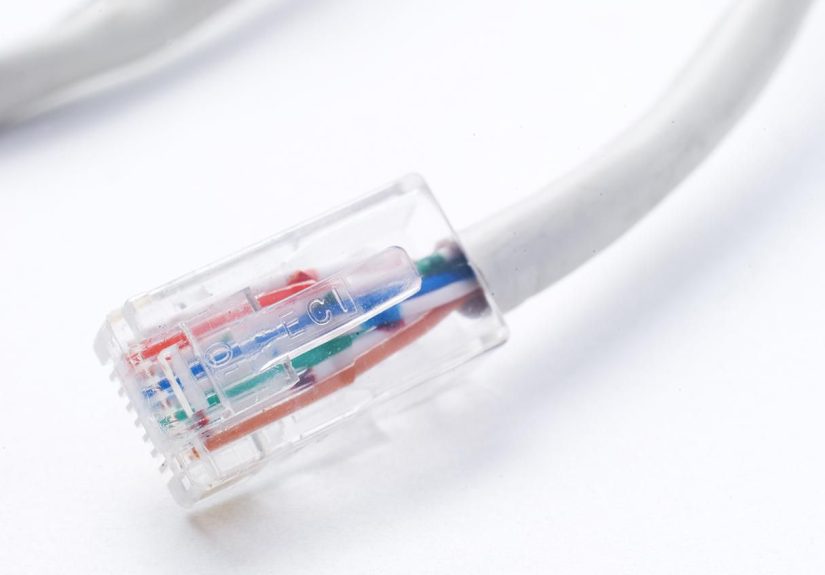
The connector at the end of most Ethernet patch cables is commonly called an RJ45 connector. Technically, people often mean an 8P8C modular plug, but “RJ45” has stuck around like a nickname nobody can shake.
When terminating Cat6, you will also run into T568A and T568B wiring patterns. Both are accepted standards. The big rule is not that one is “faster” than the other. It is that you must be consistent. Mixing A on one end and B on the other creates a crossover arrangement, which is not what most modern structured cabling runs are meant to be unless you specifically intend it.
Jacket Ratings Matter More Than Most Buyers Realize
Plenty of people shop for Ethernet cable by speed alone, then discover the hard way that building codes also have opinions.
Common jacket ratings include:
- CMP: Plenum-rated cable for air-handling spaces, such as above certain ceilings or below raised floors.
- CMR: Riser-rated cable for vertical runs between floors.
- CM: General-purpose cable for many standard indoor spaces.
- CMX: Limited-use cable, often seen in certain residential or outdoor-related applications.
Plenum-rated cable can usually be used in riser spaces, but riser cable generally should not be used in plenum spaces. Translation: buying the wrong jacket can turn a cheap cable into an expensive do-over.
Can Cat6 Handle PoE?
Yes. Cat6 is commonly used for Power over Ethernet, which lets the same cable carry both data and power. That is why Cat6 shows up with devices like access points, IP cameras, VoIP phones, smart lighting, access-control gear, and other networked devices that prefer not to be babysat by a separate power adapter.
But PoE adds one practical consideration: heat. Larger cable bundles carrying more power can experience temperature rise, which affects performance. That does not mean Cat6 is a bad choice for PoE. It means installers need to think about bundle size, conductor quality, temperature rating, and application. In other words, “just stuff it all together and hope for the best” is not a recognized engineering discipline.
How to Choose the Right Cat6 Cable
If you are shopping for Cat6, use this checklist:
Choose bare copper, not copper-clad aluminum
Pure bare copper is the better choice for standards compliance, performance, and PoE reliability. Very cheap cable often gets cheap for a reason.
Match the cable to the job
Use solid bulk cable for permanent runs. Use stranded patch cords for flexible connections.
Pick the right jacket rating
Check whether your installation space needs CMP, CMR, CM, or outdoor/direct-burial cable.
Do not overbuy without a reason
If your longest runs are short and your devices are gigabit or multigig, Cat6 may be a better value than Cat6a.
Do not underbuy either
If you are opening walls in a new build or major renovation, it can be worth thinking ahead. Labor is expensive. Pulling a better cable once is usually cheaper than pulling a replacement later while muttering at drywall dust.
Common Cat6 Installation Mistakes
- Untwisting pairs too far at termination: Keep the twists as close as possible to the jack or plug. Excess untwist hurts performance.
- Ignoring bend radius: Sharp bends can degrade signal quality.
- Pulling too hard: Too much tension can damage the cable.
- Mixing poor components: Good cable paired with bad jacks or sloppy terminations is like putting premium tires on a shopping cart.
- Using inconsistent wiring patterns: Pick T568A or T568B and stay consistent.
- Buying mystery cable: If the specs are vague, suspiciously cheap, or full of marketing fog, assume there is a catch.
Who Should Buy Cat6?
Cat6 makes sense for a wide range of buyers:
- Homeowners wiring rooms for streaming, work, gaming, and smart devices
- Small businesses upgrading offices without jumping straight to Cat6a everywhere
- Gamers who want stable low-latency wired connections
- Installers who need reliable structured cabling for modern endpoints
- Anyone using PoE for access points, cameras, or phones
If you need a balanced blend of cost, performance, and practicality, Cat6 is often the networking equivalent of buying the right tool instead of the biggest one.
Common Real-World Experiences With Cat6 Cables
One reason Cat6 remains so popular is that the real-world experience tends to be pleasantly boring, and in networking, boring is beautiful. A good Cat6 run usually disappears into the background and just works. That is exactly what most people want from infrastructure: no drama, no random disconnects, and no need to develop a spiritual relationship with reboot buttons.
In homes, one common experience is the jump from flaky Wi-Fi dependence to a more stable wired backbone. People often pull Cat6 to a home office, media room, or gaming area and immediately notice that video calls become steadier, downloads stop wobbling all over the place, and online gaming feels more consistent. The cable itself is not “making the internet faster” in a magical sense, but it removes weak links between the modem, router, switches, PCs, and access points. Suddenly the network feels less like a haunted house and more like a functioning utility.
In office environments, Cat6 often becomes the quiet hero during moves, adds, and upgrades. A business may not think much about cabling when it is first installed, but a well-done Cat6 system pays off later when the team adds VoIP phones, Wi-Fi access points, IP cameras, or faster switches. Because Cat6 provides more performance margin than older cable, it usually handles these changes gracefully. People do not always notice the cable when it works, but they absolutely notice when old or poorly terminated cabling starts causing intermittent issues that eat hours of troubleshooting time.
Another common experience is learning that installation quality matters as much as the label on the box. Many people buy Cat6 expecting instant greatness, then terminate it badly, kink it around tight corners, mix components, or use bargain-bin plugs that seem to have been designed by a committee of raccoons. The result is a cable run that technically exists but performs like it would rather be somewhere else. When the same cable is installed cleanly, terminated consistently, and tested properly, the experience is very different.
For PoE devices, Cat6 also tends to create a “why didn’t we do this sooner?” moment. Running one cable for both power and data makes cameras, phones, and access points much easier to place. That simplicity is one of Cat6’s biggest practical advantages. Of course, people also discover that cable planning matters. Bundle too much, ignore temperature, or use questionable conductors, and the convenience starts getting complicated.
Overall, real experience with Cat6 usually comes down to this: when you choose the right cable, match it to the environment, and install it properly, it becomes one of the least exciting parts of your network. That is a compliment. In a world full of tech that constantly begs for attention, Cat6’s best feature may be that it mostly lets you forget it is there.
Conclusion
Category 6 Ethernet cables are popular for a simple reason: they deliver a strong balance of speed, stability, affordability, and flexibility. They are fast enough for most modern home and office networks, robust enough for many PoE deployments, and practical enough that installers still reach for them every day.
If you need dependable gigabit performance, room for multigig upgrades, and the possibility of 10GbE on shorter runs, Cat6 is a smart choice. If your project demands guaranteed 10GbE at full 100-meter distance, then Cat6a may be worth the extra size and cost. Either way, the best results come from choosing quality cable, matching it to the environment, and installing it with care.
Because in networking, the cable is not the glamorous part. It is the part that determines whether the glamorous parts get to shine.