Table of Contents >> Show >> Hide
- Introduction: When Your Living Room Needs a Pit Wall
- What Is an F1 Light Box?
- Why Race Status Matters So Much in Formula 1
- The Main F1 Race Status Colors and Signals
- Safety Car and Virtual Safety Car: The Big Two for a Light Box
- How an F1 Light Box Gets Race Status Data
- Why Fans Love the Idea
- Practical Uses Beyond Looking Cool
- Design Tips for a Better F1 Light Box
- Specific Example: A Dynamic F1 Logo Light Box
- What an F1 Light Box Cannot Do
- F1 Light Box Experiences: What It Feels Like on Race Day
- Conclusion: A Small Box With Big Race-Day Energy
- SEO Tags
Note: This article discusses fan-made F1 light box projects and race-status visualization in an informational way. It does not imply official affiliation with Formula 1, the FIA, or any F1 team.
Introduction: When Your Living Room Needs a Pit Wall
Formula 1 is not exactly a slow hobby. One second you are calmly eating chips on the couch, and the next second the broadcast is shouting about a yellow flag, a Virtual Safety Car, a red flag, a pit-lane investigation, and someone’s front wing having a deeply emotional relationship with carbon fiber confetti. That is where an F1 light box becomes more than a pretty glowing desk ornament. It turns race status into instant visual language.
The idea is simple: build or buy a light box shaped like an F1-inspired logo or motorsport display, connect it to live race data or home automation, and let it change colors based on what is happening on track. Safety Car? Flash yellow. Red flag? Glow red. Green flag? Back to racing, baby. It is the kind of fan project that feels like it escaped from a team garage and landed beside your TV remote.
In official racing, drivers already rely on flags, light panels, steering-wheel displays, radio messages, and race control instructions. Fans, however, often get the drama through TV graphics, commentary, and live timing apps. An F1 race status light box bridges that gap. It gives your room a quick, visual “track status” signal without requiring you to stare at five screens like a strategy engineer surviving on espresso and tire-degradation graphs.
What Is an F1 Light Box?
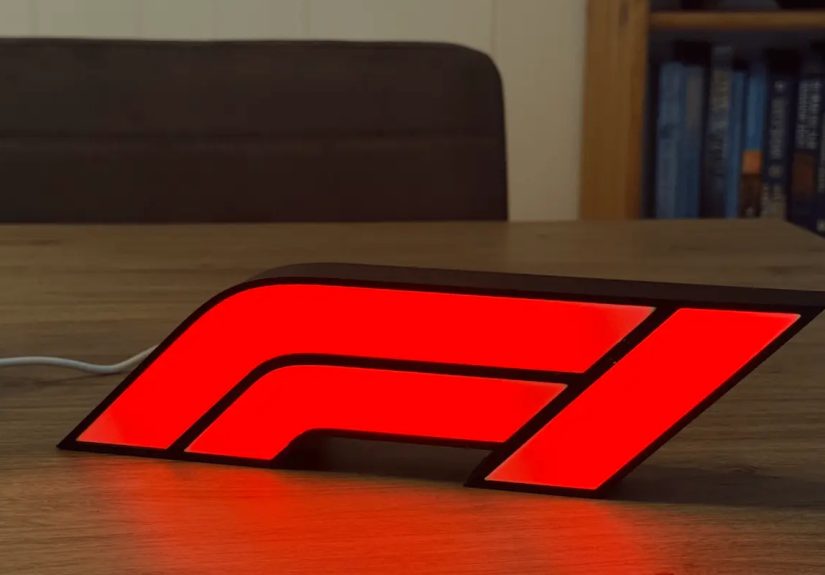
An F1 light box is usually a decorative LED display inspired by Formula 1 branding, car liveries, race tracks, driver initials, or motorsport symbols. A basic version is simply a glowing sign. A smarter version reacts to live race events, making it part decoration, part dashboard, and part “don’t talk to me, there’s a Safety Car” warning system.
The most interesting versions combine 3D printing, LED strips, microcontrollers, and live data feeds. A maker can design the housing in software such as Fusion 360, print the shell, install addressable LEDs, and connect the electronics to a home automation platform. When race status changes, the light changes too. It is not magic, although during a chaotic wet race it may feel like wizardry with USB power.
Decorative Light Box vs. Smart Race Status Light Box
A decorative F1 light box looks cool, and looking cool is not a crime. It can sit on a shelf, brighten a gaming setup, or make a sim-racing corner feel like a miniature paddock. A smart light box goes further. It can react to live events such as green flag running, yellow flags, Safety Car periods, Virtual Safety Car periods, and red flags.
The difference is similar to wearing a team cap versus receiving race control messages. One says, “I like F1.” The other says, “I know exactly why everyone just stopped pushing lap times.”
Why Race Status Matters So Much in Formula 1
Race status is not just background noise. It changes strategy, tire temperature, fuel saving, overtaking rules, pit-stop timing, and the entire mood of a Grand Prix. A yellow flag may prevent overtaking in a sector. A Safety Car can erase a 12-second lead faster than a bad pit stop can ruin a Sunday. A red flag can reset the race and give teams time to change tires. A green flag can unleash 20 drivers who have been waiting to attack like caffeinated sharks.
For drivers, official instructions come through trackside flags, FIA light panels, the cockpit, and team radio. FIA regulations state that light signals displayed on trackside light panels have the same meaning as flag signals. That matters because modern F1 cars are traveling at extreme speeds, and clear communication is a safety requirement, not a nice bonus.
For fans, understanding race status makes the broadcast far easier to follow. Instead of wondering why a driver suddenly stopped attacking, you can see that a yellow flag or VSC has neutralized the action. Instead of blaming your favorite driver for losing momentum, you can blame the correct thing: timing, strategy, or, occasionally, the motorsport gods having a dramatic afternoon.
The Main F1 Race Status Colors and Signals
A smart F1 light box works best when it mirrors the most important race states. It does not need to explain every obscure regulation. It just needs to show what matters quickly.
Green: Racing Is Live
Green means the track is clear and the session is running normally. After a caution period, a green flag or green light panel signals that drivers may resume racing. In a fan light box, green is the “we are back” color. It tells viewers to stop checking the snack table and return to the screen before someone sends it around the outside.
Yellow: Caution on Track
Yellow indicates danger ahead. Drivers must slow down, be prepared to change direction, and follow restrictions depending on whether the caution is local, double waved, or part of a larger neutralization. For a light box, yellow is the most useful warning color because it instantly tells fans that the rhythm of the race has changed.
Red: Session Stopped
A red flag means the session or race has been suspended. This can happen because of a serious crash, unsafe track conditions, debris, heavy rain, barrier repairs, or other safety concerns. In living-room terms, red means “do not panic, but yes, something big happened.” It is also a good time to refill your drink without missing an overtake.
Blue: Faster Car Approaching
Blue flags are most relevant to drivers being lapped. They tell a slower car that a faster car is approaching and should be allowed through under the correct conditions. A fan light box may not need blue as a default mode, but advanced setups could use it to show when leaders are approaching traffic.
White, Black, and Checkered Signals
Other racing signals include white for a slow vehicle ahead, black-and-orange for mechanical issues, black-and-white for unsportsmanlike driving warnings, and the checkered flag for the end of a session. A light box can include these if it is connected to detailed data, but most fans will get the biggest benefit from green, yellow, red, Safety Car, and VSC states.
Safety Car and Virtual Safety Car: The Big Two for a Light Box
The two race statuses most worth visualizing are Safety Car and Virtual Safety Car. They are common enough to matter and dramatic enough to change race strategy instantly.
Safety Car Mode
When the Safety Car is deployed, drivers reduce speed and form up behind it. The pack compresses, gaps disappear, tire temperatures drop, and pit-stop strategy can flip upside down. A driver who was quietly losing the race can suddenly become a genius because they pitted at the perfect moment. F1 is fair like that, in the same way a claw machine is “technically possible.”
For a light box, Safety Car mode could flash yellow, pulse amber, or display a dedicated “SC” pattern. If the display supports text or segmented LEDs, showing “SC” makes the signal even clearer. The goal is to make the status obvious from across the room.
Virtual Safety Car Mode
The Virtual Safety Car, or VSC, is used when the race needs to be neutralized without bringing out the physical Safety Car. Drivers must slow to a controlled pace, and overtaking is generally restricted. The field does not bunch up in the same way, but strategy still changes because pit stops can cost less time relative to cars moving slowly on track.
A light box can show VSC with a yellow pattern, a slower pulse, or a separate color blend if the LEDs support it. A dedicated VSC mode is useful because casual viewers often confuse Safety Car and Virtual Safety Car. The light box can help them understand why cars are slow but not physically lined up behind a Mercedes-AMG safety car.
How an F1 Light Box Gets Race Status Data
A smart race light box needs a data source. Some projects use home automation integrations, unofficial live timing tools, or custom scripts that read race status from available data feeds. Official F1 products and services also offer live timing, driver tracker maps, tire information, telemetry, and race-related updates for fans. The exact setup depends on the builder’s technical comfort level and the data access they choose.
Common Components
A typical DIY build may include a 3D-printed enclosure, LED strip or LED matrix, diffuser panel, microcontroller, power supply, and software logic. The diffuser matters more than beginners expect. Without it, the light can look like a row of tiny angry dots instead of a smooth motorsport glow.
The microcontroller handles instructions such as “turn red,” “flash yellow,” or “return to green.” Home automation platforms can trigger those changes when race status changes. More advanced builders can add Wi-Fi, MQTT, API polling, or local dashboard integrations.
Latency and Sync
One challenge is timing. Broadcasts may be delayed compared with live data. Streaming services, cable broadcasts, international feeds, and replay tools can all be slightly out of sync. A light box that turns red before the TV shows the incident is technically impressive, but it may also spoil the surprise like a friend who reads the race result in the group chat.
The best setups include a delay option so the light box matches the broadcast. That way the visual signal enhances the viewing experience instead of becoming a tiny glowing spoiler machine.
Why Fans Love the Idea
F1 fans already live in a world of data. Lap times, sector colors, tire age, pit windows, DRS gaps, undercuts, overcuts, deltas, and weather radar all matter. A light box takes one slice of that information and makes it physical. It is data you can see without opening another app.
This is especially useful during watch parties. Not everyone in the room knows every rule. Some people are lifelong fans. Others are there because snacks were promised. When the light box turns yellow, even casual viewers know something has changed. When it turns red, everyone looks up. When it goes green, the room returns to full race mode.
It also adds atmosphere. F1 is theatrical by nature: lights out, tire blankets, garage doors, pit boards, carbon fiber, dramatic radio messages, and engineers saying things like “Plan C” as if that explains anything to the rest of humanity. A race-status light box fits perfectly into that world.
Practical Uses Beyond Looking Cool
Second-Screen Viewing
Many fans watch F1 with a second screen open for live timing. A light box reduces the need to check that screen every few seconds. You can still use live timing for detailed analysis, but the light box handles the broad status signal.
Sim Racing Rooms
For sim racers, an F1 light box can become part of the cockpit environment. Even if it is not connected to the sim itself, it creates the mood of a race control system. Some builders could adapt the concept for racing games, using telemetry or game events to trigger caution lights, pit alerts, or session-end signals.
Accessibility and Quick Awareness
Visual race-status tools can help viewers who process information better through color and light than through commentary. During a loud watch party, a flashing yellow signal may be easier to notice than a commentator explaining that a car has stopped in sector two.
Home Automation Fun
Once a race-status light box is connected to home automation, the possibilities become delightfully ridiculous. Green flag could dim the lights. Red flag could pause background music. Safety Car could trigger a snack reminder. Is that necessary? Absolutely not. Is it excellent? Obviously.
Design Tips for a Better F1 Light Box
A good light box should be readable, attractive, and reliable. The shape should be recognizable without relying too heavily on protected logos or team branding. Fan art and personal-use projects are common, but anyone planning to sell products should be careful with trademarks and official branding.
Use Clear Color Logic
Do not assign random colors just because the LED strip can produce 16 million shades. Race signals already have established meanings. Green, yellow, red, and blue should behave in ways fans expect. Save rainbow mode for victory celebrations or for when your favorite driver somehow survives a two-stop strategy that looked doomed on lap twelve.
Make It Visible, Not Blinding
A light box should be bright enough to notice but not so bright that it becomes the main character in your living room. Diffused light, adjustable brightness, and smooth transitions make the project feel polished.
Plan for Manual Override
Live data can fail. Wi-Fi can drop. APIs can change. A manual mode lets you switch colors yourself if the automation stops working. That is not admitting defeat; that is engineering with dignity.
Respect Delay Settings
If your broadcast runs 30 seconds behind live timing, build in a delay. Race fans are emotionally fragile during strategy chaos. They do not need a light box spoiling a red flag before the TV catches up.
Specific Example: A Dynamic F1 Logo Light Box
One notable maker project used a Formula 1-inspired logo light box that reacts to live race events. The project combined 3D modeling, electronics, and home automation to create a display that changes color based on race status. The appeal is obvious: instead of a static decoration, the light box becomes part of the race-day experience.
For example, during normal racing it can glow green. During a Safety Car period it can flash yellow. During a red flag it can hold solid red. That simple behavior instantly communicates the session state. It is not trying to replace official timing screens. It is doing something more charming: turning race control into room decor.
That is the beauty of the concept. It is understandable even to someone who does not know tire compounds from compound interest. Green means go. Yellow means caution. Red means stopped. The learning curve is flatter than a worn hard tire at the end of a long stint.
What an F1 Light Box Cannot Do
A fan light box is not an official FIA system. It should not be treated as a source for betting, official classification, safety decisions, or real motorsport operations. It is a fan display, not race control. If it disagrees with official timing, the official source wins. The light box may be cool, but it does not get invited to stewards’ meetings.
It also cannot explain every nuance of a race. A yellow light tells you caution exists, but it may not tell you whether the flag is local, whether a lap time will be deleted, or whether a driver lifted enough. For that, you still need live timing, race control messages, broadcast analysis, and sometimes a good old-fashioned replay.
Still, that limitation is part of the charm. The light box is not trying to be a full data wall. It is a clean, quick signal. In a sport overflowing with information, simplicity is valuable.
F1 Light Box Experiences: What It Feels Like on Race Day
Using an F1 light box during a Grand Prix changes the rhythm of watching the race. Without it, race status is something you notice when the broadcast graphic changes or when commentators raise their voices. With it, the room itself reacts. The light becomes part of the atmosphere, almost like a tiny marshal post on your shelf.
Imagine a typical Sunday. The formation lap begins, the snacks are arranged with the seriousness of a tire strategy meeting, and everyone is pretending they will not yell at the TV. The race starts, the light box glows green, and it quietly becomes the room’s status center. You do not think about it constantly, which is exactly why it works. It sits in the background until something changes.
Then, suddenly, it flashes yellow. Before the commentators finish explaining the incident, everyone knows the race has shifted. Someone asks, “Safety Car?” Another person checks live timing. The room wakes up. Strategy math begins. Should the leader pit? Will the midfield get a cheap stop? Did someone’s race just get rescued by chaos? The light box does not answer all those questions, but it asks them beautifully.
During a red flag, the experience is even stronger. A solid red glow creates a clear pause. The race has stopped, but the conversation starts. People debate whether tires can be changed, whether the restart will be standing or rolling, whether the team on old tires just got saved, and whether the driver who caused the stoppage will receive a penalty. The light box turns dead time into structured suspense.
For new fans, it is especially helpful. F1 can be intimidating because the broadcast assumes viewers understand a lot: DRS, deltas, track limits, tire compounds, pit windows, parc fermé, Safety Car rules, VSC timing, and why everyone becomes a lawyer when five seconds are added after the race. A light box simplifies the first layer. It tells new viewers what kind of race state they are watching before they learn the deeper rules.
For experienced fans, the appeal is different. It feels immersive. It creates the mood of a miniature pit wall at home. Pair it with live timing on a tablet, onboard cameras on a second monitor, and a main broadcast on the TV, and suddenly your living room looks like it is one headset away from calling an undercut. The light box becomes the smallest part of the setup, but often the most charming.
There is also a social benefit. During watch parties, people drift in and out. Someone grabs food, someone checks their phone, someone starts explaining tire degradation with unnecessary passion. The light box quietly keeps everyone oriented. Green means the race is active. Yellow means pay attention. Red means sit back, because the restart drama is loading.
The best experience comes when the light box is not overcomplicated. Too many colors, patterns, or alerts can make it confusing. A clean setup with green, yellow, red, Safety Car, and VSC modes is usually enough. The goal is not to turn your wall into an airport runway. The goal is quick awareness.
There is one more underrated pleasure: the build itself. For DIY fans, designing, printing, wiring, testing, and debugging the light box is part of the fun. It combines motorsport obsession with practical making. When it finally reacts correctly to a race status change, the satisfaction is real. You are not just watching F1 anymore. You have built a tiny glowing companion that panics with you in real time.
That is why the F1 light box idea works so well. It is not merely decoration, and it is not trying to replace official data. It lives in the sweet spot between fandom, technology, and race-day emotion. It makes the invisible structure of the race visible. And yes, it also looks fantastic on a shelf, which never hurts.
Conclusion: A Small Box With Big Race-Day Energy
An F1 light box helps you know the current race status by turning complex race-control information into instant visual cues. It can show green flag running, yellow caution, Safety Car, Virtual Safety Car, and red flag stoppages in a way that is easy to understand at a glance. For casual fans, it makes F1 less confusing. For hardcore fans, it adds atmosphere and data-driven fun. For everyone else in the room, it is a glowing reminder that something dramatic is probably happening and they should look up from their nachos.
As F1 continues to blend sport, technology, data, and entertainment, fan-made devices like smart light boxes show how creative the community has become. They do not need to be official to be useful. They simply need to be clear, responsive, and designed around real racing signals. In a sport where milliseconds matter, sometimes one color change is enough to tell the story.