Table of Contents >> Show >> Hide
- Why Safe Music Downloads Matter
- The Golden Rules Before You Download Anything
- The Safest Sites to Use for Music Downloads
- Ownership vs. Offline Listening: A Very Important Distinction
- Red Flags That a Music Download Site Is Not Safe
- How to Download Music Safely on Any Device
- Which File Format Should You Choose?
- Practical Examples
- Real-World Experiences: What Safe Music Downloading Actually Feels Like
- Conclusion
If the phrase free music download makes you feel like you should immediately check your laptop for a virus, congratulations: your instincts are working. Downloading music safely in 2026 is less about being a tech wizard and more about avoiding the digital equivalent of an alleyway guy whispering, “Psst, want the latest album in a ZIP file?”
The good news is that safe music downloading is absolutely possible. The trick is knowing the difference between legal ownership, offline listening, and “this looked free until my browser started screaming”. Some platforms let you truly buy and keep songs. Others let you download music inside an app for offline playback. Both can be safe. Random “download MP3 now” sites with six flashing banners and a fake antivirus popup? Not so much.
This guide breaks down the safest sites to use, how to spot red flags, what file types actually mean, and how to protect your device while still building a music library you can enjoy without regrets, malware, or accidental copyright trouble.
Why Safe Music Downloads Matter
Music downloading has two major risks: security and legality. The security problem is obvious. Unsafe download sites can hide malware in fake buttons, cloned pages, misleading ads, or shady installers. One careless click can turn “I just wanted one song for my road trip” into “Why is my browser opening crypto ads at 3 a.m.?”
The legality issue is just as important. Not every downloadable track online is actually licensed for public distribution. If a song is copyright-protected and the uploader does not have permission to share it, downloading it can cross a line fast. That is why the safest approach is simple: use platforms that are either official stores, licensed subscription services, or clearly licensed/open archives.
In plain English: safe music downloading means getting your music from sources that are both clean and legit.
The Golden Rules Before You Download Anything
1. Start with the official website or official app
If you find a music service through a weird ad, a pop-up, or a “top result” that looks slightly off, back away slowly. Type the platform name directly into your browser or use its official app from a trusted app store.
2. Know whether you are buying or borrowing
This is where many people get confused. A paid download from a digital store usually means you own a file or permanent access to that purchase. A streaming subscription with offline mode usually means you can listen offline inside the app while your account remains active. Both are useful, but they are not the same thing.
3. Check the license on free music
Free does not always mean “do whatever you want.” Some music is free for personal listening only. Some is licensed under Creative Commons terms. Some can be reused commercially, and some absolutely cannot. If the site provides license details, read them before downloading.
4. Avoid peer-to-peer “free hit song” traps
If a site promises chart-topping songs for free in bulk, especially through torrent-style or peer-to-peer methods, that is a huge red flag. This is one of the fastest ways to wander into malware, fake files, or illegal distribution.
5. Never install a mystery downloader
You should not need a random EXE file, browser extension, or “special codec unlocker” to download a normal music file from a reputable source. If a site demands that, close the tab and keep your blood pressure low.
6. Keep your device boringly updated
Safe downloading is not only about where you click. It is also about whether your browser, operating system, antivirus, and music apps are current. Security updates are not glamorous, but neither is ransomware.
The Safest Sites to Use for Music Downloads
Below are the safest and most practical options, grouped by how they work in real life.
1. Apple Music
Apple Music is a strong choice for people who want a polished, mainstream service with official offline listening. You can add songs, albums, and playlists to your library and download them for offline playback inside the app. It is simple, clean, and about as far from sketchy as the internet gets.
Best for: iPhone users, family plans, people who want a friction-free offline option.
Keep in mind: Apple Music downloads are mainly for offline listening within the Apple Music ecosystem, not for building a folder of standalone music files you move around like it is 2007.
2. iTunes Store
If you want to buy music and keep it, the iTunes Store is still one of the safest options. This is the “I paid for this song, and I would like it to remain mine” route. Purchased tracks can be re-downloaded on authorized devices, which makes it appealing for listeners who prefer ownership over rental-style access.
Best for: buying singles or albums permanently, rebuilding a personal library, users who want official purchases without shady middlemen.
3. Amazon Music and Amazon Digital Music
Amazon remains a practical option for both subscription listening and purchased music. If you buy tracks from Amazon’s digital music catalog, downloading past purchases through your account is straightforward. That makes it a good fit for people who want a trusted retailer and do not want to gamble on no-name MP3 shops.
Best for: shoppers who already live in the Amazon ecosystem, buyers who want easy account-based access to purchased music.
4. Bandcamp
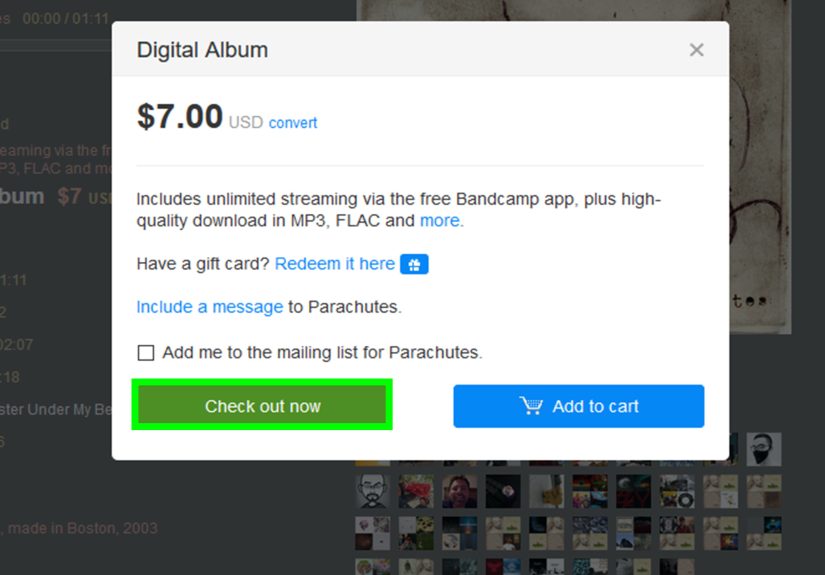
Bandcamp is one of the most listener-friendly and artist-friendly music platforms online. When you buy music on Bandcamp, you usually get high-quality downloads and the ability to re-download past purchases. Better still, your money goes more directly to artists than on many big platforms.
Best for: indie music fans, collectors, people who care about supporting artists directly, audiophiles who like better-quality download options.
Bandcamp also feels refreshingly honest. It is less “algorithmic machine feeding you twelve identical playlists” and more “actual human beings made this music and would like to pay rent.”
5. Spotify
Spotify is safe, mainstream, and excellent for offline listening if you have the right subscription tier. But it is important to understand the fine print: Spotify’s downloads are designed for offline playback in Spotify, not for exporting tracks as regular MP3 files. That makes it great for convenience, not for permanent file ownership.
Best for: people who want playlists, discovery features, and offline listening without buying music track by track.
6. YouTube Music
YouTube Music is another safe choice if you want app-based offline listening. Its Smart Downloads feature is especially handy for people who forget to prepare ahead of time and then suddenly remember they are boarding a train, plane, or very long family car ride. It can automatically save music for offline listening based on your habits.
Best for: listeners who like recommendation-driven downloads, YouTube-heavy users, people who want convenience more than permanent ownership.
7. SoundCloud
SoundCloud can be safe, but you need to use it correctly. Not every track is downloadable. If an artist has enabled downloads, you will see an official download option. If there is no download button, that usually means the uploader did not intend the track to be downloaded. Respect that signal. SoundCloud also offers offline listening features through its paid tiers.
Best for: discovering emerging artists, DJ edits, remixes, and independent creators who choose to share downloadable tracks.
8. TIDAL
TIDAL is a strong pick for people who care about audio quality and want a premium, reputable service with offline listening. It is especially appealing to listeners who want lossless or higher-resolution playback while still staying inside a secure, licensed platform.
Best for: audio enthusiasts, album listeners, people who want high-quality sound without using sketchy “HD download” sites.
9. Pandora
Pandora is a sensible, safe option for U.S. listeners who like radio-style listening and curated stations. Certain subscription levels support offline access to downloaded music or saved collections on mobile devices. It is less about building a permanent file archive and more about easy, legal access without security headaches.
Best for: casual listeners, commuters, people who want a simple offline option with familiar radio-style features.
10. Internet Archive
The Internet Archive is a great resource for public-domain, historical, live, and community-shared audio collections. It is especially useful for old recordings, niche live sets, lectures, spoken word, and special collections. Not every item is downloadable, so you need to check the available download options and any restrictions listed on the page.
Best for: public-domain material, historical audio, live archives, unusual collections you will not find on mainstream platforms.
11. Free Music Archive
Free Music Archive is one of the better-known destinations for open-licensed and original music from independent artists. It can be excellent for creators, hobby filmmakers, students, podcasters, or anyone who wants legal downloadable music outside the mainstream charts. The key is to read each track’s license carefully, because the allowed uses can vary.
Best for: open-licensed music, creative projects, discovering lesser-known artists, legally sourced free downloads.
Ownership vs. Offline Listening: A Very Important Distinction
This is the moment where many music fans realize they have been using the word “download” to mean three different things.
- Permanent purchase: You buy a song or album and can usually re-download it later. Think iTunes Store, Amazon digital purchases, and many Bandcamp releases.
- Offline listening: You download music inside a subscription app so it plays without internet. Think Apple Music, Spotify, YouTube Music, TIDAL, and Pandora.
- Licensed free download: The track is legally downloadable because the artist or platform explicitly allows it. Think certain SoundCloud tracks, Free Music Archive content, and parts of the Internet Archive.
If your goal is to build a permanent collection, choose stores or artist-direct platforms. If your goal is convenience, a subscription service with offline listening is more than enough. The mistake is assuming they are interchangeable. They are cousins, not twins.
Red Flags That a Music Download Site Is Not Safe
Fake buttons everywhere
If the page has multiple giant “DOWNLOAD NOW” buttons, especially above and below the real content, that is classic bait. Reputable music sites do not design their pages like a carnival game.
It wants software you did not ask for
If the site says you must install a download manager, codec, speed booster, browser cleaner, or mysterious plugin, that is your cue to leave. Fast.
It promises brand-new hits for free with no explanation
That is not generosity. That is either infringement, malware, or both wearing a fake mustache.
Pop-ups claim your device is infected
No legitimate music platform needs to scare you into a phone call or emergency scan before you can hear a song. Those fake warnings are a classic scam tactic.
Odd file types
A music download should usually arrive as MP3, FLAC, WAV, ALAC, AAC, or another recognized audio format. If you expected a song and got an EXE, MSI, or SCR file, do not open it. Delete it and pretend it never happened.
No licensing, no artist info, no business identity
Legitimate music platforms usually tell you who uploaded the track, who owns it, or what terms apply. If the site says nothing beyond “free hottest songs here,” treat it like spoiled milk.
How to Download Music Safely on Any Device
- Go directly to the official website or app.
- Sign in with a real account if required.
- Confirm whether you are purchasing, saving offline, or downloading under a license.
- Check storage space before downloading a giant lossless album to a phone that is already begging for mercy.
- Use Wi-Fi when possible, especially for big albums or high-resolution files.
- Keep your browser, operating system, and security software updated.
- Back up your purchased music if the service allows permanent files.
Which File Format Should You Choose?
MP3: Small, widely compatible, and still the everyday workhorse.
AAC: Efficient compressed audio, common in Apple and streaming ecosystems.
FLAC: Lossless and excellent for quality-conscious listeners.
ALAC: Apple’s lossless format, useful if you are deep in the Apple world.
WAV: Very high quality, very large files, not ideal if your laptop storage is already full of screenshots and mystery duplicates.
For most listeners, MP3 or AAC is perfectly fine. For serious listening setups, FLAC or ALAC makes more sense. The safest sites are usually transparent about which format you are getting.
Practical Examples
If you want one album and you want to keep it forever
Use Bandcamp, iTunes Store, or Amazon digital purchases.
If you want a giant library for travel
Use Apple Music, Spotify, YouTube Music, TIDAL, or Pandora with offline downloads enabled.
If you need legal free music for a personal or creative project
Try Free Music Archive, selected SoundCloud tracks with enabled downloads, or specific collections on the Internet Archive.
If you want to support independent artists directly
Bandcamp is usually the standout option.
Real-World Experiences: What Safe Music Downloading Actually Feels Like
The biggest lesson people learn about music downloads is that the safest choice usually feels a little less dramatic. There is no adrenaline rush, no suspicious countdown timer, and no giant green button promising “ULTRA HD FREE MP3.” Safe downloading is, frankly, a bit boring. That is exactly why it works.
A lot of listeners start with convenience. They subscribe to Spotify, Apple Music, YouTube Music, TIDAL, or Pandora because they want songs available on a flight, in the gym, or on a subway with terrible signal. In that setting, safe downloading is easy. You find an album, tap download, and move on with your life. No malware scan. No file conversion site. No existential crisis. The app handles the storage, the catalog is licensed, and the risk level stays low.
Then there is the second group: people who actually want to own music. These are the listeners who do not want to depend entirely on a subscription, an internet connection, or the mood swings of a recommendation algorithm. Their experience is different. They often end up happiest on Bandcamp, the iTunes Store, or Amazon’s digital purchase options, because buying music there feels more deliberate. You pick an album, pay for it, download it, and keep it. It feels less like renting a hotel room and more like finally buying the couch.
Bandcamp, in particular, tends to create the most satisfying experience for music fans who care about artists. You buy an album, get a good-quality download, and know the purchase is going to a real musician instead of disappearing into a giant corporate fog. That emotional piece matters more than people admit. Safe downloading is not only about avoiding bad actors. It is also about choosing platforms that feel trustworthy, transparent, and worth returning to.
Free music experiences vary the most. Some people have a great time digging through Free Music Archive or the Internet Archive and discovering niche recordings they never would have found elsewhere. Others get frustrated because free music requires a little more reading. You may need to check a license, confirm a usage right, or accept that not every item is downloadable. But that extra step is a feature, not a bug. It is part of what makes the experience safer and more legitimate.
Almost everyone who has had a bad experience with music downloads tells a similar story: they were in a hurry. They searched for a song, clicked the first result, trusted a flashy button, ignored a weird popup, or downloaded a file that did not look quite right. Safe downloading rewards patience. The extra fifteen seconds you spend checking the source can save you hours of cleanup later.
In real life, the safest music sites win not because they look exciting, but because they make the whole process feel normal. That is the gold standard. When downloading music feels calm, clear, and predictable, you are probably doing it right.
Conclusion
If you want to download music safely, the smartest strategy is beautifully simple: use official stores, licensed streaming apps with offline mode, and clearly licensed archives. For permanent purchases, Bandcamp, iTunes Store, and Amazon are hard to beat. For effortless offline listening, Apple Music, Spotify, YouTube Music, TIDAL, and Pandora are reliable choices. For legal free downloads, Free Music Archive, SoundCloud’s enabled downloads, and the Internet Archive are the stronger bets.
The unsafe web will always tempt people with “free” music wrapped in shady shortcuts. But safe music downloading is not about finding the cleverest loophole. It is about choosing sources that respect your device, your time, and the artists behind the songs. In other words: get the music, skip the malware, and let your playlist cause the drama instead.