Table of Contents >> Show >> Hide
- What Is MozBar?
- Why MozBar Still Matters in 2026
- Core MozBar Features You Should Actually Care About
- Free vs. Premium: What Do You Get?
- How to Use MozBar Strategically
- What MozBar Does Well
- What MozBar Does Not Do Well
- MozBar vs. Other SEO Browser Extensions
- Is MozBar Worth Using?
- Experience Using MozBar in Real SEO Work
- Final Thoughts
If SEO tools were a superhero team, MozBar would be the one that shows up fast, gives you useful intel, and leaves before your coffee gets cold. It is one of those browser extensions that has survived wave after wave of shiny new SEO tools because it solves a very real problem: sometimes you do not want a giant dashboard, a four-tab spreadsheet, and an existential crisis just to size up a webpage.
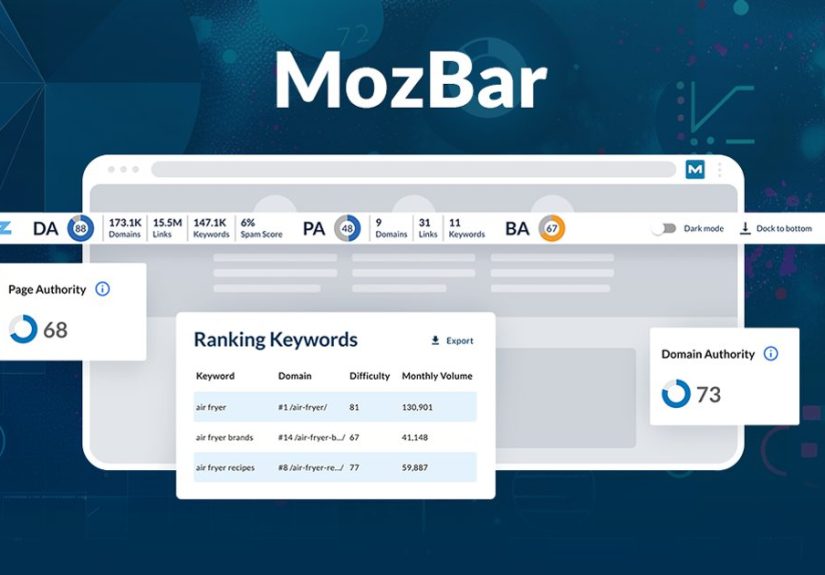
MozBar gives you quick SEO insights right inside Chrome while you browse. You can look at a page, a search result, or a competitor’s article and instantly get a snapshot of page-level and domain-level metrics, link attributes, and on-page details. For beginners, it is an easy doorway into SEO analysis. For experienced marketers, it is the digital equivalent of checking the pulse before doing surgery.
That said, MozBar is not magic. It will not rank your site by itself. It will not make mediocre content sparkle like a disco ball. What it will do is help you research faster, compare pages more intelligently, and spot SEO signals without constantly bouncing between tools. That is why it still matters.
What Is MozBar?
MozBar is a Chrome extension from Moz that overlays SEO data directly in your browser. In practical terms, it helps you evaluate a webpage or a search engine results page without leaving the tab you are already in. That is a big deal when you are reviewing competitors, qualifying link opportunities, or checking whether a page is built like a polished SEO machine or like a forgotten attic full of broken furniture.
The free version is designed to make SEO research more accessible. Community users can access key metrics such as Domain Authority and Page Authority, while paid Moz users unlock additional data and features. Moz has also continued updating the extension, with newer versions emphasizing improved usability, stronger page analysis, and extra premium insights.
Why MozBar Still Matters in 2026
SEO has become noisier, more competitive, and frankly more crowded with tools than a Black Friday electronics aisle. Yet MozBar still earns a place in many workflows because it solves three common problems well:
1. It speeds up research
Instead of opening a full platform every time you want to compare two pages, MozBar lets you inspect SEO signals instantly. That makes it useful for quick checks during content planning, outreach, competitor analysis, and on-page review.
2. It adds context to search results
Seeing metrics directly on the SERP can help you understand the competitive landscape for a keyword. You are no longer just looking at ten blue links. You are looking at relative authority, page strength, and link opportunities.
3. It lowers the friction of learning SEO
SEO beginners often struggle because many tools feel like airplane cockpits. MozBar is simpler. You visit a page, click the extension, and start learning what is on the page and how Moz evaluates it. That immediate feedback loop is useful for training your SEO instincts.
Core MozBar Features You Should Actually Care About
Some SEO tool feature lists read like they were written by a robot trying to win a buzzword contest. Let us skip that and focus on what MozBar helps you do in real life.
Instant Page Authority and Domain Authority
The most recognizable MozBar features are PA and DA. Page Authority estimates the ranking strength of a specific page. Domain Authority estimates the relative ranking potential of an entire domain. These metrics are proprietary to Moz, and they are widely used for benchmarking, especially in link building and competitor review.
They are helpful, but they are not holy scripture. A DA score is not a Google ranking factor, and it should not be treated like one. Think of it as directional data, not divine prophecy. It helps you compare sites, but it does not replace real performance metrics like rankings, clicks, conversions, and revenue.
SERP Overlay for Competitor Analysis
One of MozBar’s handiest tricks is showing SEO metrics while you are looking at search results. This is incredibly useful when you are evaluating keyword difficulty in a practical way. If the first page is filled with strong domains, deeply relevant content, and mature link profiles, you know the climb may be steep. If the results are mixed, there may be room for a well-optimized page to break in.
This feature is also useful during content audits. You can compare your article against what already ranks and quickly see whether you are entering a lightweight sparring match or stepping into an SEO cage fight.
Link Highlighting and Link Type Analysis
MozBar can differentiate links by type, including internal, external, followed, and nofollowed links. This sounds nerdy because, well, it is nerdy. But it is also useful. You can inspect how a page distributes authority, whether it is overly cluttered with external links, or whether a potential outreach target uses nofollow links on guest content.
If you do digital PR or backlink outreach, this feature can save time. No one wants to send a polished pitch only to discover the target page structure offers no meaningful SEO value.
On-Page SEO Review
MozBar also helps you analyze important on-page elements. Depending on the view and account level, that can include page titles, meta data, headings, markup, canonical-related details, schema, hreflang signals, robots references, and sitemap discovery. In plain English, it gives you a quicker way to spot technical and structural clues without manually digging through page code like a caffeinated raccoon.
Keyword Highlighting
Need to see whether a term appears in visible content on a page? MozBar can highlight keywords on-page. That makes it easier to review content alignment, search intent targeting, and basic on-page optimization. It is not a complete content strategy, but it is a helpful first pass.
CSV Export from SERPs
For users who like to turn observations into spreadsheets, MozBar supports exporting SERP analysis to CSV. This is useful for deeper comparison work, especially when you are documenting keyword research, competitor audits, or link qualification lists.
Free vs. Premium: What Do You Get?
The free version of MozBar is enough for many users who want quick research support. It gives access to core authority metrics and a practical way to evaluate pages on the fly. That alone makes it valuable for freelancers, content writers, junior SEOs, and small business owners who are trying to understand search competition without paying for a full platform immediately.
Premium users, especially those tied into Moz Pro, get more depth. That may include additional metrics like Spam Score, premium analysis features, top-ranking keyword snapshots, Brand Authority access, and stronger integration with the broader Moz ecosystem. If the free version is a flashlight, premium is more like a headlamp with extra batteries and a map.
How to Use MozBar Strategically
The biggest mistake people make with SEO extensions is treating them like shiny toys instead of decision-making tools. Here are a few smart use cases.
Content Planning
Before writing a new article, search the target keyword and review the ranking pages with MozBar turned on. Check which domains are dominating, how strong the individual pages appear, and whether the results reflect one clear search intent or several different ones. This can help you decide whether to target the keyword, refine the angle, or choose a better opportunity.
Competitor Benchmarking
MozBar works well for quick side-by-side comparisons. If a competing page outranks yours, inspect its authority signals, page structure, internal linking, and on-page setup. You may discover that the issue is not just backlinks. Sometimes the real problem is that your page answers the question like a sleepy intern while theirs answers it like a confident subject-matter expert.
Link Prospecting
When building a guest posting or outreach list, MozBar can help you qualify prospects quickly. Look at domain strength, inspect the types of outbound links on published content, and review whether the site seems relevant and healthy. This is where MozBar saves time because not every website with a pretty homepage is worth your outreach effort.
Technical Spot Checks
MozBar is not a substitute for a full technical crawl, but it is great for first-pass diagnostics. You can review key elements of a page in seconds and identify issues worth deeper investigation. Think of it as triage, not surgery.
What MozBar Does Well
MozBar’s biggest strength is convenience. It makes SEO data visible where decisions happen: in the browser, on the page, and inside the SERP. That reduces friction, which matters more than people think. A tool can be technically powerful, but if it is clunky, people stop using it. MozBar is often fast enough and simple enough that it stays in the workflow.
It is also approachable. Many SEO professionals began by learning what DA and PA look like across different websites, then gradually used that context to understand competition and link equity. MozBar helps build that mental model. It turns abstract SEO concepts into something visual and immediate.
What MozBar Does Not Do Well
Now for the reality check. MozBar is useful, but it has limits.
It can encourage metric obsession
Because DA and PA are so visible, some users overvalue them. That is a mistake. Authority metrics are proxies, not business outcomes. A site with lower authority can still outrank stronger domains with better intent matching, sharper content, stronger page relevance, and smarter internal linking.
It is not a full SEO platform
MozBar is excellent for quick analysis, but it cannot replace comprehensive keyword research, rank tracking, full-site crawling, or deep backlink analysis. It is a browser-side assistant, not the entire orchestra.
It should not be your only SEO truth source
Every SEO platform has its own data model and proprietary metrics. Moz has DA and PA. Ahrefs has DR and UR. Other tools have their own scoring systems. Smart SEOs use these as comparative lenses, not universal truth. If one metric says “great” and your organic traffic says “absolutely not,” trust the traffic.
MozBar vs. Other SEO Browser Extensions
MozBar competes in a crowded field that includes extensions from Ahrefs, Semrush-adjacent tools, and other SERP analysis plugins. What keeps MozBar relevant is its familiarity, ease of use, and strong brand recognition in SEO education. It remains a go-to choice for people who want quick authority checks, on-page review, and SERP-level comparisons without a steep learning curve.
In other words, MozBar may not be the only wrench in the toolbox, but it is the one many people can grab without reading the manual first.
Is MozBar Worth Using?
Yes, especially if you want a lightweight SEO toolbar for Chrome that helps you research faster. MozBar is worth using if you are a content marketer, blogger, freelancer, in-house SEO, agency strategist, or small business owner who needs quick page-level insight without opening a giant platform every five minutes.
It is particularly valuable if your workflow involves content planning, outreach, competitor review, or quick on-page checks. It becomes even more useful when paired with a broader SEO stack, because it helps you move from question to first-level answer almost instantly.
The key is using it wisely. Let MozBar guide your curiosity, not replace your judgment.
Experience Using MozBar in Real SEO Work
Here is the honest part: MozBar tends to shine most during the messy middle of SEO work, when you are bouncing between ideas, competitors, tabs, and mild confusion. It is not always the final decision-maker, but it is often the tool that helps you notice where to look next.
For example, imagine you are researching a keyword for a new blog post. You search the phrase, scan the top ten results, and use MozBar to get a feel for the terrain. Right away, you can tell whether the SERP is packed with heavyweight domains or sprinkled with pages that are beatable with better content. That quick context changes your writing strategy. Instead of blindly drafting a post and hoping for the best, you shape the article around what the competition is actually doing.
There is also a psychological advantage to using MozBar. SEO can feel overwhelming because there are so many moving parts: content quality, technical health, links, search intent, user behavior, internal architecture, and algorithm updates that arrive like surprise weather. MozBar does not solve all of that, but it makes the work feel more manageable because it puts useful clues right in front of you.
Writers and editors can benefit from it too. If you are updating old content, MozBar gives you a quick way to study the pages currently outranking you. You can look at how strong those pages appear, how they are structured, and whether they seem to deserve the spot. Sometimes that process is humbling. Sometimes it is encouraging. And sometimes it confirms that your competitor is ranking with an article that reads like it was written by a waffle iron. Either way, it is useful.
In outreach work, the extension is even more practical. Instead of collecting a giant list of possible websites and reviewing them later, you can qualify opportunities as you browse. That means less time chasing irrelevant sites and more time focusing on prospects that actually make sense for your niche and goals.
Another real-world benefit is habit formation. Tools like MozBar help newer SEOs build pattern recognition. Over time, you start noticing relationships between stronger pages, cleaner site structures, more relevant linking patterns, and better search visibility. That does not happen because a toolbar tells you the answer. It happens because repeated exposure trains your judgment. MozBar becomes part of that training process.
Of course, there are days when it can tempt you into overthinking metrics. You look at a DA score, then another, then another, and suddenly you are comparing numbers like a fantasy football manager who forgot the game starts in five minutes. That is where discipline matters. MozBar is best when it supports decisions, not when it turns into a distraction.
Overall, the experience of using MozBar is less about flashy innovation and more about practical usefulness. It saves clicks, speeds up research, and helps you see SEO signals in context. In a field where time disappears into tabs and dashboards, that kind of simplicity is refreshing.
Final Thoughts
MozBar remains one of the most recognizable SEO toolbars for Chrome for a reason. It is fast, useful, and approachable. It helps you evaluate pages, compare search results, inspect link structures, and understand SEO signals without turning every task into a major expedition.
Its best use is not as a crystal ball, but as a research companion. Use it to spot opportunities, benchmark intelligently, and learn how pages compete in search. Just do not confuse Moz’s metrics with Google’s ranking system, and do not let a shiny score distract you from what actually matters: useful content, sound technical SEO, strong relevance, and measurable business results.
In the end, MozBar is like a reliable multitool. It will not build the whole house, but it can absolutely help you figure out which wall is crooked.