Table of Contents >> Show >> Hide
- Why Online Privacy Is a Big Deal in 2026
- What Is “Privacy Winner”?
- The Privacy Winner Stack: 7 Core Layers
- 1) Identity Shield: Password Manager + Unique Credentials
- 2) Strong Sign-In: MFA, Passkeys, and Security Keys
- 3) Browser Privacy: Reduce Trackers and Session Risk
- 4) Network Privacy: Trusted VPN Habits and Secure Wi-Fi Behavior
- 5) Data Exposure Control: Remove What You Can
- 6) Device Hardening: Updates, Locks, and Encrypted Backups
- 7) Breach Readiness: Credit Freeze + Recovery Playbook
- How to Build Your Privacy Winner Setup in 60 Minutes
- Common Mistakes That Kill Online Privacy
- Who Should Use Privacy Winner?
- How to Choose Tools Without Getting Overwhelmed
- Final Takeaway
- 500-Word Experience Section: What Privacy Winner Looks Like in Real Life
Let’s be honest: online privacy used to feel like a “nice-to-have.” Like matching socks. Or reading terms and conditions.
Today, it’s essential. Your inbox, bank app, cloud photos, location history, and shopping habits are all part of one giant digital identity.
If someone hijacks it, the damage is not just technicalit’s financial, emotional, and time-consuming.
That’s why this guide introduces Privacy Winnernot as one magical app, but as a practical privacy system you can set up and actually use.
Think of it like a personal security team that works while you sleep: smarter logins, safer browsing, tighter device settings, cleaner data trails,
and a clear response plan when a breach happens.
In this in-depth guide, you’ll learn how to build your own Privacy Winner stack, avoid common mistakes, and protect your digital life without becoming a paranoid bunker operator.
(No tinfoil hats required. Optional, but not required.)
Why Online Privacy Is a Big Deal in 2026
Cybercrime is no longer a niche threat for “other people.” It’s mainstream, industrialized, and highly automated.
Attackers use phishing, credential stuffing, SIM swaps, leaked passwords, fake support calls, and social engineering to break into accounts fast.
They don’t need to crack your encryption if they can trick you into opening the door.
At the same time, data exposure comes from everyday habits:
reusing passwords, ignoring software updates, clicking “Allow” on every pop-up, or assuming private browsing means invisibility.
It doesn’t. Incognito/private mode mostly prevents local history storage; it does not make you anonymous online.
Privacy Winner solves this by combining identity protection, device security, and recovery readiness into one repeatable workflow.
The goal is simple: reduce what can be stolen, reduce how easily it can be abused, and reduce the fallout if something still goes wrong.
What Is “Privacy Winner”?
Privacy Winner is a layered framework for personal online privacy:
- Prevent: Stop easy attacks (weak logins, phishing, unpatched software).
- Minimize: Share less data and remove exposed personal info where possible.
- Contain: Segment accounts and devices so one breach doesn’t become a full collapse.
- Recover: Have a playbook for account recovery, fraud alerts, and credit protection.
The “ultimate tool” is not one download button. It’s the stack you build from trusted components that fit your life.
Translation: privacy that’s strong and usable beats “perfect security” you abandon in 3 days.
The Privacy Winner Stack: 7 Core Layers
1) Identity Shield: Password Manager + Unique Credentials
Reused passwords are still one of the easiest ways to get compromised. A password manager gives you long, random,
unique credentials for every account, so one breach doesn’t unlock ten more.
Start with your email, banking, cloud storage, and social accounts firstthose are your high-impact targets.
Bonus move: store security question answers in your password manager too, and make them random.
“Mother’s maiden name” doesn’t help if it’s publicly discoverable. “BlueToaster!47” does.
2) Strong Sign-In: MFA, Passkeys, and Security Keys
Passwords alone are no longer enough. Enable multi-factor authentication (MFA) wherever possible.
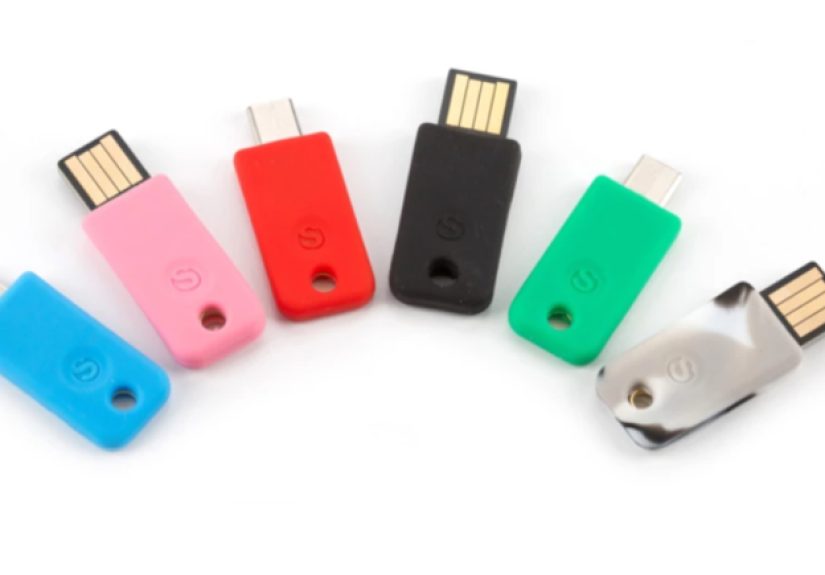
Prefer phishing-resistant methods (passkeys or hardware security keys) over SMS codes when available.
If an attacker steals your password, that second factor often blocks account takeover.
For critical accounts (primary email, admin accounts, financial services), go one step further:
use a physical security key and save backup codes offline.
3) Browser Privacy: Reduce Trackers and Session Risk
Your browser is your front door to the internet. Harden it:
- Turn on anti-tracking protections.
- Block third-party cookies where possible.
- Use separate browser profiles for work/personal/shopping.
- Auto-clear cookies for non-essential sites.
- Review extension permissions monthly and remove the junk.
Private browsing is useful on shared devicesbut it is not stealth mode against websites, networks, or ISPs.
Treat it like “don’t leave footprints on this computer,” not “become invisible.”
4) Network Privacy: Trusted VPN Habits and Secure Wi-Fi Behavior
Public Wi-Fi is convenient and risky. On airports, hotels, cafés, and conferences, use a trusted VPN for sensitive activity.
Even then, remember a VPN is not a magic invisibility cloak. It protects traffic in transit, but your account behavior,
browser fingerprinting, and app permissions still matter.
At home, secure your router: change default admin credentials, update firmware, disable unused remote access, and use WPA2/WPA3 encryption.
If you have smart-home devices, place them on a separate guest network.
5) Data Exposure Control: Remove What You Can
Privacy protection is also about reducing your searchable footprint.
Data brokers and people-search sites aggregate addresses, phone numbers, age ranges, relatives, and more.
Manually opt out where possible, then repeat quarterly.
If you use a data-removal service, audit results regularly.
Automation helps, but “set and forget” is not realistic in a constantly changing broker ecosystem.
6) Device Hardening: Updates, Locks, and Encrypted Backups
Unpatched software is a gift to attackers. Turn on automatic updates for operating systems, browsers, apps, and security software.
Use strong device passcodes, biometric unlock, and full-disk encryption.
Back up phones and laptops regularly (encrypted backups only) so ransomware or theft doesn’t become permanent loss.
For people at elevated risk (journalists, activists, executives, targets of harassment), use advanced protections such as lockdown-style modes where available.
7) Breach Readiness: Credit Freeze + Recovery Playbook
Assume breaches will happen somewhere in your digital supply chain.
Your edge comes from response speed:
- Change compromised credentials immediately.
- Revoke suspicious sessions and app tokens.
- Enable/upgrade MFA on affected accounts.
- Check financial accounts and transaction alerts.
- Place a credit freeze if identity data is exposed.
- Review free credit reports regularly and dispute errors fast.
Privacy Winner mindset: don’t panic, execute your checklist.
How to Build Your Privacy Winner Setup in 60 Minutes
Minute 0–15: Secure Your Identity Core
- Create or clean up a password manager vault.
- Replace reused passwords on top 10 important accounts.
- Store backup codes for MFA in a safe place.
Minute 15–30: Turn On Strong Authentication
- Enable MFA for primary email first (most important account).
- Add passkeys for supported services.
- Set account recovery email/phone and verify they’re current.
Minute 30–45: Harden Devices and Browsers
- Enable automatic updates everywhere.
- Activate screen lock + biometrics.
- Review browser privacy settings and remove risky extensions.
Minute 45–60: Activate Breach Defense
- Set bank/card transaction alerts.
- Create a “breach response note” with key steps and contacts.
- If needed, place/plan credit freeze controls with major bureaus.
Congratulationsyou just moved from “hope-based security” to “process-based privacy.”
Common Mistakes That Kill Online Privacy
- Using SMS-only MFA for everything: better than nothing, but vulnerable to SIM-swap scenarios.
- Installing too many browser extensions: each extension is another potential data leak.
- Treating private mode like anonymity: it mostly protects local history, not network visibility.
- Ignoring update prompts: delayed patching keeps known holes open.
- No recovery plan: strong prevention without recovery steps equals chaos during incidents.
- One email for every account: use aliases for shopping/newsletters to reduce correlation and spam exposure.
Who Should Use Privacy Winner?
Students
Protect school accounts, cloud drives, and social profiles from takeover.
Start with passkeys and a password manageryou’ll never go back to “Password123!” life.
Families
Use shared security rules: device updates on, suspicious links ignored, account alerts enabled, and financial notifications sent to two adults.
Family privacy is strongest when behavior is consistent.
Freelancers and Small Business Owners
Your personal and business identities are often blended.
Segment devices, use separate browser profiles, and enforce MFA on client tools.
One compromised inbox can become invoice fraud in a single afternoon.
How to Choose Tools Without Getting Overwhelmed
Pick tools using this shortlist:
- Security architecture: end-to-end encryption where applicable, transparent documentation.
- Phishing resistance: passkeys/security key support.
- Usability: if the setup is painful, long-term use will fail.
- Portability: export/migration options so you’re not trapped.
- Update cadence: active maintenance and clear security communications.
- Recovery design: sane account recovery without opening giant backdoors.
The best privacy tool is the one you will actually maintain.
Fancy features are great; consistent habits are better.
Final Takeaway
“Privacy Winner” is a strategy, not a slogan. It combines everyday actionsunique passwords, phishing-resistant sign-in,
hardened devices, controlled data exposure, and an incident response planinto a durable system.
You don’t need to become an engineer. You need repeatable routines.
Start with your top five accounts today. Then improve one layer per week.
In a world where data spills are common and scams scale fast, privacy is no longer about hiding.
It’s about controlling risk and keeping your life yours.
500-Word Experience Section: What Privacy Winner Looks Like in Real Life
Experience 1: The “I got hacked but recovered in an hour” moment.
A freelance designer noticed a login alert from a country she had never visited. Old version of her life?
She would have panicked, changed one password, and hoped for the best. Privacy Winner version?
She followed her checklist: forced logout on all sessions, changed her password using her manager, switched to passkey login,
checked forwarding rules in email, and reviewed payment accounts for strange activity. She found a malicious forwarding rule,
removed it, and blocked the device token. Total chaos avoided. Time to recover: under one hour.
Emotional outcome: mildly annoyed, not devastated.
Experience 2: The parent who stopped a “school emergency” scam.
A parent received a scary text claiming their child needed urgent payment for a school trip issue.
The message looked legitimate and used a familiar school name. But Privacy Winner habits kicked in:
never trust urgent payment requests from messages alone, verify through a known channel, and don’t click links.
They called the school directly from a saved number. It was fake. Because their financial alerts were already enabled,
they also confirmed no unauthorized charges happened. The lesson: privacy and scam defense are siblings, not cousins.
Experience 3: The traveler who used public Wi-Fi without public regret.
At an airport layover, a consultant needed to submit invoices and access client docs.
Instead of connecting raw to café Wi-Fi and praying, he used a VPN, avoided sensitive account changes,
and relied on passkey login for core services. He also used a separate browser profile for work.
Did this make him “invisible”? No. Did it significantly reduce exposure to common interception and credential theft risks? Yes.
Privacy Winner is about reducing attack surface, not pretending risk disappears.
Experience 4: The data broker cleanup reality check.
A creator found their old addresses and phone numbers all over people-search sites.
They spent a weekend submitting opt-out requests, then set a quarterly reminder to repeat.
Some records reappeared under slight variations. Annoying? Very. Worth it? Absolutely.
Within months, scam calls dropped noticeably, and random “we know where you live” intimidation attempts became less convincing.
Privacy Winner in practice means maintenance, not one-time magic.
Experience 5: Credit freeze as a confidence tool.
After a breach notice, a young professional immediately froze credit files at all major bureaus and reviewed free credit reports.
A week later, an unauthorized credit inquiry appeared at one bureau.
Because the freeze was already in place, no new account was opened.
Instead of becoming identity theft cleanup season, it became a quick dispute and documentation task.
That’s the hidden superpower of Privacy Winner: when bad things happen, you respond with procedure, not panic.
Across all these stories, the pattern is clear. Nobody became a cybersecurity superhero.
They just built a system and practiced it. Privacy Winner works because it is boring in the best possible way:
repeatable, measurable, and resilient under stress. If your digital life mattersand it doesthis is the upgrade that pays for itself.