Table of Contents >> Show >> Hide
- Why This Cyber Monday Skylight Deal Stood Out
- What the Skylight Digital Calendar Actually Does
- Why Families Keep Talking About It
- Is the Skylight Calendar Worth Buying on Sale?
- Features That Make the Deal More Tempting
- Who Should Shop This Deal
- Who Might Want to Skip It
- The Bottom Line on This Cyber Monday Deal
- Extended Experience Section: What Living With a Skylight Calendar Feels Like
- Conclusion
If your family schedule currently lives in seven different placesyour phone, your partner’s phone, a sticky note on the fridge, a school email nobody opened, a group text nobody answered, a planner nobody updated, and the back of your brainthen yes, the Skylight Digital Calendar is speaking directly to you. Loudly. In color. Probably from the kitchen wall.
Cyber Monday deals tend to blur together after a while. One minute it’s vacuum discounts, the next it’s a suspiciously cheap air fryer, and suddenly you’ve blacked out and bought matching storage bins. But every once in a while, a deal pops up that feels genuinely useful. That’s the energy behind the Skylight Digital Calendar sale, which made this popular family organizer one of the more interesting smart home buys of the shopping weekend.
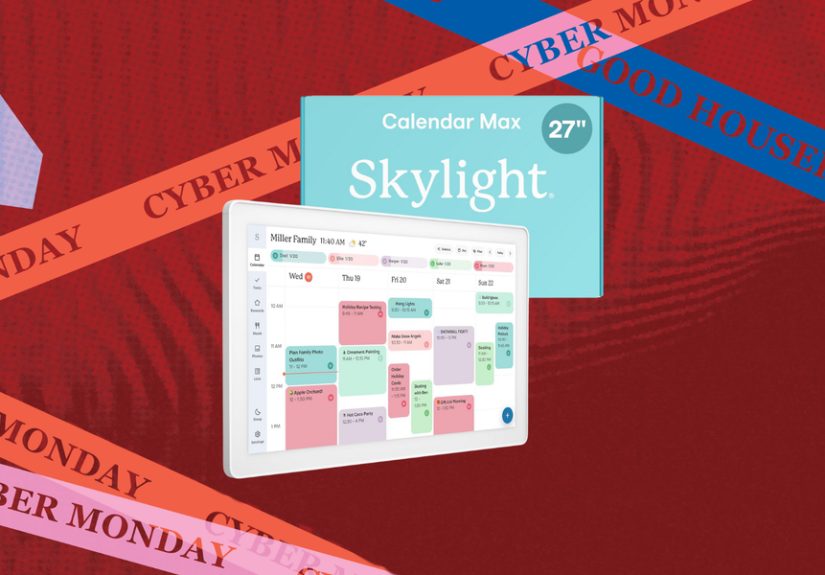
The headline-grabbing offer knocked as much as $120 off the Skylight Digital Calendar during Cyber Monday, turning a premium family-planning gadget into something a little easier to justify. And because this is not just another pretty screen pretending to be productive, the deal got attention for a reason. The device combines a shared calendar, chore chart, meal planner, list hub, and family command center into one touchscreen display that actually wants to be seen, not hidden behind a tab on your laptop.
In other words, this wasn’t a “buy now, figure out what it does later” kind of sale. It was a “wait, this might actually save my household” kind of sale.
Why This Cyber Monday Skylight Deal Stood Out
The biggest draw, of course, was the markdown. A discount of up to $120 is large enough to get attention, but the real story is what buyers were getting for that price. During the Cyber Monday promotion, the 15-inch version landed at a much more approachable price point, while the 27-inch model also dropped enough to make bigger families and busier homes take a second look.
That matters because the Skylight Calendar is not a throwaway gadget. It is designed to live in a central place in the home, where everyone can see what is happening at a glance. Think kitchen, mudroom, family room, or that mysterious wall space where paper calendars go to retire. It is part display, part organization system, and part peace treaty for households tired of asking, “Wait, who has soccer at 6?”
Deals on products like this tend to do well when they solve a real annoyance, and schedule chaos is one of the most dependable annoyances in modern life. Parents are juggling pickups, practices, school notices, doctor visits, birthdays, dinners, work meetings, and whatever fresh emergency arrives in an unread email at 9:42 p.m. A shared visual calendar is not glamorous, but it can be wildly effective. That is exactly why the Skylight sale generated so much interest.
What the Skylight Digital Calendar Actually Does
The Skylight Digital Calendar is best understood as a smart family hub built around visibility. Instead of every event staying trapped inside individual phones and apps, the calendar pulls schedules into one place and displays them on a wall-mounted or countertop touchscreen. Everyone gets a clearer picture of the day, the week, and the collision course otherwise known as Thursday.
1. Shared scheduling without the usual drama
The core feature is calendar syncing. Skylight is built to pull in household schedules so everyone can view them together on one screen. Rather than forcing family members to dig through texts or compare screenshots, the device turns separate commitments into a shared household timeline. That sounds simple, but simple is often exactly what busy homes are missing.
2. More than a calendar
What makes the device more compelling than a basic digital planner is the extra family-management layer. Skylight also supports chores, meal planning, and lists, so it is not limited to “dentist at 3” and “band concert at 7.” It can also function as the place where dinner plans live, task assignments are tracked, and grocery reminders stop haunting your memory.
3. A format everyone can use
Touchscreen matters here. The experience is designed to be visual and approachable, which is why the Skylight has become popular with families who want something easier than yet another app. People can view schedules by day, week, month, or agenda-style layouts, add or adjust items, and quickly understand what is happening without needing a tutorial or a 14-step setup ritual.
4. App access when you’re away from home
The in-home screen is the hero, but the companion app is what keeps the system from becoming a giant decorative lie. When you are out and about, you can still access and update what is on the calendar, which helps the home display stay current instead of becoming an expensive digital fossil.
Why Families Keep Talking About It
There is a reason this product shows up again and again in family-focused gift guides, organizing roundups, and digital calendar reviews. It solves a very specific household pain point: the mental load of being the person who remembers everything.
In many homes, one adult unofficially becomes the Keeper of All Information. They know which child needs which form signed, which appointment was rescheduled, which after-school activity changed locations, and why Friday is somehow both spirit day and pizza day. Skylight works because it makes that information more visible to everyone else. That alone can make a family feel more coordinated and a little less like one person is running air traffic control with a coffee in one hand.
Reviews often point to the same appeal: it is easy to read, easy to place in a high-traffic spot, and useful for seeing the whole family plan at a glance. The device also earns points for being flexible enough to sit on a stand or mount to the wall, which means it can adapt to the way a household naturally moves through its day.
And yes, kids tend to engage with it more readily than they do with verbal reminders. A chore chart on a bright, shared screen somehow feels more official than a parent saying, “Please unload the dishwasher” for the fifth time. Technology: occasionally helpful, occasionally hilarious.
Is the Skylight Calendar Worth Buying on Sale?
For the right household, absolutely. The best Cyber Monday deals are not always the ones with the biggest percentage off. They are the ones that lower the price barrier on something people will genuinely use every day. Skylight falls into that category.
This is especially true for families with multiple schedules to manage, co-parents coordinating routines, households with older kids who can check plans independently, or anyone trying to replace a mess of paper notes and app notifications with one shared system. It can also appeal to professionals or students living in busy homes, because the usefulness is not limited to parents with toddlers and soccer cleats by the door.
That said, value depends on expectations. If you want a full entertainment device, voice assistant hub, streaming screen, or kitchen tablet that does twenty unrelated things, the Skylight may feel too focused. Its appeal comes from doing a narrower job well: organizing household life. For some shoppers, that focus is exactly the point. For others, it may feel more specialized than they need.
The Cyber Monday discount made that choice easier. When a premium organizer gets a serious markdown, it starts to compete less with “Should I buy this?” and more with “How much daily friction could this remove?” That is a much more interesting calculation.
Features That Make the Deal More Tempting
Wall mount or stand setup
One of the more practical details is placement flexibility. A digital calendar only works if people actually see it, and Skylight can be mounted on the wall or propped on its included stand. That gives buyers more freedom to place it where the family naturally passes through.
Lists, chores, and meal planning
This is where the product starts to feel less like a fancy calendar and more like a household operating system. Meal planning gives families a quick answer to “What’s for dinner?” Lists help centralize groceries, errands, and to-dos. Chore features create accountability, or at least reduce the odds that someone claims they “didn’t know” trash day existed.
Optional premium upgrades
Skylight also offers a paid Plus tier with additional features such as Magic Import, meal tools, reward functions, and photo or video screensaver options. That gives buyers room to keep things basic or go deeper depending on how much they want the calendar to do. Some households will be perfectly happy with the standard toolkit. Others will love the added automation.
A cleaner, calmer interface
One underrated benefit of a dedicated screen is visual clarity. A phone calendar is personal and private. A wall calendar is public and ambient. It lives in your line of sight, which means it can reduce the constant need to check, ask, confirm, and re-confirm. That kind of passive visibility sounds small until you realize how much family stress is caused by missing information rather than missing effort.
Who Should Shop This Deal
Busy families: This is the obvious audience, and probably the best fit. If your home runs on overlapping schedules, the Skylight feels tailor-made for you.
Parents carrying the household mental load: If you are the one always remembering pickup times, lunch orders, and doctor appointments, this kind of shared display can reduce the burden of being the only human calendar in the building.
Households trying to get kids more involved: A visible touchscreen hub can make routines easier for children to follow than whispered instructions launched at them while they put on one shoe and forget the other.
Organization lovers: Some people hear “meal planning, lists, chore charts, synced schedules” and immediately start levitating. This is your moment.
Gift shoppers: A big discount on a practical but slightly splurge-y product makes it more attractive as a holiday gift for parents, spouses, or families who love smart home tools that actually solve problems.
Who Might Want to Skip It
If your household is tiny, your schedule is simple, and your current phone calendar already works beautifully, Skylight may be more nice-to-have than need-to-have. The same goes for shoppers who strongly prefer low-tech systems like paper planners or magnetic whiteboards. There is no shame in being analog. Pens are still undefeated in one category: never needing Wi-Fi.
You should also go in understanding that some of the most talked-about bonus features sit behind the premium subscription. That does not ruin the product, but it is worth factoring into the long-term value conversation.
The Bottom Line on This Cyber Monday Deal
Plenty of sales sound exciting in the moment and pointless a week later. The Skylight Digital Calendar’s Cyber Monday discount was more interesting because it cut the price on something with a real everyday payoff. It is not trying to be a toy, a trend, or a random smart gadget looking for a purpose. It has a very clear job: help people see their lives in one place and stay a little less overwhelmed.
That clarity is why the product keeps showing up in reviews, gift guides, and organizing conversations. The hardware looks polished, the touchscreen format is approachable, and the family-focused features go beyond basic scheduling. Add a meaningful Cyber Monday discount to the mix, and it becomes one of those rare deals that feels practical, giftable, and genuinely useful all at once.
So yes, “This Skylight Digital Calendar Is $120 off for Cyber Monday” is the sort of headline that gets clicks. But in this case, the headline also points to something real: a well-liked household organizer that becomes a lot more compelling when the price drops. And in the wild world of holiday shopping, finding a deal that might actually make daily life easier is almost suspiciously refreshing.
Extended Experience Section: What Living With a Skylight Calendar Feels Like
The most interesting part of the Skylight story is not the spec sheet. It is the lived experience. A digital family calendar sounds a little boring on paper, right up until it starts removing the tiny moments of chaos that pile up all week. That is when the product begins to make emotional sense, not just technical sense.
Picture a normal weekday morning. Someone is packing lunches. Someone else cannot find a shoe. One kid has practice after school, another has a dentist appointment, and there is a low-level argument about whether tonight is pasta night or leftovers night. In homes like that, the value of a large, visible shared screen becomes obvious fast. It is not just displaying information; it is reducing repeated questions. The answer is simply there.
That changes the mood of a household more than you might expect. Instead of one parent being interrupted every five minutes to confirm times and plans, everyone can glance at the calendar and keep moving. That shiftfrom “ask the household manager” to “check the screen”is a surprisingly big deal. It creates more independence for kids, more clarity for partners, and fewer opportunities for crossed wires.
Another experience people tend to appreciate is the ritual factor. A shared digital calendar becomes part of the family rhythm. You check it while making coffee. Kids glance at it before school. Someone adds a reminder in the app while sitting in the carpool lane. Dinner plans stop being abstract and start becoming visible. Chores feel more official when they are assigned on a central display instead of muttered into the air. The whole system nudges the family toward better communication without requiring a big sit-down meeting every night.
There is also something satisfying about seeing the week laid out in a format that feels bigger than a phone. Phones are excellent for personal planning, but they are not ideal for household coordination. They are private, crowded, and easy to ignore. A wall display is the opposite. It is communal. It invites quick check-ins. It helps people think beyond their own schedule and notice how their plans affect the rest of the house.
Even the little details matter in daily life. The ability to mount the device or keep it on a stand makes it easier to place where it naturally fits. The list and meal features can turn it into more than a calendar, which is important because family life rarely stays neatly sorted into one category. Most households are not dealing with “events” on one side and “everything else” on the other. It is all mixed together. A practical organization system needs to reflect that reality.
And then there is the emotional relief. Not magic. Not perfection. Just relief. Relief from forgotten appointments, duplicated reminders, missed messages, and that creeping feeling that important details are slipping through the cracks. A Skylight Calendar will not make a family suddenly become serene, color-coordinated scheduling monks. But it can make the week feel more visible, more manageable, and a little less like everybody is winging it in different time zones.
That is why the Cyber Monday discount resonated. It was not merely a markdown on hardware. It was a discount on friction. On mental clutter. On the exhausting role of being the one person who somehow remembers all the things. For a lot of shoppers, that is the kind of savings that feels bigger than the dollar amount.
Conclusion
The Skylight Digital Calendar earned attention during Cyber Monday because it paired a meaningful discount with a genuinely useful product. For families trying to centralize schedules, simplify routines, and make household information visible to everyone, it offers more than a pretty screen. It offers structure. And when that structure gets cheaper by up to $120, the deal becomes a whole lot easier to like.