Table of Contents >> Show >> Hide
- Why a Watt Meter Can Actually Save You Money
- What a Watt Meter Measures
- How to Use a Watt Meter the Right Way
- What to Test First for the Fastest Savings
- Best Watt Meters to Buy Right Now
- How to Choose the Right Watt Meter
- Mistakes to Avoid When Using a Watt Meter
- What Real Savings Usually Look Like
- Experience Section: What It Feels Like to Use a Watt Meter in Real Life
- Final Thoughts
If your electric bill keeps showing up like an uninvited houseguest who eats all the snacks, a watt meter can help you figure out who in your home is responsible. Spoiler: it is often not the obvious villain. Sure, air conditioning and electric dryers are big users, but plenty of smaller devices quietly sip power all day long and stack up into very real money over a month.
A watt meter is one of the cheapest tools you can buy for home energy savings. Plug the meter into the wall, plug your device into the meter, and suddenly you are no longer guessing. You can see how many watts a gadget uses right now, how much energy it consumes over time, and in many cases how much that use costs. That changes the game. Instead of declaring war on every appliance in the house, you can target the ones that are actually bloating your bill.
In this guide, you will learn how a watt meter works, how to use one correctly, which appliances are worth testing first, and which of the best watt meters are worth buying right now. We will also cover when a basic plug-in model is enough and when it makes sense to upgrade to a smart plug or a whole-home energy monitor.
Why a Watt Meter Can Actually Save You Money
The biggest benefit of a watt meter is not magic. It is clarity. Most people either underestimate tiny always-on devices or overestimate how much they save by obsessively unplugging the wrong things. A watt meter replaces hunches with measurements.
Let’s say you test a dehumidifier and find it draws around 600 watts and runs about 8 hours a day. At an electricity price of 17.45 cents per kilowatt-hour, that works out to roughly $25 per month. That is not terrifying, but it is enough to make you ask better questions. Does it need to run that long? Can you raise the humidity threshold? Is it older and less efficient than a newer model? Suddenly you have options instead of vague guilt.
Now flip the script. A device pulling only 10 watts in standby mode sounds harmless. Cute, even. But left on 24/7, that tiny draw adds up to about $15 per year. One gadget is not a crisis. Five or six of them, plus a router, a printer, a game console, an extra TV box, and some chargers, and now your “small stuff” has formed a union.
This is where a watt meter shines. It helps you find three different kinds of savings:
- Energy hogs that use more power than expected.
- Standby loads that keep drawing electricity when you think they are off.
- Behavior opportunities like running certain devices less often, at better times, or with smarter settings.
In many homes, the meter does not reveal one dramatic smoking gun. Instead, it reveals a pile of “huh, that is more than I thought” moments. Those moments are exactly where lower bills begin.
What a Watt Meter Measures
A good electricity usage monitor usually shows several readings. You do not need to become an engineer to use them, but knowing the basics makes the numbers far more useful.
Watts
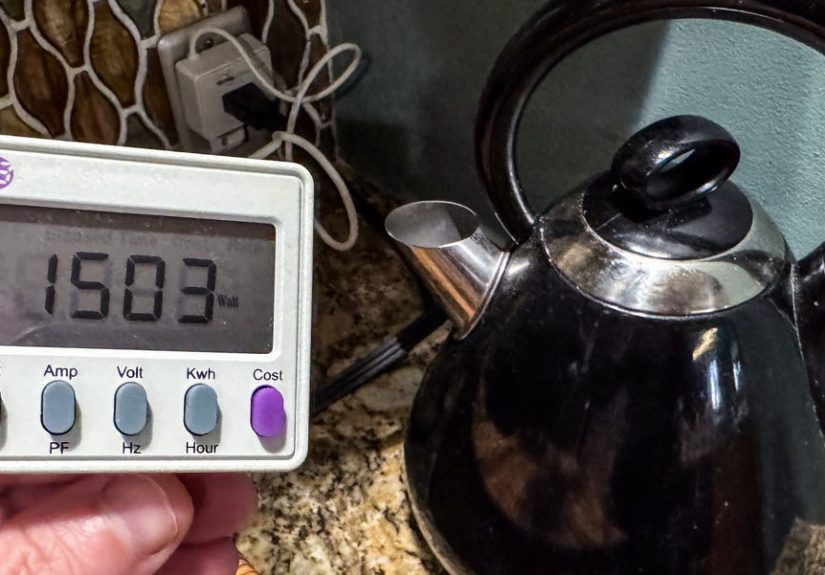
This is the instant power draw. If a space heater shows 1,500 watts, that means it is pulling a lot of power right now. If a laptop charger shows 12 watts, that is a much smaller load.
Kilowatt-hours (kWh)
This is the number that matters most for your utility bill. Your electric company charges you for energy over time, not just instant power. If a device uses 1,000 watts for one hour, that equals 1 kWh.
Volts and Amps
These help you understand the electrical load and whether a device is operating within normal limits. For most homeowners, they are nice-to-know numbers rather than the main attraction.
Cost Estimate
Many of the best watt meters let you enter your local electricity rate so the meter can estimate operating cost. This is wildly helpful because it translates nerdy numbers into normal-human language: “Oh, this old freezer costs how much?”
How to Use a Watt Meter the Right Way
Using a watt meter is easy, but using it well takes a tiny bit of strategy.
- Plug the watt meter into a standard wall outlet.
- Plug the appliance or device into the watt meter.
- Enter your utility rate if your model allows it.
- Check the live watt reading first.
- Let the device run for long enough to capture real behavior.
The last step matters. Some products cycle on and off. Refrigerators, dehumidifiers, window air conditioners, and coffee makers do not draw the same power every second. If you only glance at a reading for ten seconds, you may miss the full picture. For cycling appliances, let the watt meter run for several hours or even a full day and then read the total kWh.
Also important: basic plug-in watt meters are best for 120-volt appliances. They are perfect for TVs, computers, fans, game consoles, dehumidifiers, portable heaters, and kitchen gadgets. They are generally not for large 240-volt appliances like electric dryers, central air systems, or most water heaters.
What to Test First for the Fastest Savings
If you want the best return on your time, do not start with a lamp that uses an LED bulb and the energy appetite of a sleepy goldfish. Start with the usual suspects.
1. Space heaters
These are comfort machines and budget goblins. A 1,500-watt heater used 5 hours a day can cost nearly $48 per year at the current national average rate, and that is with moderate use. If you run it daily all winter, the number climbs fast.
2. Dehumidifiers and portable AC units
These often run longer than people realize. A watt meter helps you see whether your humidity setting, timer habits, or room placement are causing extra run time.
3. Older refrigerators or freezers
The garage fridge is legendary for two things: holding mystery condiments and quietly burning money. Test it for 24 hours and compare the cost to how badly you really need a second fridge.
4. Gaming consoles and entertainment centers
Some devices draw more power in active mode than expected, while others nibble away in standby. Consoles, streaming boxes, sound systems, and cable equipment are prime targets.
5. Desktop computers, monitors, and printers
Home office setups can look innocent until you realize the printer has been quietly waiting for a memo from 2023 while still using electricity.
6. Chargers, routers, and “always on” devices
Each one may be small, but small loads multiplied by nonstop hours are exactly how electricity bills become annoying.
Best Watt Meters to Buy Right Now
The best watt meter for you depends on whether you want simple readings, cost tracking, app control, or a full home energy view. Here are the strongest options for most households.
Best Classic Plug-In Watt Meter: P3 Kill A Watt P4400
If you want the old-school favorite, this is the one. The P3 Kill A Watt has earned its reputation because it does the basics really well. It shows watts, volts, amps, frequency, power factor, VA, and accumulated kWh. There is no app, no account, and no nonsense. You plug it in, test a device, and get answers.
Best for: homeowners who want a reliable, no-frills watt meter for regular spot checks.
Why it stands out: simple interface, strong reputation, useful electrical readings beyond just watts, excellent for learning how devices really behave.
Best Budget Watt Meter: BN-LINK Electricity Usage Monitor
The BN-LINK plug-in monitor is a good budget choice for people who want cost tracking without spending much. It supports a typical 125V, 15A, 1875W load and includes multiple display modes for watts, volts, amps, frequency, power factor, kWh, time, and estimated cost.
Best for: bargain hunters and first-time users who want a practical meter for everyday appliances.
Why it stands out: plenty of data, cost input, good load rating for standard household devices, straightforward value.
Best for Overload Alerts and Long Monitoring: Kuman KW47
The Kuman KW47 is handy if you like a little extra hand-holding. It includes overload protection and lets you enter the local electricity price so you can track cost more easily. It is especially useful when you want to leave the meter in place for longer stretches to measure devices that cycle on and off.
Best for: users who want a simple plug-in monitor with cost setup and basic safety reminders.
Why it stands out: overload alarm, price-setting feature, beginner-friendly operation.
Best Smart Plug Alternative: TP-Link Kasa EP25 or Emporia Smart Plug
If you want app-based tracking and scheduling, a smart plug with energy monitoring may be more useful than a traditional watt meter. Models like the Kasa EP25 and Emporia Smart Plug let you monitor real-time energy use and control devices from your phone.
Best for: lamps, fans, coffee stations, chargers, and devices you want to automate.
Why it stands out: scheduling, remote control, recurring routines, easier long-term habit changes. A traditional watt meter tells you what happened. A smart plug helps you do something about it.
Best Upgrade Beyond Plug-In Meters: Sense or Emporia Vue
If your goal is not just to test one appliance but to understand your entire house, step up to a whole-home monitor. Sense focuses on real-time whole-home tracking and device detection, while Emporia gives you a more ecosystem-style approach with smart plugs and broader management options.
Best for: homeowners serious about reducing overall consumption, tracking circuits, or identifying big loads across the home.
Why it stands out: broader visibility, better long-term trend tracking, useful when a plug-in meter is too limited.
How to Choose the Right Watt Meter
Choose a basic plug-in meter if you want:
- Fast tests on individual appliances
- No app or Wi-Fi setup
- A low-cost energy-saving tool
- Good old-fashioned button pressing
Choose a smart plug with energy monitoring if you want:
- Phone-based tracking
- Schedules and timers
- Remote shutoff
- Ongoing monitoring for one outlet
Choose a whole-home monitor if you want:
- Panel-level insights
- Multiple appliances tracked over time
- Bigger-picture patterns across the home
- A more advanced home energy setup
Mistakes to Avoid When Using a Watt Meter
Mistake 1: Testing for too short a time. Many devices cycle. If you only check the live watt number, you can wildly misjudge total energy use.
Mistake 2: Ignoring standby power. The whole point is catching the sneaky stuff. Test devices when they are “off,” asleep, or waiting.
Mistake 3: Using a basic meter on the wrong appliance. Standard plug-in meters are for typical 120-volt outlets, not big 240-volt loads.
Mistake 4: Measuring but not changing anything. The watt meter is not a decorative lifestyle accessory. Once you know what costs money, act on it. Use timers, change settings, replace inefficient gear, or plug standby offenders into switched or smart power strips.
What Real Savings Usually Look Like
Watt meters rarely make people rich. They make people smarter. And smarter usually turns into cheaper.
Maybe you discover your old garage fridge is not “kind of inefficient” but genuinely expensive to keep around. Maybe you learn your home office setup drains more power after work than during it because half the gear never fully sleeps. Maybe your dehumidifier is doing battle with a basement window you forgot does not close all the way. That is the beauty of the tool: it points you toward the fix.
In practical terms, the savings often come from a combination of moves:
- Replacing one or two inefficient appliances
- Reducing unnecessary runtime
- Cutting standby waste with smart strips or schedules
- Retiring duplicate devices you do not really need
- Changing habits once the cost becomes visible
That last one is huge. When a meter tells you something costs only pennies a day, you stop stressing about it. When it tells you something costs real money every month, you stop pretending it is “probably fine.”
Experience Section: What It Feels Like to Use a Watt Meter in Real Life
Here is the part people do not always mention in technical reviews: using a watt meter is weirdly addictive. It starts innocently. You plug in the TV, check the number, nod like a responsible adult, and feel done. Five minutes later, you are testing the coffee maker, the air fryer, the monitor on your desk, and the charger in the guest room like a detective in a very low-stakes mystery.
A common experience is that the first results are both disappointing and enlightening. Disappointing because there is often no single appliance screaming, “I am your whole bill.” Enlightening because the meter quickly shows patterns you would never spot on a monthly statement. The fan in the bedroom is cheap to run. Great. The old freezer in the garage is much less charming when you realize it is always working. The gaming setup uses less power than your dehumidifier while active, but more in standby than you guessed. The printer, that lazy little bureaucrat, still draws power even though nobody has printed a boarding pass in months.
Another very real experience is learning that convenience has a price tag. Anything with a clock, a glowing light, instant-on mode, Wi-Fi standby, or remote access is probably using at least a little electricity all the time. Sometimes the cost is tiny and not worth your attention. Sometimes it is enough to justify plugging the whole cluster into a switched power strip or a smart plug. That distinction is liberating. You stop obsessing over every plugged-in object and start focusing on the ones that matter.
Many users also report that the meter changes how they buy appliances. After you see real energy use with your own eyes, vague marketing words stop being persuasive. “Powerful,” “fast,” and “extra large” begin to sound expensive. Meanwhile, timers, eco modes, auto shutoff, and better insulation start sounding beautiful. A watt meter does not just help with today’s bill; it quietly upgrades your judgment for future purchases.
There is also an oddly satisfying psychological shift that happens. Your electric bill goes from feeling mysterious to feeling negotiable. That may be the tool’s best feature. Instead of opening the monthly bill and squinting at it like it was written by wizards, you begin to understand where the numbers come from. Not perfectly, of course. A plug-in meter will not explain your central AC, water heater, or every hardwired circuit. But it gives you enough visibility to stop feeling helpless.
And finally, there is the humor of discovering what is and is not worth worrying about. Some devices are innocent. Others are freeloaders with plugs. The watt meter does not judge. It just tells the truth. And that truth usually leads to one of two reactions: relief because the appliance is cheaper than expected, or laughter because you have apparently been operating a tiny private utility company for a forgotten gadget in the corner of your home.
If that sounds dramatic, welcome to the wonderfully nerdy world of home energy monitoring. It is not glamorous. It will not make your neighbors jealous unless they are the sort of people who get excited about kilowatt-hours. But it is one of the simplest, cheapest, and most practical ways to understand your home better and trim your electric bill without playing guess-and-regret every month.
Final Thoughts
If you want an affordable way to cut energy waste, a watt meter is one of the smartest small purchases you can make. It helps you spot expensive devices, uncover standby power waste, and make better decisions about how you use electricity at home. A classic plug-in model like the P3 Kill A Watt remains a fantastic choice for straightforward testing. Budget models from BN-LINK and Kuman add useful cost-tracking features. Smart plugs from Kasa or Emporia are great for combining monitoring with automation. And if you want to zoom out, whole-home systems like Sense or Emporia Vue offer a much bigger picture.
The best watt meter is the one that turns your electric bill from a monthly surprise into a manageable number. And honestly, any tool that can do that deserves a spot in the drawer right next to the batteries, the tape measure, and the mystery Allen keys nobody remembers buying.