Table of Contents >> Show >> Hide
- The Quick Difference
- What a Power Strip Actually Does
- What a Surge Protector Actually Does
- The Label Test: UL 1363 vs UL 1449
- Surge Protector Ratings You’ll See (and What They Mean)
- Power Strip vs Surge Protector: A Side-by-Side Checklist
- What Should You Plug Into Each?
- Safety Rules (Because Electricity Doesn’t Accept Apologies)
- Common Myths That Need to Retire
- Whole-House Surge Protection (Worth Knowing)
- Mini-FAQ
- of “Experience” People Actually Relate To
- Conclusion
They’re the most commonly confused “look-alike” gadgets in American homes. One is basically an outlet extender. The other is an outlet extender with a tiny bodyguard inside that tries to block dangerous voltage spikes.
Let’s make this easy: you’ll learn what each device really does, how to read the label like a pro, what specs matter, and how to avoid the classic safety mistakes (like plugging a space heater into a strip and hoping the laws of physics take the day off).
The Quick Difference
- Power strip: Adds outlets. It distributes normal household power to multiple devices. No surge protection unless it explicitly says so.
- Surge protector: Adds outlets and helps protect electronics from short, fast voltage spikes (surges).
If your goal is convenience and organization, a power strip might be enough. If your goal is protecting expensive or sensitive electronics, you want a surge protector.
What a Power Strip Actually Does
A basic power strip (often called a relocatable power tap) is essentially a multi-outlet extension cord. It takes one wall outlet and lets you plug in several devicesusually low-power electronics like a laptop, monitor, lamp, or chargers.
Many strips include an on/off switch and overload protection (a breaker). That breaker can trip if the strip is overloaded, which is good. But it’s important to understand what it isn’t: a breaker does not stop voltage spikes. It’s more like a seatbelt for overloads, not airbags for surges.
Most safety guidance agrees on the intended use: power strips are best for multiple low-powered loads and are a poor match for high-wattage appliances that run hot or run continuously.
What a Surge Protector Actually Does
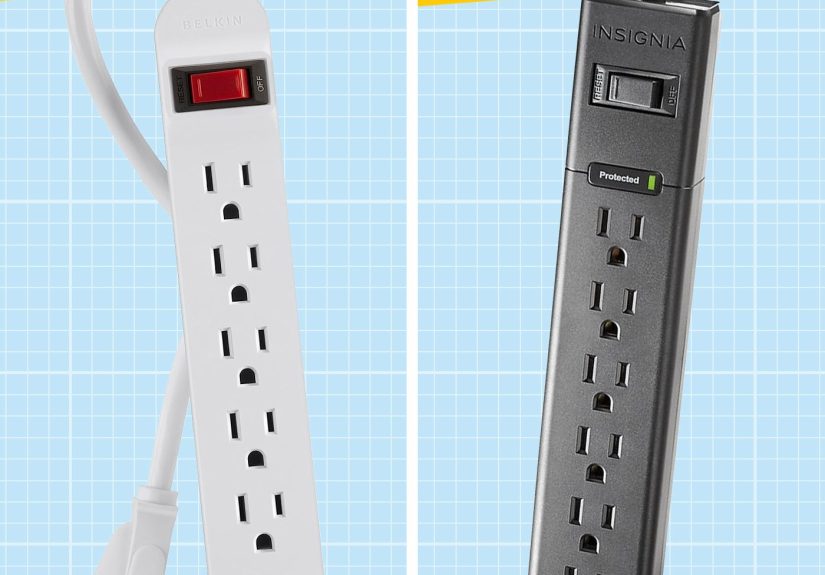
A surge protector can look identical to a power strip, but it contains surge-suppression components inside (commonly metal oxide varistors, or MOVs). When voltage spikes above a safe level, those components help limit (clamp) the spike and divert energy away from your connected devices.
Surges can come from lightning in the area, utility switching, or big loads turning on and off (HVAC, refrigerators, pumps). You may never notice the surgebut your electronics might.
One key detail: surge protectors don’t last forever. Protection capacity degrades over time and use. Many models include a Protected indicator light; if that light goes out, the strip may still deliver power, but it’s no longer doing surge protection.
The Label Test: UL 1363 vs UL 1449
When shopping (or checking what you already own), flip the strip over and read the fine print:
- Power strip: commonly evaluated as a relocatable power tap under UL 1363.
- Surge protector: evaluated under UL 1449, the key safety standard for surge protective devices.
Also look for plain-language clues on the label or packaging: “surge protective device,” “surge suppressor,” “TVSS,” “SPD,” or similar. If it claims surge protection but provides no surge specs and no UL 1449 listing, treat it like a regular power strip (and shop again with your skeptical hat on).
Surge Protector Ratings You’ll See (and What They Mean)
Power strips usually list only basic electrical ratings (like 15A, 125V). Surge protectors add surge-related specs. Here are the ones worth caring aboutwithout turning your shopping trip into a semester of electrical engineering.
Voltage Protection Rating (VPR) / let-through voltage
This indicates, under a standardized test, how much voltage can “get through” during a surge event. Lower is generally better. You’ll often see common rating levels such as 330V, 400V, 500V, or 600V on consumer surge protectors. If you’re comparing two reputable products at similar price points, a lower VPR is typically a stronger signal of protection performance.
Joule rating
Joules describe how much surge energy the protector can absorb over time. Higher joules usually means more capacity to survive repeated surges. Think “stamina,” not “invincibility.” For a basic home office or TV setup, people often shop in the “at least four digits” range (1,000+ joules), while higher-end setups may justify more.
Status indicator and/or automatic shutoff
A “Protected” light is useful because surge protection can fail silently. Some models also shut off power when protection is compromised. That can be annoying in the moment (“why did my monitor turn off?”) but helpful long-term (“ohmy protection died, time to replace it”).
Outlet spacing, cord length, and form factor
This isn’t just convenienceit’s practical safety. Crowded, side-by-side outlets encourage people to use adapter stacks. Look for wide-spaced outlets if you have bulky power bricks, and choose a cord length that reaches the wall outlet without becoming a tripping hazard.
Power Strip vs Surge Protector: A Side-by-Side Checklist
- Need more outlets for low-watt devices? Power strip is fine.
- Protecting electronics with microchips and memories? Surge protector is smarter.
- High-watt heat makers (space heater, toaster oven)? Neitheruse a wall outlet.
- Multiple devices on a desk or TV stand? A surge protector often gives you both organization and protection.
If you’re still unsure, use the “replacement test”: would replacing this device ruin your weekend or your wallet? If yes, surge protect it.
What Should You Plug Into Each?
Here’s a practical cheat sheet. (If your device makes heat on purpose, it usually belongs in the wall outletnot a strip.)
| Device type | Power strip OK? | Surge protector recommended? | Why |
|---|---|---|---|
| Phone chargers, lamps (LED), small speakers | Yes | Optional | Low wattage and simple loads |
| Computer, monitor, gaming console, TV, router | Sometimes | Yes | More sensitive electronics; spikes can be expensive |
| Space heater, AC unit, microwave, toaster oven, power tools | No | No (use wall outlet) | High continuous draw = overheating/fire risk |
Quick math you can do without crying: amps = watts ÷ 120. A 1,500-watt space heater pulls about 12.5 amps by itselfclose to the limit of many common household circuits, before you add anything else.
Safety Rules (Because Electricity Doesn’t Accept Apologies)
Never plug a space heater into a power strip or extension cord
Space heaters draw a lot of power continuously. Safety agencies routinely warn to plug them directly into a wall outlet.
Don’t “daisy chain” strips
Plugging a strip into another strip (or a strip into an extension cord) increases the risk of overloading and heat buildup. If you constantly need more outlets, consider adding permanent outlets instead of stacking strips.
Use only listed, undamaged products
Look for reputable safety listings, avoid cheap knockoffs, and retire anything with a frayed cord, loose plug, cracked housing, discoloration, or a dead protection light.
Grounding matters
Surge protectors rely on a proper ground path. Avoid adapters that defeat grounding, and fix loose or ungrounded outlets before trusting surge protection.
Common Myths That Need to Retire
Myth: “It has a switch, so it’s a surge protector.”
A switch just lets you turn the outlets on and off. Surge protection requires specific internal components and rated performance. Read the label for UL 1449 and actual surge specs.
Myth: “Higher joules means I’m protected from everything.”
Higher joules usually means more capacity, but it doesn’t make you invincible. Quality, proper installation (grounded outlet), and an appropriate VPR also matter.
Myth: “Surge protectors protect against a direct lightning strike.”
No point-of-use surge protector is designed to take a direct strike and save everything. If a major storm is coming, unplugging sensitive electronics is still the safest move.
Myth: “If it still powers my devices, it must still be protecting them.”
Not necessarily. Surge protection can fail while the outlets still deliver power. That’s why a working protection indicator (or automatic shutoff) is valuable.
Whole-House Surge Protection (Worth Knowing)
Plug-in surge protectors protect what’s plugged into them. A panel-level surge protective device can reduce surges entering your home electrical system. Many safety educators recommend a layered approach: a panel-level device plus point-of-use protection for sensitive electronics.
If you’re curious, you’ll often see surge protective devices described in “types” based on installation location (panel-level vs point-of-use). You don’t have to memorize the taxonomyjust know that whole-home + point-of-use is a strong combo.
Mini-FAQ
How can I tell which one I already own?
Flip it over and read the label. If you see surge specs (VPR/let-through voltage, joules) and a surge protection standard (commonly UL 1449), it’s a surge protector. If you only see basic electrical ratings with no surge specs, it’s likely just a power strip.
Can I plug a surge protector into an extension cord?
It’s generally discouraged. The safest approach is plugging the surge protector directly into a properly grounded wall outletno extra links in the chain.
When should I replace a surge protector?
Replace it if the protection indicator goes out, if it shows heat damage (cracks, discoloration, melted areas), or after a major surge event if the manufacturer recommends replacement. If it’s old and has seen years of everyday use, periodic replacement is a reasonable safety habit.
of “Experience” People Actually Relate To
These are common, real-life patterns that show up in safety guidance, electrician advice, and homeowner storiesbecause learning the difference shouldn’t require a dramatic smell of melting plastic.
The Home Office That Outgrew Its Outlets
It starts innocently: laptop, monitor, printer, desk lamp, phone charger, and a router. One power strip cleans up the desknice. Then the second monitor arrives. Then a standing desk converter. Then a ring light. Suddenly the one strip is full, so another strip gets added “just for now.” Now you’ve got multiple strips, multiple adapters, and a cable nest that looks like it’s auditioning for a nature documentary.
The usual outcome isn’t a Hollywood explosionit’s subtler: warm plugs, intermittent device resets, tripped breakers, or a strip that feels hot under the desk. The fix is boring but effective: consolidate onto one high-quality, listed strip or surge protector, keep the load reasonable, and add a real outlet if the workspace permanently needs more power. Stacking strips is the electrical version of “just one more chair leg on a wobbly table.”
The Space Heater Shortcut
When the room is cold, people reach for a space heaterand then they realize the nearest outlet is inconvenient. The temptation is strong: “I’ll just plug it into this power strip.” But space heaters can pull around 12–13 amps continuously, and many strips aren’t built to handle that kind of sustained load.
Overheating happens at the plug and connection points first, which is why you’ll often see warning signs like a warm cord, a slightly discolored plug, or a strip that’s hotter than it should be.
This is one of those situations where safety advice is refreshingly clear: plug the heater directly into the wall. If you need heat in a spot where the heater can’t reach the outlet safely, the better solution is changing the layout or having a professional add an outletnot asking a $12 strip to do heavyweight work.
The “But It Was Plugged In!” Storm Surprise
After a thunderstorm, a TV or computer refuses to turn on. The owner says, “But it was plugged into a strip!” The difference is which strip. If it was only a power strip, there was no surge protection. If it was a surge protector, repeated smaller surges (or one big event) may have exhausted its protective components.
Many people discover the “Protected” light is off after the damagemeaning the strip kept delivering power, but it stopped providing surge defense.
Two takeaways: (1) use a surge protector for sensitive electronics (and protect the router/modem too), and (2) treat the indicator light like a smoke alarm batterywhen it says it’s done, it’s done. Replace it.