Table of Contents >> Show >> Hide
- Why Brother Color Printers Make Sense for Business
- What “Smarter Business” Printing Really Means
- Top Brother Color Printer Categories for Business Use
- Features to Look for Before You Buy
- Who Should Choose a Brother Color Printer?
- Brother Color Laser vs. Inkjet for Business
- How to Choose the Right Model Without Regret
- Real-World Experience: What Using a Brother Color Printer Feels Like in Business
- Conclusion
- SEO Tags
If your office printer has ever eaten a proposal five minutes before a meeting, printed your logo in fifty shades of “almost blue,” or moved at the speed of a sleepy sloth on a Monday morning, you already know one truth: business printing is not glamorous, but it is absolutely mission-critical. The right printer does more than spit out pages. It keeps teams moving, presentations polished, invoices readable, and your workplace just a little less chaotic.
That is where Brother color printers enter the chat. In the business space, Brother has built a reputation around practical performance: fast color output, sturdy design, useful all-in-one features, flexible connectivity, and a lineup that can scale from a compact office nook to a busy workgroup. In plain English, these machines are made for people who want fewer printer tantrums and more actual work getting done.
This guide breaks down what makes Brother color printers a smart business choice, which features matter most, what kinds of offices benefit the most, and how to choose a model without falling into the classic trap of buying too little printer for too much workload. Because nothing says “budget mistake” quite like a tiny printer being asked to behave like the backbone of a growing company.
Why Brother Color Printers Make Sense for Business
Brother color printers are popular in business settings for a simple reason: they are built around document-heavy work. While some printers chase photo perfection or bargain-basement pricing, Brother’s business-focused color printers tend to prioritize sharp text, clean graphics, respectable speed, and features that matter in a real office. Think automatic duplex printing, scanning, copying, faxing on select models, strong paper handling, and wireless plus Ethernet connectivity.
That balance matters. Most businesses are not printing museum-quality art. They are printing contracts, pitch decks, brochures, training materials, labels, reports, spreadsheets, client handouts, and the occasional “Please stop microwaving fish in the break room” sign. For that kind of work, reliable color output and workflow efficiency beat gimmicks every time.
Brother also gives businesses room to grow. The lineup includes single-function color printers for teams that mostly print, all-in-one models for offices that need scanning and copying, and heavier-duty Workhorse devices for larger groups with more demanding monthly volume. That means you do not have to overbuy on day one, but you also do not have to switch brands the moment your business gets busier.
What “Smarter Business” Printing Really Means
Let’s talk about the phrase smarter business. It sounds like something printed on a glossy brochure beside a photo of an office where nobody has visible stress. But in practical terms, smarter business printing usually comes down to five things: speed, quality, convenience, security, and total operating cost.
1. Speed That Keeps Work Moving
When an office prints often, slow output creates hidden costs. People wait around. Work piles up. Teams send jobs twice because they think nothing happened. Brother color laser and LED business models are designed to keep pace with regular office demand, and many business-class models deliver speeds that feel built for a workday instead of a weekend craft table. Fast first-page times and efficient duplex printing are especially valuable when multiple people share the same device.
2. Professional-Looking Color
Color still matters in business. A sales sheet with charts, a property flyer, a restaurant menu update, or a marketing handout all benefit from vivid but controlled color. Brother color printers are generally strongest when producing sharp documents, clean line graphics, and polished business materials. That makes them a good fit for organizations that want strong presentation quality without stepping into the much messier world of photo-specialist printing.
3. Workflow Features That Save Time
Printing is only part of the office reality. Scanning, copying, sending multi-page documents, and routing files to the cloud are just as important. Brother’s all-in-one color printers can combine print, copy, scan, and fax functions in one device, which is a fancy way of saying fewer machines hogging space and fewer excuses for why a file has not been sent yet. Features like automatic document feeders, duplex scanning on select models, touchscreen shortcuts, and app-based mobile printing make repetitive tasks a lot less repetitive.
4. Security That Is Not an Afterthought
Printers are often treated like harmless office furniture until someone remembers they live on the network and handle sensitive information. Brother puts real emphasis on business printer security, including device, document, and network protections on many models. For businesses handling HR paperwork, legal documents, financial records, or customer information, that matters. A printer should not be the weak link in your security chain just because it mostly sits there looking innocent.
5. Cost Control Over Time
The cheapest printer is often the most expensive one six months later. Businesses should think beyond the box price and consider toner yields, maintenance needs, downtime, paper efficiency, and whether the machine is right-sized for the workload. Brother’s business color printers often appeal to offices trying to keep long-term printing costs predictable, especially compared with devices that burn through supplies or demand constant babysitting.
Top Brother Color Printer Categories for Business Use
Compact Color Printers for Small Offices
If you run a small office, home-based company, startup team, or professional practice, a compact Brother color printer can be the sweet spot. These models are designed to fit tighter spaces while still offering business-ready features like wireless printing, automatic two-sided output, and reliable text quality. They are ideal for businesses that need color often but do not need to print at industrial levels.
Examples in this lane include compact single-function models and smaller all-in-one devices that keep the footprint manageable. They are especially useful for consultants, accountants, real estate agents, therapists, designers, and remote teams that need polished documents without dedicating half the office to one machine.
All-in-One Color Printers for Multi-Tasking Teams
For many businesses, the smartest choice is not just a printer. It is an all-in-one. Brother color all-in-one printers are a practical fit for offices that scan contracts, copy forms, send signed packets, and print internal materials every day. Instead of juggling separate devices, staff can handle multiple workflows from one machine.
This category is especially strong for law offices, medical administration teams, schools, nonprofit groups, and small operations with limited space. If your team regularly says, “Can you scan this real quick?” an all-in-one model earns its keep very fast.
Workhorse Models for Growing Businesses
Then there is the serious stuff: larger Brother Workhorse and business-class color printers built for heavier workloads, larger paper capacity, stronger security, and more advanced document handling. These are for workgroups that print all day, not once in a while between coffee breaks.
If your business has outgrown “a printer” and now needs “a shared office print system that nobody curses at,” this is the category to watch. These models are better suited for expanding teams, higher monthly print volumes, and environments where uptime matters as much as print quality.
Features to Look for Before You Buy
Print Volume and Duty Cycle
Start with honesty. How much does your business actually print? A small office printing a few hundred pages a month does not need the same machine as a busy office pushing thousands of pages. Buying too small leads to frustration. Buying too large can waste money. Match the printer to your real workload, not your imaginary future where everyone suddenly prints color brochures every Tuesday.
Single Function vs. All-in-One
If you only print, a single-function printer can be more affordable and easier to place. But if your team scans or copies often, an all-in-one usually delivers better value. Many businesses think they only need printing until the first time a client asks for a scanned, signed, and emailed packet in the next ten minutes.
Duplex Printing and Duplex Scanning
Automatic two-sided printing is one of those features people ignore until they have it, then refuse to live without it. It saves paper, looks more professional, and reduces manual flipping. Duplex scanning can be just as useful if your office handles double-sided documents regularly. Less flipping, fewer errors, happier humans.
Connectivity Options
Modern business printing needs flexibility. Look for Wi-Fi, Ethernet, USB, mobile printing compatibility, and cloud workflow options if your team prints from laptops, phones, or tablets. Brother’s mobile and cloud tools are useful for remote work, hybrid teams, and employees who refuse to remember where the USB cable lives.
Paper Capacity and Expandability
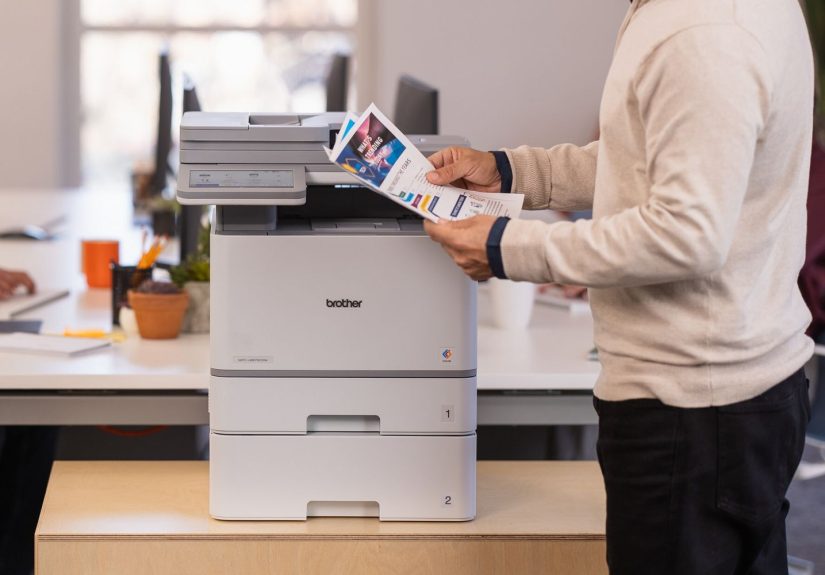
A printer that needs constant paper refills is not saving anyone time. Brother’s higher-end business printers often offer expandable paper trays, which is a major plus for offices with heavier use. Multiple tray options can also help if you switch between standard paper, letterhead, labels, or specialty media.
Touchscreen and Workflow Shortcuts
This may sound minor, but a good touchscreen interface is one of the easiest ways to reduce friction. It helps users launch common tasks quickly, create shortcuts, and avoid the old-fashioned “press this tiny arrow six times and hope for the best” printer experience.
Security Features
Businesses should pay close attention to security controls, especially if the printer will process confidential documents. Features such as user access controls, secure printing, authentication options, and network protection tools can make a real difference. The printer should help your compliance and privacy efforts, not quietly sabotage them.
Who Should Choose a Brother Color Printer?
Brother color printers make a strong fit for several business types:
Small Businesses and Startups
These teams often need solid performance, easy setup, and good value without enterprise-level complexity. Brother’s compact and midrange color printers fit that middle ground nicely.
Professional Offices
Law firms, real estate agencies, financial offices, consultants, and medical administration teams often need crisp text, occasional color graphics, scanning, and secure handling. Brother’s all-in-one business models line up well with those needs.
Hybrid and Remote Work Environments
Businesses with mixed work setups benefit from mobile printing, cloud access, and dependable wireless options. Brother’s app ecosystem and wireless support help keep document workflows moving even when the office is spread across several ZIP codes.
Growing Teams
If your business is adding employees or taking on more document-heavy work, Brother’s business and Workhorse lines offer an easier upgrade path than constantly replacing underpowered devices.
Brother Color Laser vs. Inkjet for Business
For most document-focused businesses, Brother color laser or LED printers make more sense than inkjet. Laser-style machines tend to shine with sharp text, fast output, and lower maintenance headaches for regular office documents. They are also a smart choice for offices where the printer may sit idle for stretches and then suddenly get hammered with work.
Brother also has business color inkjet options, and those can be attractive for offices that want lower upfront costs or larger-format flexibility on select models. But if your priority is high-volume document printing, predictable performance, and professional-looking reports, a Brother color laser model usually feels like the more business-minded move.
How to Choose the Right Model Without Regret
Here is the simplest framework:
If You Print Mostly Documents
Choose a Brother color laser printer with duplex printing, solid toner yield, and strong monthly capacity.
If You Scan and Copy Often
Choose an all-in-one model with an automatic document feeder and, ideally, duplex scanning.
If Several People Share One Device
Choose a business-class or Workhorse model with Ethernet, higher paper capacity, and stronger security controls.
If Space Is Tight
Choose a compact model that still includes the basics: wireless printing, automatic two-sided output, and easy mobile support.
If You Need to Present a More Professional Brand Image
Choose a model known for strong color document output. The extra polish on brochures, handouts, charts, and proposals is often worth it.
Real-World Experience: What Using a Brother Color Printer Feels Like in Business
Here is where the conversation gets more relatable. On paper, every printer sounds fantastic. In real life, the difference shows up on a random Wednesday when three people need to print, one person needs to scan, a client is arriving in twenty minutes, and the office internet is being dramatic for no reason.
A good Brother color printer tends to shine in exactly those moments. Setup is usually manageable, especially for businesses already used to office technology. Once installed, the machine often fades into the background in the best possible way. That is the dream, really: not a printer that becomes the center of office life, but one that quietly does its job without demanding a support group.
In a small office, the benefit is immediate. A team can print client packets, invoices, and internal documents with color that looks clean and intentional, not flashy and strange. Logos look more professional. Charts are easier to read. Training documents feel more polished. Even simple materials carry a little more authority when they do not look like they were printed by a device held together by wishful thinking.
In an all-in-one setup, the workflow improvements are even more noticeable. A receptionist can scan a signed form to email. A manager can copy a stack of onboarding documents. A remote employee can print from a phone before arriving at the office. A team lead can use preset shortcuts to send files where they need to go faster. Small moments like these do not sound dramatic, but across weeks and months they add up to real time savings.
The other big difference is consistency. Businesses value tools they can trust. Brother color printers are often appreciated not because they are exciting, but because they are dependable. That matters. Nobody celebrates a printer for doing its job, but everybody notices when it does not.
For growing businesses, there is also a psychological advantage to having a printer that feels like it belongs in a serious operation. It changes the rhythm of daily work. Teams stop improvising around equipment limitations. They stop emailing files to outside print shops for routine materials. They stop wondering whether the machine can handle one more stack of pages. That confidence is part of what smarter business printing really means.
Of course, no printer is magic. Toner still needs replacing. Networks still act up. Some offices will need higher capacity than others. But in practical, day-to-day business use, Brother color printers tend to hit a useful sweet spot: professional output, sensible features, manageable learning curve, and enough range in the lineup to suit different business stages.
If your current device feels slow, flimsy, expensive to maintain, or allergic to modern workflows, upgrading to the right Brother color printer can feel less like buying hardware and more like removing a daily annoyance from your business. And honestly, that may be the most underrated productivity upgrade of all.
Conclusion
Brother color printers are a smart choice for businesses that want more than basic printing. They offer the mix most offices actually need: sharp business documents, efficient color output, flexible all-in-one options, security-minded features, and models that scale from small teams to busy workgroups. Whether you need a compact office printer or a heavier-duty workhorse, the smartest buy is the one that fits your real workflow, protects your time, and keeps the office moving without unnecessary drama.
In other words, a smarter business printer is not the flashiest machine on the market. It is the one that prints when it should, scans what you need, works with the devices your team already uses, and does not turn routine tasks into an episode of office survival theater. Brother color printers make a strong case for exactly that kind of smarter business.