Table of Contents >> Show >> Hide
- Quick Answer: The 3 Best Ways to Check Uber Availability
- Why Uber Availability Is Not Always a Simple Yes or No
- Way 1: Check Uber’s Official City Pages
- Way 2: Open the Uber App or Website and Test Your Exact Trip
- Way 3: Use Fare Estimates, Reserve, and Airport Tools
- How to Tell the Difference Between “Uber Is Not Available” and “No Drivers Are Nearby”
- Tips for Checking Uber Availability Before an Important Trip
- What to Do If Uber Is Not Available in Your Area
- Common Mistakes People Make When Checking Uber Availability
- Examples: How Different Situations Affect Uber Availability
- Experience Section: Real-World Lessons from Checking Uber Availability
- Conclusion
Few modern travel questions create more tiny panic than, “Can I get an Uber here?” Maybe you just landed at a small airport, moved to a new suburb, booked a cabin that looks peaceful but suspiciously far from civilization, or promised friends you would “just call an Uber” without actually checking. Bold move. Sometimes it works beautifully. Sometimes the app stares back at you like a quiet lake.
The good news is that checking Uber availability is easy when you know where to look. Uber operates in thousands of cities worldwide, but availability can vary by country, state, city, neighborhood, airport, time of day, ride type, local regulations, and driver supply. In other words, “Uber is in my city” and “an UberX is five minutes away from my driveway at 5:15 a.m.” are cousins, not twins.
This guide explains how to check if Uber is available in your area using three practical methods: Uber’s city pages, the Uber app or web booking tool, and fare or reservation tools. You will also learn what “no cars available” really means, why airports can be special little transportation puzzles, and how to plan a backup ride before your schedule starts sweating.
Quick Answer: The 3 Best Ways to Check Uber Availability
The fastest way to check if Uber is available near you is to open the Uber app, enter your pickup and destination, and see whether ride options appear. For trip planning, you can also search Uber’s official city pages or use Uber’s online fare estimator. If you are going to or from an airport, check Uber’s airport pages or the app for pickup zones, ride options, and reservation availability.
Here are the three main ways:
- Search Uber’s official city pages to see whether Uber operates in your city or travel destination.
- Use the Uber app or Uber website to test your exact pickup and drop-off locations in real time.
- Check fare estimates, Reserve, and airport tools to confirm trip options before an important ride.
Why Uber Availability Is Not Always a Simple Yes or No
Before we dive into the steps, it helps to understand what “Uber is available” really means. A city may appear on Uber’s service map, but the number of available drivers can change throughout the day. A downtown pickup at 6 p.m. may show several options, while a rural pickup 20 miles away at midnight may show none. Ride types also differ. UberX might be available, but Uber Black, Uber Comfort, UberXL, Uber WAV, bikes, scooters, or Uber Reserve may not be offered in that same area.
Availability can also depend on local rules. Airports often require rideshare drivers to pick up passengers in specific zones. Some airports support scheduled pickups, while others may only allow on-demand rides. Some cities have strong Uber coverage, while smaller towns may have limited driver activity even if they are technically inside a service area.
The safest approach is to check both broad coverage and live availability. Think of it like checking whether a restaurant exists and then checking whether it is open, has tables, and has not run out of fries. All four details matter.
Way 1: Check Uber’s Official City Pages
Uber’s city pages are the best place to start when you want a broad answer to the question, “Does Uber operate here?” These pages let you browse cities and regions where Uber offers rides. If you are planning travel, moving to a new area, or writing down transportation options before a trip, this is the cleanest first step.
How to Use Uber’s City Pages
To check availability this way, go to Uber’s official website and look for the cities or locations section. You can search by country, state, city, or destination. In the United States, Uber lists many cities by state, which makes it easier to confirm coverage before you open the app.
For example, if you are traveling to Savannah, Georgia, you can search Uber’s U.S. city listings or search for “Uber Savannah” through Uber’s website. If the city page exists, it usually means Uber operates there. From there, you can explore common ride options, estimated prices, airport connections, and local travel information.
When This Method Works Best
This method is ideal when you are planning ahead. It is useful for vacations, business trips, college visits, weddings, medical appointments, hotel stays, or comparing transportation options in a city you have never visited. It gives you a general answer before you start testing exact addresses.
It is also helpful if you are checking multiple destinations. Maybe your trip includes Chicago, Madison, and a small lake town in Wisconsin. Uber’s city pages can quickly show which areas are more likely to have coverage and which ones deserve extra planning.
What City Pages Do Not Tell You
Uber’s city pages do not guarantee that a driver will be available at the exact moment you need one. They also may not tell you whether every ride type is available at your specific pickup point. A city page can confirm general service, but the app gives you the real-time answer.
Use the city page as your first clue, not your final boarding pass. If your ride is important, always confirm with the app close to the time of travel.
Way 2: Open the Uber App or Website and Test Your Exact Trip
The most accurate way to check Uber availability in your area is to use the Uber app. The app checks your pickup location, destination, available ride types, current driver supply, estimated arrival times, and pricing. This is the method to use when you need a ride soon or want to know whether Uber works from a specific address.
How to Check in the Uber App
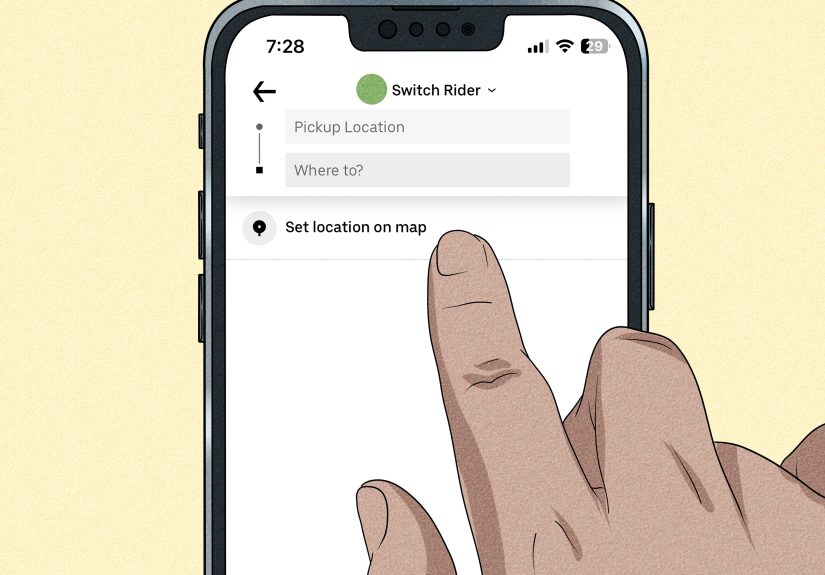
Open the Uber app and enter your destination in the “Where to?” box. Then confirm or edit your pickup location. You can let the app use your current location, type the address manually, or move the pin on the map. Once your pickup and destination are entered, the app will show available ride options if Uber can serve that route.
You might see options such as UberX, UberXL, Uber Comfort, Uber Black, or other local ride types. The app may also show estimated pickup times and prices. If Uber is not available for your pickup area, the app should tell you. If Uber operates there but no drivers are nearby, you may see a “no cars available” type of message.
How to Check Without the App
If you do not want to use the mobile app, Uber also allows riders to request or price a ride through its website in many areas. You can sign in, enter a pickup location and destination, review available options, and request a ride from a browser. This is especially useful if your phone is low on storage, your app is glitching, or you are helping a family member who treats app updates like suspicious government paperwork.
Use Precise Pickup Details
For the most accurate result, enter the exact pickup address, not just the city name. “Orlando” is broad. “Hotel entrance on International Drive” is useful. A few blocks can make a difference, especially at airports, malls, stadiums, hospitals, campuses, hotels, and event venues where pickup rules can be specific.
If you are in a large building or complex, check whether the app suggests a designated pickup spot. Uber often uses map pins, walking directions, pickup notes, and venue-specific guidance to reduce confusion. Your driver can only meet you where cars are allowed to stop, not necessarily where your optimism placed the pin.
What “No Cars Available” Means
“No cars available” does not always mean Uber does not operate in your area. It may mean there are currently no nearby drivers for the ride type you selected. Try refreshing the app after a few minutes, selecting a different ride option, changing the pickup spot slightly, or checking again at a busier time.
For example, UberX may be unavailable in a quiet suburb at 2 a.m., while UberXL or Comfort might appear. Or the reverse could happen. If the app offers a “notify me” option when a driver becomes available, use it when you are flexible. If you are not flexible, start working on Plan B before Plan A turns into a character-building exercise.
Way 3: Use Fare Estimates, Reserve, and Airport Tools
The third way to check Uber availability is to use Uber’s planning tools, especially fare estimates, Uber Reserve, and airport pages. These are helpful when you are not requesting a ride right now but want to know whether Uber is likely to work for a future trip.
Use Uber’s Fare Estimator
Uber’s fare estimator lets you enter pickup and drop-off locations to view estimated trip prices where Uber is available. It is a practical planning tool because it gives you more than a yes-or-no answer. If the tool can estimate a ride, that is a good sign that Uber supports the route or area. If it cannot produce options, you may need to check the city page, try a different pickup point, or use the app for a real-time test.
Fare estimates can vary from final prices. Demand, traffic, tolls, route changes, wait time, and local fees can affect the actual fare. Still, estimates are useful for comparing transportation choices before a trip. They can help you decide whether Uber is cheaper than parking, a rental car, hotel shuttle, taxi, or asking your cousin for a ride and paying in emotional debt.
Check Uber Reserve
Uber Reserve allows riders in select areas to book rides in advance. In many locations, riders can reserve a trip days or weeks ahead, depending on local availability and ride type. If Reserve appears for your pickup and destination, that can be a good sign that Uber supports planned trips in the area.
However, Reserve is not available everywhere. Some areas may support on-demand rides but not scheduled rides. If you do not see a Reserve option, it does not automatically mean Uber is unavailable. It may simply mean advanced scheduling is not offered for that pickup area, ride type, or time.
Check Airport Pages and Pickup Rules
Airport trips deserve special attention. Uber serves many major airports, but each airport may have its own pickup zones, staging areas, signage, rideshare rules, and terminal instructions. At some airports, you may need to follow signs for “Rideshare,” “App-Based Ride Services,” “Transportation Network Companies,” or a named pickup area. At others, the app may guide you to a specific door, level, garage, or curb.
Before flying, search for your airport inside Uber’s airport section or check the app after entering the airport as your pickup or destination. If you are arriving late at night, this becomes even more important. A large airport in a major metro area may have strong Uber availability, while a small regional airport after the last flight of the day may be much less predictable.
How to Tell the Difference Between “Uber Is Not Available” and “No Drivers Are Nearby”
These two messages are easy to confuse, but they mean different things. If Uber is not available in your location, the app may tell you that the service does not operate there or that rides cannot be requested from that pickup area. This is a coverage issue. You may need to move the pickup location, use a taxi, rent a car, take public transportation, or arrange another ride.
If no drivers are available, Uber may operate in the area, but there are no drivers ready for your request at that moment. This is a supply issue. You can wait, try another ride type, walk to a busier pickup point, check again later, or schedule a ride if that feature is available.
Here is a simple way to think about it:
- Uber unavailable in your location: The app cannot serve that pickup area or route.
- No drivers available: Uber may serve the area, but driver supply is currently too low.
- No specific ride type available: Try another option, such as UberX instead of Comfort or UberXL.
- Reserve not available: On-demand rides may still work, but scheduled rides may not be supported there.
Tips for Checking Uber Availability Before an Important Trip
Test the Route at the Same Time of Day
If you need a ride at 4:30 a.m., do not only check availability at 2 p.m. on a sunny Tuesday. Driver supply can change dramatically by time of day. Test the route around the same time you plan to travel. You do not have to book the ride, but you can see whether options usually appear.
Check Both Pickup and Destination
Sometimes riders only check whether Uber is available from their current location. But the destination matters too, especially if it is far outside the service area. A driver may be willing to take you from a city to a remote destination, but getting another Uber back may be difficult. Always check the return trip if you need one.
Look at Multiple Ride Types
If UberX does not appear, check whether other ride types are listed. If UberXL is available but UberX is not, you may pay more, but at least you know you have a possible option. Likewise, premium ride types may exist in large cities but disappear in smaller towns.
Move the Pickup Pin Carefully
If the app struggles with your location, edit the pickup address or drag the pin to a safer, clearer pickup spot. Good pickup locations include hotel entrances, public buildings, well-lit streets, rideshare zones, transit centers, and legal curbside stops. Avoid private roads, restricted gates, construction zones, or places where your driver would need the confidence of a stunt coordinator.
Update the App
An outdated app can cause login problems, map errors, missing ride options, or payment issues. Keep the Uber app updated, confirm your phone number and email, and make sure your payment method works before you need a ride. Discovering a card problem while standing outside with luggage is not a lifestyle anyone recommends.
What to Do If Uber Is Not Available in Your Area
If Uber is not available, do not panic. Transportation existed before rideshare apps, although yes, it involved more phone calls and fewer tiny car icons. Your backup options may include local taxi companies, hotel shuttles, airport shuttles, public transit, rental cars, car services, community transportation, bike-share, scooter-share, or asking your host for recommended local transportation.
In rural or low-density areas, local taxi companies may be more reliable than rideshare apps. In resort towns, hotels often know which transportation companies actually show up. At airports, official ground transportation desks can point you toward taxis, shuttle buses, rental cars, or regional transit.
If you are traveling for a wedding, medical appointment, early flight, job interview, or event with a strict start time, arrange a backup before the day of travel. Uber can be convenient, but convenience is not the same as a guarantee.
Common Mistakes People Make When Checking Uber Availability
Only Checking the City Name
Searching “Uber in Dallas” may tell you Uber operates in Dallas, but it does not confirm that a ride is available from a specific suburb, warehouse, park, venue, or rural address. Always check the exact pickup and drop-off points.
Assuming Airports Work Like Regular Streets
Airport pickups can involve special zones and instructions. Do not drop your pin randomly at baggage claim and expect the driver to materialize through a wall. Follow the app’s airport guidance and posted signs.
Checking Too Early or Too Late
If you check days ahead using only the app’s on-demand screen, you may not get a realistic picture of driver supply. If you check five minutes before a critical ride, you may not have time for a backup. Use city pages and fare tools early, then check live availability closer to departure.
Ignoring Return Transportation
Getting to a destination is only half the story. If you take Uber to a remote winery, trailhead, beach, industrial park, or wedding venue, check whether you can get back. Many riders learn this lesson at sunset, wearing uncomfortable shoes.
Examples: How Different Situations Affect Uber Availability
Example 1: A Downtown Hotel
You are staying at a hotel in downtown Denver and need a ride to dinner. Uber’s city page confirms service in Denver, and the app shows UberX, Comfort, and XL with short pickup times. This is a strong availability scenario. You can probably request a ride when ready, although prices may rise during events or peak demand.
Example 2: A Small Town Outside a Metro Area
You are visiting a relative 45 minutes outside Nashville. Uber may be active in the broader region, but the app shows no drivers nearby from the exact pickup address. That means service may be limited. You might still find a ride during busy hours, but you should not rely on it for an early flight without a backup.
Example 3: A Regional Airport Late at Night
Your plane lands at 11:50 p.m. at a smaller airport. Uber’s airport page may show that rides are supported, but live driver supply could be low after midnight. Check the app after landing, but also look for taxi stands, hotel shuttle schedules, or rental car counters before you travel.
Example 4: A Concert or Stadium Event
Uber may be widely available in the city, but pickup zones near stadiums can be crowded and restricted after large events. The app may route you to a designated pickup area or suggest walking a few blocks. Checking availability is not only about whether Uber exists; it is about whether the pickup plan makes sense.
Experience Section: Real-World Lessons from Checking Uber Availability
One of the biggest lessons from using Uber in different areas is that the app is both powerful and very literal. It does not care that you are late, wearing formal clothes, or emotionally attached to the idea of being picked up exactly where you are standing. It cares about roads, service areas, drivers, legal pickup zones, and whether your phone can figure out which side of the building you are on.
A practical habit is to check Uber availability twice: once while planning and once when the ride is close. When planning a trip, use Uber’s city pages, fare estimates, and airport information. This gives you a general sense of whether Uber operates in the area and what the trip might cost. Then, on the day of travel, open the app and enter the real pickup and destination. This second check shows current driver supply and real-time options.
Another useful experience is to test the return ride. Many travelers check Uber from the airport to the hotel but forget to check the hotel back to the airport at 5 a.m. Others ride to a restaurant, wedding venue, or vacation rental and assume they can leave the same way. In busy cities, that usually works. In rural areas, beach towns, mountain communities, and outer suburbs, it can be risky. A quick test in the app can prevent a long wait, an expensive local cab, or a dramatic group discussion in a parking lot.
Pickup points matter more than many riders expect. In large buildings, airports, campuses, hospitals, and shopping centers, the difference between “front entrance,” “north entrance,” and “rideshare pickup zone B” can decide whether your driver finds you quickly or circles like a confused hawk. Always zoom in on the map, confirm the pin, read pickup notes, and watch for app instructions. If your location looks wrong, edit it before requesting.
Timing also changes everything. Uber may be easy to find during lunch hour but scarce before sunrise. In entertainment districts, availability may be strong until bars close, when prices rise and pickup times stretch. In residential suburbs, weekday mornings may be better than late nights. When a ride is important, check around the same time you plan to travel. This is especially smart for airport rides, medical appointments, and work shifts.
Finally, experienced riders keep a backup plan. That does not mean Uber is unreliable; it means transportation is affected by weather, demand, traffic, local rules, driver supply, and technology. Save a local taxi number, ask your hotel about shuttles, check public transit, or compare rental car costs for longer trips. Uber is often the easiest option, but the smartest traveler treats it as one excellent tool, not the only tool in the toolbox.
Conclusion
Checking whether Uber is available in your area is simple when you use the right method for the moment. Start with Uber’s city pages for broad coverage, use the Uber app or website for exact real-time availability, and rely on fare estimates, Reserve, and airport pages when planning ahead. The app is usually the final authority because it reflects your actual pickup location, destination, ride options, and driver supply.
The key is not just asking, “Is Uber in this city?” Ask, “Can Uber pick me up at this exact place, at this exact time, for this exact trip?” That little extra precision can save you money, stress, and the awkward experience of pretending you meant to stand outside a closed gas station for 35 minutes.
Note: Uber availability can change by location, time, ride type, airport rules, and current driver supply. Always confirm directly in the Uber app or website before relying on Uber for an important trip.