Table of Contents >> Show >> Hide
- Before You Start: What a Roblox Gift Card Does
- Can You Redeem a Roblox Gift Card in the iPhone App?
- How to Use a Roblox Gift Card on iPhone: 10 Steps
- Step 1: Find the Roblox Gift Card Code
- Step 2: Open Safari on Your iPhone
- Step 3: Go to the Roblox Redeem Page
- Step 4: Sign In to the Correct Roblox Account
- Step 5: Enter the Gift Card Code Carefully
- Step 6: Tap or Click Redeem
- Step 7: Check Your Roblox Credit Balance
- Step 8: Convert Roblox Credit to Robux or Use It for Premium
- Step 9: Open the Roblox App and Confirm Your Robux
- Step 10: Keep the Card and Receipt Until Everything Works
- Roblox Gift Card vs. Apple Gift Card: Do Not Mix Them Up
- Common Problems When Redeeming Roblox Gift Cards on iPhone
- Safety Tips for Roblox Gift Cards
- Tips to Get the Best Experience on iPhone
- Best Ways to Spend Roblox Credit After Redeeming
- Experience Section: Real-World Lessons From Redeeming Roblox Gift Cards on iPhone
- Conclusion
So you have a Roblox gift card, an iPhone, and a very understandable desire to turn that mysterious code into Robux, Roblox Credit, or maybe a Premium subscription. Good news: the process is simple. Slightly less magical news: you usually do not redeem a Roblox gift card directly inside the Roblox iPhone app. Instead, you use Safari or another web browser on your iPhone, sign in to the correct Roblox account, and redeem the card through Roblox’s official redemption page.
This matters because many iPhone users confuse three different things: Roblox gift cards, Apple Gift Cards, and in-app Roblox purchases through the App Store. They are related only in the way a pizza, a pizza coupon, and a pizza delivery app are related. All may lead to happiness, but each works differently.
In this guide, you will learn exactly how to use a Roblox gift card on iPhone in 10 clear steps, how to check your balance, how to spend Roblox Credit, what to do if the code does not work, and how to avoid the classic “oops, I redeemed it on the wrong account” disaster.
Before You Start: What a Roblox Gift Card Does
A Roblox gift card is designed to add value to a Roblox account. Depending on the type of card, it may redeem as Roblox Credit, Robux, or an eligible item or subscription option. Most standard Roblox gift cards are redeemed through a web browser and added to the Roblox account you are signed into at the time of redemption.
That last part is important: the card attaches to the account currently logged in. If your younger sibling borrowed your iPhone, logged into Roblox, and left their account open, congratulationsyou may have accidentally funded their digital empire. Always check the username before redeeming.
Can You Redeem a Roblox Gift Card in the iPhone App?
Usually, no. On iPhone, the most reliable method is to open Roblox in a web browser, such as Safari, and go to the official Roblox gift card redemption page. The iOS app is mainly built for playing experiences, chatting with friends, customizing your avatar, and making purchases through Apple’s in-app purchase system.
That is why many users search for “how to redeem Roblox gift card on iPhone app” and get frustrated. The answer is not hidden in a secret menu guarded by a blocky dragon. You simply need to switch from the app to the browser.
How to Use a Roblox Gift Card on iPhone: 10 Steps
Step 1: Find the Roblox Gift Card Code
If you have a physical Roblox gift card, gently scratch off the protective coating on the back to reveal the PIN or code. Use a coin carefully rather than attacking it like you are mining for ancient treasure. If the card is digital, open the email or retailer message that contains the code.
Before typing anything, make sure the code is complete and readable. Some characters can look similar, such as O and 0, or I and 1. If the code looks blurry, zoom in on your iPhone screen or copy it carefully from the digital receipt.
Step 2: Open Safari on Your iPhone
On your iPhone, open Safari, Chrome, or another trusted browser. Safari is usually the easiest because it is already installed and works well with Roblox’s website.
Do not search random phrases like “free Roblox gift card redeem generator.” That path leads to disappointment, scams, and possibly a lecture from someone who warned you already. Always use the official Roblox website.
Step 3: Go to the Roblox Redeem Page
Type the official Roblox redemption address into the browser. You can also go to Roblox’s main website and navigate to the gift card redemption page from there. The redemption page will have a box where you can enter your code.
Make sure the site is the real Roblox website before signing in. A safe habit is to look carefully at the address bar. Scammers love fake pages that look “almost” right, because “almost” is where gift card balances go to vanish.
Step 4: Sign In to the Correct Roblox Account
Log in with the Roblox username and password for the account that should receive the credit. If the iPhone belongs to a parent, sibling, or shared household device, take a moment to confirm the username displayed on the page.
This is the most common mistake: users redeem a code successfully, then panic because the Robux or credit is not visible on their account. In many cases, the gift card was redeemed while another account was signed in. A 10-second username check can save a 30-minute support headache.
Step 5: Enter the Gift Card Code Carefully
Tap the code field and type the Roblox gift card code exactly as shown. If you copied it from an email, paste it into the box and check for extra spaces before or after the code. Extra spaces can sometimes cause errors.
If you are typing manually, slow down. Gift card codes are not a speed test. Accuracy beats thumb gymnastics every time.
Step 6: Tap or Click Redeem
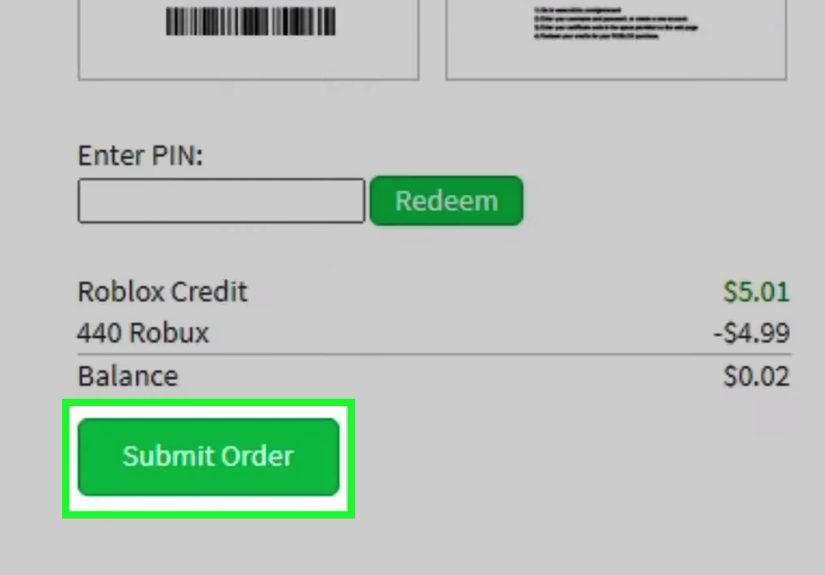
After entering the code, tap the Redeem button. If the code is valid and unused, Roblox should show a confirmation message. That message means the card value, item, or eligible reward has been added to the account.
If you do not see confirmation right away, do not repeatedly smash the button like it owes you money. Wait a moment, refresh if needed, and check whether the code was accepted.
Step 7: Check Your Roblox Credit Balance
After successful redemption, you may see your available Roblox Credit near the redemption area. You can also check billing or account settings on the Roblox website to confirm whether the credit has been added.
Remember: Roblox Credit and Robux are not always displayed in the same place. Credit is like store value sitting in your account. Robux is the virtual currency you use for avatar items, game passes, experience purchases, and other eligible items across Roblox.
Step 8: Convert Roblox Credit to Robux or Use It for Premium
Once the gift card is redeemed, you can use the available credit to buy Robux or, where eligible, purchase Roblox Premium. Premium may include a monthly Robux allowance and other benefits, depending on the plan offered in your region and account settings.
If Roblox offers a “Get Robux” option after redemption, follow the on-screen prompts. Review the package before confirming. The largest available package may be suggested automatically, but you should choose the option that fits what you actually want.
Step 9: Open the Roblox App and Confirm Your Robux
After redeeming through Safari, open the Roblox app on your iPhone. Make sure you are signed into the same account. Check your Robux balance at the top of the app or in the relevant account area.
If the balance does not update immediately, close and reopen the app. You can also sign out and sign back in, but only if you know your login details. Nothing ruins a Robux celebration faster than forgetting your password mid-victory.
Step 10: Keep the Card and Receipt Until Everything Works
Do not throw away the physical card or delete the digital receipt right away. If there is a problem, Roblox Support may ask for details such as the gift card PIN, serial number, purchase receipt, store name, location, or screenshots.
Once the card is redeemed and the balance is safely in your account, you can relax. Until then, treat the receipt like a tiny financial parachute.
Roblox Gift Card vs. Apple Gift Card: Do Not Mix Them Up
A Roblox gift card is redeemed through Roblox and applies to your Roblox account. An Apple Gift Card is redeemed through your Apple Account and can usually be used for App Store purchases, subscriptions, apps, games, and other Apple services depending on Apple’s rules in your region.
If you have an Apple Gift Card and want Robux on iPhone, you would normally redeem the Apple Gift Card in the App Store first, then use your Apple balance for an in-app Roblox purchase. That is different from redeeming a Roblox gift card. A Roblox card belongs on Roblox’s redemption page; an Apple card belongs in Apple’s redemption system.
Common Problems When Redeeming Roblox Gift Cards on iPhone
The Code Says Invalid
Check for typing mistakes, extra spaces, and similar-looking characters. If you copied the code from an email, paste it into Notes first to see whether hidden spaces were included. Also confirm that the card is truly a Roblox gift card, not an Apple, Amazon, Xbox, or other retailer card.
The Card Was Already Redeemed
If Roblox says the card has already been redeemed, check your other Roblox accounts. It may have been used on a different account by accident. If you believe the card was stolen, damaged, or redeemed incorrectly, contact Roblox Support with your proof of purchase and card details.
You Redeemed the Card but Do Not See Robux
The card may have added Roblox Credit rather than instantly adding Robux. Go back to the Roblox website and check your available credit. From there, you may need to buy Robux using the redeemed credit.
The Page Will Not Load on iPhone
Try refreshing Safari, turning off content blockers temporarily, switching from Wi-Fi to cellular data, or clearing browser cache. You can also try another browser. If the Roblox website is having temporary issues, wait and try again later.
The PIN Is Damaged
If the code is scratched too hard or partly unreadable, do not guess repeatedly. Keep the card, receipt, and packaging. Take clear photos and contact Roblox Support or the retailer where the card was purchased.
Safety Tips for Roblox Gift Cards
Never share your Roblox gift card code with strangers, “Robux generators,” social media giveaways, fake moderators, or anyone claiming they can double your balance. Once a gift card code is redeemed, the value is usually gone from the card. A real company, school, government agency, or support representative should not ask you to pay them with a gift card code.
Parents should also consider Roblox parental controls, spending limits, and account security settings. Gift cards can be a smart way to control spending because they limit purchases to a set amount, but they are not a replacement for supervision, strong passwords, and honest conversations about online safety.
Tips to Get the Best Experience on iPhone
First, redeem the card through Safari while connected to a stable internet connection. Second, make sure your Roblox account email is verified so account recovery is easier if you forget your password. Third, enable two-step verification if available. Fourth, avoid third-party websites promising free Robux. Fifth, check the account name before redeeming every single time.
If you are buying a gift card for someone else, consider sending a digital card only to the recipient or their parent. Do not post the code in a group chat. Gift card codes are like toothbrushes: useful, personal, and not something you should casually share with everyone.
Best Ways to Spend Roblox Credit After Redeeming
Once your Roblox gift card is redeemed on iPhone, you have choices. You can buy Robux and spend it on avatar accessories, outfits, emotes, game passes, private servers, or in-experience items. You can also consider Roblox Premium if you play often and want recurring benefits.
For casual players, buying a modest Robux package may be the simplest choice. For regular players, Premium may offer better long-term value depending on your habits. For younger players, parents may want to discuss a spending plan before the Robux arrives and mysteriously transforms into hats, wings, pets, and a suspiciously expensive sword.
Experience Section: Real-World Lessons From Redeeming Roblox Gift Cards on iPhone
Using a Roblox gift card on iPhone sounds simple, but the real experience often depends on tiny details. The first lesson is that the Roblox app and the Roblox website feel connected, but they do not always handle payments the same way. A user may open the app, tap around for five minutes, and wonder why there is no obvious “Redeem Gift Card” button. The solution is not to keep digging through app menus. The better move is to open Safari and redeem through the Roblox website.
The second lesson is that account switching is more dangerous than it looks. Many families share devices. A parent may use the iPhone to help one child redeem a card, while another child’s account is still logged in from yesterday. Roblox will not pause dramatically and ask, “Are you absolutely sure this is the chosen one?” It simply applies the redemption to the active account. That is why checking the username is not just a polite suggestionit is the step that prevents drama in the living room.
The third lesson is patience. Sometimes users expect Robux to appear instantly in the app, and when it does not, they assume the card failed. In reality, the card may have become Roblox Credit first. The user may need to spend that credit on a Robux package or Premium through the website. Think of Roblox Credit as money loaded into your Roblox wallet. It is useful, but it may still need one more step before it becomes Robux.
The fourth lesson is to protect the code like cash. A Roblox gift card code is not a screenshot to share for “help.” It is not something to send to a random person who promises bonus Robux. It is not a password reset tool, a contest entry, or proof that you are a “real fan.” Once someone else redeems it, the card may be empty. In real life, you would not hand a stranger a $25 bill and ask them to check whether it is real. Treat a gift card code the same way.
The fifth lesson is that receipts matter. Many people toss the card packaging or delete the email as soon as they redeem the code. That is fine when everything works, but painful when something goes wrong. Keep the card, receipt, and confirmation email until the credit or Robux is visible in the correct account. If support is needed, those details can make the difference between “we can investigate” and “sorry, we do not have enough information.”
Finally, the best experience comes from slowing down. Open the official Roblox website. Sign into the correct account. Enter the code carefully. Confirm the redemption. Check the balance. Then open the app and enjoy. The whole process can take just a few minutes, but only if you avoid the common shortcuts that create problems. In other words, redeem like a careful gamer, not like someone speedrunning a shopping cart.
Conclusion
Using a Roblox gift card on iPhone is easy once you know the correct route: use a browser, go to Roblox’s official redemption page, sign in to the right account, enter the code, and confirm the balance. The biggest misunderstanding is expecting the iPhone app to handle the entire gift card process. For most users, Safari is the key.
Roblox gift cards are a convenient way to buy Robux, manage spending, or give a Roblox fan a flexible present. Just remember to protect the code, avoid scam websites, keep your receipt, and double-check the account before redeeming. Your future avatarwith its new outfit, accessory, or wildly unnecessary glowing swordwill thank you.
Note: Always redeem Roblox gift cards only through the official Roblox website, and never share your gift card code or PIN with strangers, “free Robux” websites, or unofficial support accounts.