Table of Contents >> Show >> Hide
- Why a Filament Scale Makes So Much Sense
- How the OctoPrint Filament Scale Setup Works
- What Makes This Better Than a Normal Filament Runout Sensor?
- Where OctoPrint Really Shines
- Installation Tips That Save Headaches
- Who Should Add a Filament Scale to OctoPrint?
- The Biggest Benefits in Everyday Printing
- The Limitations You Should Know Before You Build One
- Final Thoughts
- Real-World Experience: What Users Learn After Living With a Filament Scale
If you have ever started a long 3D print with the same energy as a gambler putting the rent on black, you already understand the problem this upgrade solves. You check the spool, squint a little, maybe hold it in one hand like a grocery-store melon expert, and declare, “Yeah, that should be enough.” Six hours later, the printer disagrees. Loudly.
That is why the idea of giving a 3D printer a real “fuel gauge” is so appealing. Instead of guessing how much filament is left, you measure it. Better yet, you pipe that number straight into OctoPrint, where it can sit in plain view like a tiny dashboard warning your future self not to do anything reckless. A filament scale turns spool weight into useful print intelligence, and once you see it in action, it feels less like a gimmick and more like one of those “why didn’t I do this sooner?” upgrades.
In practical terms, adding a filament scale to OctoPrint means pairing a load cell with an HX711 amplifier board, mounting your spool holder so the scale can read the weight, and using a plugin to display the remaining filament. It is simple in concept, modest in cost, and surprisingly effective. The result is a setup that helps you avoid failed prints, manage partial spools more intelligently, and stop treating filament estimation like tea-leaf reading.
Why a Filament Scale Makes So Much Sense
A slicer can estimate how much material a model should use, and that estimate is absolutely useful. But “useful” and “infallible” are not the same thing. Print settings change. Purges happen. Failed first attempts get retried. Support-heavy models chew through filament faster than your memory suggests. And then there is the universal hobbyist problem: half-used spools with mysterious histories.
A filament scale gives you a real-world reading rather than a best guess. If your spool weighs 612 grams today and the empty spool weighs 240 grams, then you know you have roughly 372 grams of filament left. That number is not magic. It is just measurement. And measurement has a habit of making chaotic hobbies look organized.
This is especially valuable for large prints, batch jobs, cosplay pieces, helmets, planter pots, enclosures, and any project that likes to eat filament with the appetite of a Labrador near an open trash can. A runout sensor can save a print after the spool actually runs dry, but a spool scale helps you decide before you hit print. That difference matters. One is a seatbelt. The other is the gas gauge telling you maybe this is not the time for a cross-country trip.
How the OctoPrint Filament Scale Setup Works
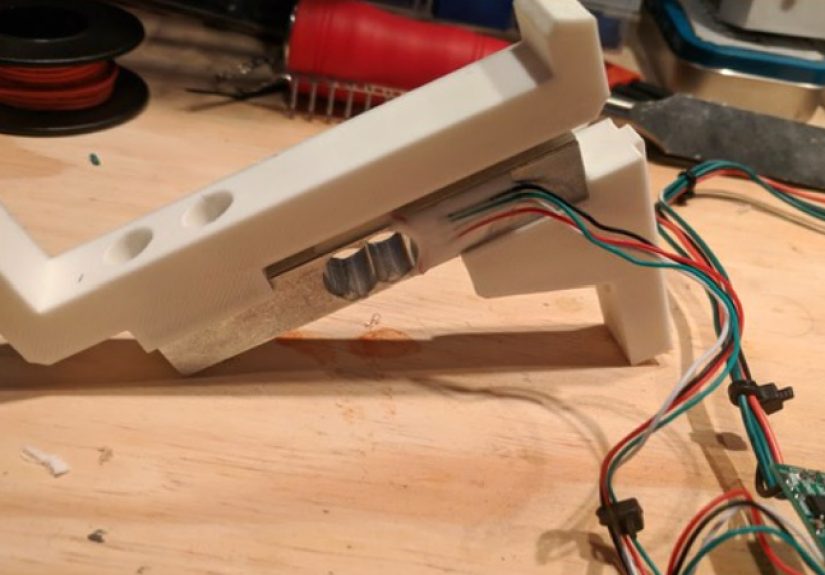
The basic hardware recipe is refreshingly straightforward. You mount the spool holder to a load cell, connect the load cell to an HX711 board, and wire that board to the Raspberry Pi running OctoPrint. The plugin reads the weight data, applies calibration, subtracts the empty spool weight, and shows the current filament weight in the OctoPrint interface.
The Key Parts
- Load cell: This is the sensor that flexes slightly under weight and converts force into an electrical signal.
- HX711 amplifier: The signal from a load cell is tiny, so the HX711 amplifies and digitizes it into something a Raspberry Pi can read.
- Spool holder bracket or mount: The scale only works if the spool’s weight is actually passing through the sensor cleanly.
- OctoPrint plugin: This is the dashboard piece that turns raw weight readings into something human-friendly.
The charm of this setup is that it is not trying to reinvent 3D printing. It is simply adding one missing number to the control panel: how much material is still on the spool. That number is incredibly useful because it bridges the gap between the physical world and the software world. Your slicer knows what the model wants. The scale knows what the spool has. OctoPrint becomes the referee.
Why the HX711 Matters
The HX711 is the unsung hero in this upgrade. A load cell produces a very small change in voltage, and without an amplifier, that signal is too faint to be practical. The HX711 is designed specifically for weighing applications, which is why it shows up in DIY scales, sensor projects, and clever printer mods like this one. In short, it is the translator between “this spool is heavy” and “OctoPrint says you have 428 grams left.”
Why Calibration Is Not Optional
A filament scale is only as good as its calibration. If the scale drifts, binds, or was calibrated with the enthusiasm of someone skipping instructions at 1:00 a.m., your beautiful dashboard number may be fiction. Good calibration means using a known weight, checking repeatability, and entering the empty spool weight correctly. That last part matters more than people expect because spool weights vary by brand, material, and spool design. One plastic spool is not automatically the twin of another.
What Makes This Better Than a Normal Filament Runout Sensor?
A normal filament runout sensor is still a smart upgrade. It pauses the print when the filament stops feeding or disappears, and on many modern printers, that is already a standard feature. But it is reactive. It tells you the problem has arrived. A filament scale is proactive. It tells you the problem is coming.
That distinction is a big deal for people who print overnight, print remotely, or simply enjoy not waking up to a half-finished dragon and a printer making sad little air-printing motions. A runout sensor can rescue a job after the last strand passes through the extruder path, but it cannot tell you whether your partial spool is a safe match for a 14-hour print before you start.
And here is the part experienced makers learn sooner or later: runout sensors do not catch every real-world mess. Filament can snag, spool ends can be taped or bent, and tangles can create feeding issues before the printer has a clean “I am empty” moment. A scale does not solve every one of those problems either, but it gives you earlier awareness. That alone is worth a lot.
Where OctoPrint Really Shines
OctoPrint is the perfect home for a filament scale because it is already the control tower for many hobby printers. It manages jobs, exposes status information, and supports plugins that extend the workflow. So instead of building a separate gadget with a tiny screen no one remembers to check, you can put the filament reading in the same place you already monitor progress, temperatures, and time remaining.
That is where this mod stops being a neat electronics project and becomes a quality-of-life upgrade. You are not just making a scale. You are making a workflow.
Pairing a Scale with Spool Management
If you want to level up beyond simple display, spool management plugins add another layer of usefulness. Tools in the OctoPrint ecosystem can track spool properties such as material, color, weight, and estimated remaining usage. Some newer integrations also warn when the selected spool may not have enough material for the next print.
That means the best setup is not scale or software. It is scale plus software. The physical measurement gives you a grounded reality check. The spool manager gives you organization. OctoPrint ties them together so your printer stops acting like a teenager with no concept of budgeting.
Pairing a Scale with a Smart Filament Sensor
Even better, a filament scale and a smart filament motion sensor solve different problems. The scale estimates available material. The motion sensor watches whether filament is actually moving. If the spool still has plenty of weight but a tangle or jam prevents feeding, the smart sensor can catch that. If the filament is moving fine but there simply is not enough of it left for the job, the scale helps you catch that first.
In other words, one tells you how much filament you have. The other tells you whether the filament is behaving. That is a very respectable partnership.
Installation Tips That Save Headaches
Keep the Mechanical Path Clean
If the spool holder rubs, binds, tilts, or drags against the frame, the reading can be inconsistent. Your filament scale should support the spool smoothly and let the load cell do the measuring without side-load weirdness. Mechanical slop is the fastest route to numbers that look official and lie to your face.
Account for the Empty Spool Weight
This is the golden rule. The scale is measuring the entire spool assembly, not just the filament. If you forget to subtract the empty spool weight, your reading will be overly optimistic, which is a fancy way of saying your printer may still run dry while your dashboard smiles politely.
Leave a Safety Margin
Even a good filament scale should not be treated like a last-drop fuel tank calculator. Real printers create friction in the feed path, and some spool setups add drag if the filament is routed through a dry box, side guide, reverse-Bowden tube, or top-mounted feed path. If your model needs 180 grams and your scale says 184 grams remain, that is not confidence. That is a dare. Give yourself breathing room.
Watch for Environmental Drift
Scales can drift slightly over time due to mounting tension, vibration, and temperature changes. That does not make them useless. It just means a quick sanity check once in a while is smart. If the number suddenly looks suspicious, weigh the spool manually and recalibrate before blaming the laws of physics, your printer, or the moon.
Who Should Add a Filament Scale to OctoPrint?
This upgrade is not only for hardcore modders with a drawer full of crimp connectors and a dangerously casual relationship with GPIO pins. It is genuinely useful for several kinds of 3D printer owners:
- People who print large parts: helmets, props, organizers, and structural pieces burn through material quickly.
- People who collect half-used spools: if your shelf looks like a retirement community for PLA, this mod is for you.
- People who run overnight prints: fewer surprises at 3:00 a.m. is always a solid goal.
- People who like data: some of us enjoy turning “I think there’s enough left” into a number with decimals.
- Print-farm tinkerers and heavy hobbyists: if multiple spools are in rotation, accurate tracking pays off quickly.
If you only print tiny calibration cubes from fresh spools and live a life of enviable discipline, you may not need this. For everyone else, a filament scale feels like bringing one adult into the room.
The Biggest Benefits in Everyday Printing
The first benefit is obvious: fewer failed prints caused by empty spools. But that is only the beginning.
A filament scale also helps you make better use of leftovers. Instead of ignoring partial spools because they feel unreliable, you can deliberately match them to small or medium jobs. You can save full spools for large prints and burn down leftovers on brackets, hooks, test parts, and shop accessories. That reduces waste and makes your material inventory feel intentional rather than haunted.
It also changes the emotional tone of remote printing. When you can see spool weight in OctoPrint, you are less likely to start a job with vague optimism and more likely to make a calm decision based on actual information. That alone lowers stress, especially if your printer lives in another room, garage, workshop, or basement dungeon of unfinished maker ambitions.
The Limitations You Should Know Before You Build One
Let’s be honest: a filament scale is clever, but it is not wizardry.
It does not know filament diameter variation. It does not automatically understand material density unless you build that logic into the workflow. It does not detect clogs on its own. And if your spool is not mounted in a way that fully transfers weight to the sensor, the reading can become less trustworthy than a used-car salesman promising “one careful owner.”
Also, not every OctoPrint setup is equally friendly to Raspberry Pi GPIO-based accessories. If your OctoPrint instance is running on unusual hardware, in a containerized environment, or on a system without easy GPIO access, you may need a more creative path. The classic approach works best when OctoPrint is running on a Raspberry Pi with straightforward sensor wiring.
Still, within those limits, the value is real. The mod is inexpensive, practical, and grounded in the way people actually print: with a mix of full spools, leftovers, hopeful assumptions, and the occasional lapse in planning.
Final Thoughts
Adding a filament scale to OctoPrint is one of those rare 3D printer upgrades that feels both nerdy and undeniably useful. It is not flashy like a new hotend, dramatic like a speed upgrade, or photogenic like RGB lights all over the frame. It is simply useful in the most satisfying possible way: it prevents dumb problems.
And that is the real appeal. A 3D printer does not need more mystery. It needs better feedback. A filament scale turns a vague question“Do I have enough filament left?”into a visible answer. Pair it with OctoPrint, a spool manager, and maybe a smart motion sensor, and you get a setup that is calmer, smarter, and far less likely to betray you halfway through a 12-hour print.
Put differently, this mod gives your printer something it should have had from the start: a fuel gauge. Once that number shows up on the screen, guessing starts to feel very old-fashioned.
Real-World Experience: What Users Learn After Living With a Filament Scale
The most relatable experience with a filament scale is not the first successful reading. It is the first time it stops you from making a bad decision. Plenty of makers install a scale because the idea sounds cool, but the real value shows up on ordinary days. You slice a model, glance at the estimate, look at the spool on the holder, and your eyes say, “Probably.” Then OctoPrint says, “Absolutely not.” That is the moment the upgrade earns its keep.
Another common experience is discovering how unreliable the human hand is as a measuring instrument. A spool that feels “kind of full” can be nearly empty if the spool itself is heavy. A spool that looks suspiciously light may still have enough material for three smaller prints. Once people start comparing guesses against scale readings, the guessing game usually ends in quiet embarrassment. The good news is that embarrassment costs less than a ruined overnight print.
Users also tend to notice how much more confidently they use partial spools. Before a scale, leftovers often become shelf decorations. They are too risky for important jobs and too uncertain for long ones, so they sit around until the workshop starts to resemble a filament museum. After adding a scale to OctoPrint, those same leftovers become useful again. A spool with 146 grams left is not “maybe enough for something.” It is enough for a bracket set, a cable organizer batch, or a small enclosure. The scale turns vague leftovers into usable inventory.
There is also a workflow benefit that sneaks up on people. Once the filament number is visible in the same interface as print progress and temperatures, it becomes part of the normal pre-print check. You stop thinking of filament as a background concern and start treating it like bed temperature or nozzle size: one more variable worth checking before you commit several hours of machine time. That habit alone can make a printer feel more professional, even if the actual hardware cost was modest.
Of course, the experience is not perfect. Some users learn quickly that poor mounting ruins otherwise good electronics. If the spool holder drags, if the filament path pulls sideways, or if the sensor mount flexes in odd ways, the readings can wander. The lesson there is simple: the fancy part is not always the chip. Sometimes the fancy part is good mechanical design and the patience to recalibrate instead of declaring the project cursed.
People who pair a filament scale with a runout or motion sensor usually report the best overall experience. The scale helps with planning. The sensor helps with real-time protection. Together they create a more complete safety net, especially for long prints and unattended jobs. One tool tells you whether you should start the print. The other helps protect you after the print has already started.
In the end, living with a filament scale is less about gadget novelty and more about trust. You trust your planning more. You trust your leftover spools more. You trust overnight jobs a little more. And in 3D printing, where so many failures begin with a tiny preventable mistake, that extra trust feels surprisingly luxurious.