Table of Contents >> Show >> Hide
- Introduction: A Medical Alert System for People Who Hate Wearing Medical Alert Buttons
- Quick Verdict: Is GetSafe Worth It?
- What Is the GetSafe Medical Alert System?
- GetSafe Pricing and Plans
- Key Features of GetSafe Medical Alert
- Pros and Cons of GetSafe
- Who Should Choose GetSafe?
- Who Should Skip GetSafe?
- Setup and Installation Experience
- Performance and Response: What to Expect
- GetSafe vs. Traditional Medical Alert Systems
- Customer Feedback and Reputation
- Safety Analysis: Where GetSafe Shines
- Safety Analysis: Where GetSafe Falls Short
- Practical Buying Tips Before Choosing GetSafe
- Realistic Experience: What Using GetSafe Feels Like at Home
- Final Verdict: GetSafe Is a Clever In-Home Safety System With a Clear Audience
Editorial note: This GetSafe Medical Alert System review is based on current public product information, third-party testing summaries, consumer review patterns, and senior-safety buying guidance from reputable U.S. sources. Pricing, promotions, and plan details may change, so readers should confirm the latest quote before purchasing.
Introduction: A Medical Alert System for People Who Hate Wearing Medical Alert Buttons
Most medical alert systems begin with a familiar bargain: wear this pendant, press this button, and help will come. That sounds simple until real life shows up. Neck pendants get left on the nightstand. Wrist buttons feel bulky. Some older adults refuse to wear anything that screams, “Hello, I have entered my emergency-button era.”
That is exactly where the GetSafe Medical Alert System tries to be different. Instead of making a wearable device the star of the show, GetSafe focuses on wall-mounted voice-activated buttons, pull cords, and a cellular base unit designed to cover key areas of the home. In other words, it is a medical alert system built for people who want protection nearby without wearing a plastic necklace all day.
But is GetSafe actually a good choice, or is it just a clever idea with a nice brochure? In this in-depth review, we will look at GetSafe pricing, equipment, features, pros and cons, setup experience, fall detection, customer feedback, and who should consider it. Spoiler: GetSafe is not perfect, but for the right household, it solves a very real problem.
Quick Verdict: Is GetSafe Worth It?
GetSafe is worth considering if you or a loved one spends most of the day at home and dislikes wearing a traditional medical alert pendant. Its biggest advantage is its home-based design: you can place voice-activated buttons and wall buttons in high-risk areas like bathrooms, bedrooms, kitchens, stairs, and hallways.
The system is especially appealing for older adults who are independent but want a reliable way to contact a 24/7 monitoring center during an emergency. It also works without a landline, using 4G LTE cellular connectivity.
However, GetSafe may not be the best medical alert system for highly active seniors who need strong on-the-go protection, people who want automatic fall detection as a core feature, or users who may forget how voice commands work during stress. It is a smart in-home safety net, not a magic bubble wrap suit. Sadly, science has not yet given us one of those.
What Is the GetSafe Medical Alert System?
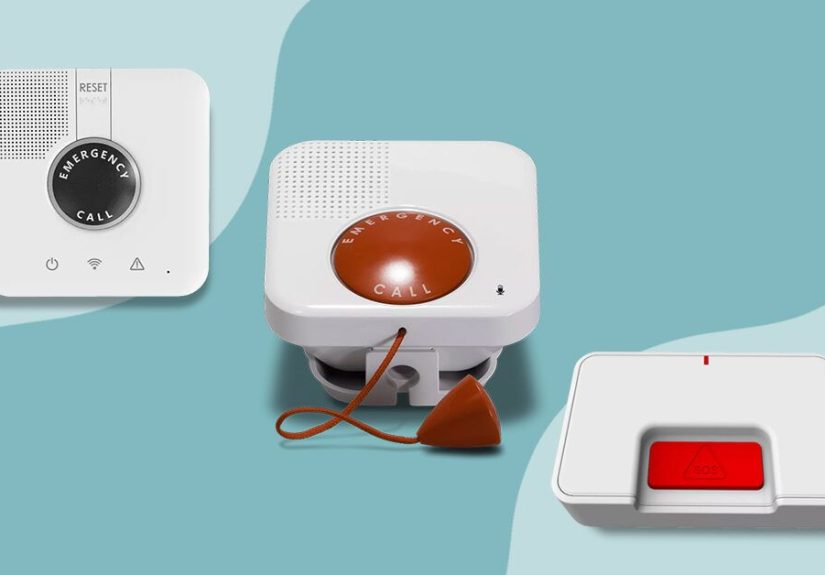
GetSafe is an in-home medical alert system designed around the idea that emergency help should be accessible from multiple places in the house, not only from a wearable button. The system typically uses a main 4G LTE base console, voice-activated wall buttons, standard wall buttons, and optional wearable accessories.
Unlike many medical alert companies that place a pendant or wrist button at the center of the experience, GetSafe’s main pitch is simple: you do not have to wear a medical alert device inside your home. Instead, you set up help buttons around the rooms where falls and emergencies are most likely to happen.
How GetSafe Works
When help is needed, users can trigger an emergency call in several ways:
- Press the emergency button on the base unit.
- Use a voice-activated wall button.
- Pull a cord on a wall-mounted button.
- Press a standard wall button.
- Use an optional wearable help button or fall detection pendant.
Once activated, the system connects to a 24/7 monitoring center. A monitoring agent can speak with the user through the device, assess the situation, contact emergency services, or notify caregivers depending on the emergency plan.
GetSafe Pricing and Plans
GetSafe uses a simple monitoring model: one monthly monitoring fee, with equipment costs based on the size of the home. As of recent public pricing, the monitoring fee is commonly listed at $29.95 per month. Equipment pricing varies by package, and promotions may reduce upfront costs.
| Plan | Best For | Typical Equipment | Regular Equipment Cost | Monthly Monitoring |
|---|---|---|---|---|
| Starter | Studio or 0–1 bedroom home | 4G LTE base console and one voice-activated wall button | About $79 before promotions | About $29.95/month |
| Standard | 2–3 bedroom home | Base console, two voice-activated buttons, and one standard wall button | About $193 before promotions | About $29.95/month |
| Select | 4–5 bedroom or multi-level home | Base console, three voice-activated buttons, and two standard wall buttons | About $307 before promotions | About $29.95/month |
Common add-ons include wearable buttons, extra voice-activated wall buttons, standard wall buttons, automatic fall detection, lockboxes, smoke detectors, and extended warranty coverage. Fall detection is usually an added monthly cost, while extra buttons are usually one-time equipment purchases.
The main takeaway: GetSafe can be affordable month to month, but upfront equipment costs matter. A small apartment setup is reasonably priced. A large home with several bathrooms, stairs, and hallways can become more expensive once you start adding buttons. Safety is priceless, yes, but your credit card still has opinions.
Key Features of GetSafe Medical Alert
1. Voice-Activated Help Buttons
The voice-activated wall button is GetSafe’s signature feature. It gives users a hands-free way to call for help in an emergency. This can be valuable in situations where a person has fallen and cannot reach a button.
For example, placing a voice button in the bathroom makes sense because bathrooms are one of the most common fall-risk zones in the home. Wet floors, tight spaces, and towel-related acrobatics are not a winning combination.
2. Pull-Cord Activation
Some GetSafe buttons include a pull cord, giving users another way to trigger an emergency call. This is especially helpful near toilets, showers, beds, or favorite chairs. If pressing a button is difficult because of arthritis, weakness, or positioning after a fall, a pull cord may be easier to reach.
3. 4G LTE Cellular Connection
GetSafe does not require a traditional landline. The system uses cellular connectivity, which is convenient for modern households that have said goodbye to landline phones sometime around the same era as DVD rentals and printed MapQuest directions.
4. 24/7 Monitoring
GetSafe connects users with a professional monitoring center around the clock. This is one of the biggest differences between a monitored medical alert system and a simple panic button that only calls family members or 911.
A trained agent can help determine whether to send emergency responders, contact a caregiver, or cancel the alarm if everything is okay. That human layer matters, especially during stressful moments when the user may be confused, scared, or unable to explain the situation clearly.
5. Optional Wearable Button
Although GetSafe is designed for people who do not want to wear a device, wearable buttons are still available. This is useful because no wall-button system can cover every possible situation. If someone spends time in the yard, garage, porch, or basement, a wearable button can fill coverage gaps.
6. Optional Fall Detection
Automatic fall detection is available as an add-on, usually through a wearable device. This feature is designed to detect certain fall-like movements and call for help if the user cannot press a button manually.
That said, fall detection technology across the medical alert industry is imperfect. It may miss some falls or trigger false alarms. GetSafe’s fall detection should be viewed as a helpful backup, not a guaranteed safety shield.
Pros and Cons of GetSafe
Pros
- No wearable required indoors: Great for people who dislike pendants or wrist buttons.
- Voice activation: Helpful when a person cannot reach a button.
- Flexible home coverage: Extra buttons can be added to high-risk areas.
- No landline needed: 4G LTE connectivity keeps setup modern and simple.
- Flat monthly monitoring fee: The monitoring cost is easy to understand.
- Good for bathrooms and stairways: Wall buttons can be placed exactly where risk is highest.
Cons
- Upfront equipment costs: Larger homes may require more buttons and higher initial spending.
- Limited mobile protection: GetSafe is strongest inside the home, not on long walks or errands.
- Fall detection costs extra: It is not automatically included in the basic system.
- Setup may require planning: Button placement matters, and some accessories may need pairing.
- Voice activation is not ideal for everyone: Users with cognitive decline, speech challenges, or panic responses may struggle to use commands consistently.
Who Should Choose GetSafe?
GetSafe is a strong fit for older adults who live alone or spend long hours alone at home. It is also a practical choice for families who worry that a loved one will not wear a pendant consistently.
It may be especially useful for:
- Seniors who dislike wearable medical alert devices.
- People who spend most of their time at home.
- Adults with mild mobility limitations.
- Families who want coverage in bathrooms, bedrooms, stairs, and kitchens.
- Users who want professional monitoring without a landline.
- People who prefer simple equipment over smartphone-based safety apps.
Who Should Skip GetSafe?
GetSafe is not the best option for everyone. If the user is frequently outside the home, a mobile GPS medical alert device or smartwatch-style medical alert system may be better. Active seniors who walk, drive, shop, attend church, volunteer, or travel locally need protection that follows them, not one that stays politely mounted to the bathroom wall.
GetSafe may also be less suitable for people with moderate to advanced dementia who may not remember voice commands or understand how to activate the system. In those cases, caregiver monitoring, automatic detection tools, or a professionally recommended safety plan may be more appropriate.
Setup and Installation Experience
GetSafe is designed for self-installation. Most users can place the base unit near a power outlet and mount wall buttons in strategic areas. The goal is to create a safety map of the home.
A smart setup usually includes buttons in:
- The bathroom, especially near the shower or toilet.
- The bedroom, near the bed.
- The kitchen, where slips and burns can happen.
- Stairways or landings.
- The living room or favorite chair.
- The hallway between key rooms.
One important tip: do not place buttons only where the home looks neat. Place them where accidents are likely. A medical alert button hidden behind a decorative plant may impress guests, but it will not help much during an emergency.
Performance and Response: What to Expect
In a typical emergency, the user activates the device, the system connects to the monitoring center, and an agent speaks through the base unit or button. The agent may verify the user’s information, ask what happened, and contact emergency responders or caregivers.
Response time can vary depending on signal strength, device placement, monitoring center conditions, and the specific situation. Users should test the system after installation and periodically afterward. A medical alert system is not a “set it and forget it forever” product. It is closer to a smoke alarm: quiet most days, extremely important on the one day it is not.
GetSafe vs. Traditional Medical Alert Systems
Traditional medical alert systems usually revolve around a wearable pendant or wrist button. That design is simple and portable, but it depends heavily on compliance. If the user does not wear the device, the system loses much of its value.
GetSafe flips the model. It prioritizes the home environment rather than the body. This is excellent for users who refuse wearables, but it also creates limits. If an emergency happens outside the range of a wall button, the user may still need a wearable or mobile device.
The best way to think about GetSafe is this: it is a home coverage system first and a wearable system second. That makes it different from Medical Guardian, Bay Alarm Medical, MobileHelp, LifeFone, ADT Health, and other providers that often lead with pendants, mobile GPS units, or watches.
Customer Feedback and Reputation
Customer feedback for GetSafe is mixed but generally points to a few consistent themes. Many users like the idea of not wearing a device and appreciate the ability to place buttons throughout the home. Positive comments often mention helpful customer service, easy daily use, and peace of mind for family members.
On the negative side, some complaints mention connection issues, setup confusion, accessory pairing, or dissatisfaction with equipment performance. This is not unusual in the medical alert industry, but it is worth taking seriously. Before buying, families should ask about cellular coverage, return policies, cancellation rules, equipment ownership, and whether the base console must be returned.
The smartest buyer is not the one who asks, “Is this good?” The smartest buyer asks, “Is this good for this specific home, this specific person, and this specific emergency risk?” That question leads to much better decisions.
Safety Analysis: Where GetSafe Shines
GetSafe’s biggest strength is reducing dependence on wearable compliance. This matters because many older adults own medical alert buttons but do not wear them consistently. The reasons are understandable: discomfort, stigma, forgetfulness, skin sensitivity, or simply not wanting to feel monitored.
By placing emergency access points around the home, GetSafe makes help feel more like part of the house than part of the person. That psychological difference can be huge. A wall button near the shower is less personal than a pendant around the neck, and for some users, that means they are more likely to accept the system.
GetSafe also shines in predictable risk zones. Bathrooms, stairs, and bedrooms are places where falls often happen. A well-placed voice button or pull cord can be more useful than a pendant sitting in a jewelry dish across the room.
Safety Analysis: Where GetSafe Falls Short
The main weakness is coverage outside the home. If a user falls while checking the mailbox, gardening, walking the dog, or bringing in groceries, a wall-mounted system may not be enough. This is where mobile GPS devices and wearable buttons have the advantage.
Another concern is that voice activation depends on the user being able to speak clearly and remember the command. During panic, pain, stroke symptoms, or breathing difficulty, voice activation may not work as smoothly as it does during a calm demonstration.
Finally, automatic fall detection is not flawless. Families should not assume it will detect every fall. Manual activation options should still be placed within reach wherever possible.
Practical Buying Tips Before Choosing GetSafe
Map the Home First
Before choosing a package, walk through the home and identify risk zones. Count bathrooms, stairs, hallways, and rooms where the user spends the most time. A one-bedroom apartment may be fine with the Starter plan. A two-story home with three bathrooms may need the Select plan or extra buttons.
Check Cellular Signal
Because GetSafe uses cellular connectivity, signal strength matters. Ask the company to confirm coverage for the address. If the home has poor cellular reception, the system may not be reliable enough.
Ask About Promotions and Return Rules
GetSafe often advertises promotions, such as discounted equipment or free shipping. Confirm the current deal, trial period, cancellation policy, and whether equipment must be returned. Do not rely on yesterday’s price. Medical alert pricing changes faster than a grandchild explaining TikTok.
Test the System
After installation, test every button. Test the voice button from the floor if possible, because emergencies rarely happen while standing elegantly in perfect posture. Also test from the bathroom doorway, bedroom floor, and favorite chair.
Realistic Experience: What Using GetSafe Feels Like at Home
Imagine an older adult named Linda who lives alone in a two-bedroom ranch-style home. Linda is independent, sharp, and proud of her routines. She cooks, watches baseball, waters her plants, and has strong opinions about how towels should be folded. What Linda does not like is wearing a medical alert pendant. She says it makes her feel “like a hospital bracelet with a subscription.”
Her daughter suggests GetSafe because it does not require Linda to wear a button inside the house. They choose a package with a base console, two voice-activated wall buttons, and a standard wall button. The first button goes in the bathroom near the shower. The second goes near the bedroom. The standard button goes in the hallway between the kitchen and living room.
At first, Linda is skeptical. She looks at the wall button like it is a tiny robot judging her wallpaper. But after a few days, it blends into the house. She does not have to remember to charge it every night. She does not have to wear anything over her blouse. She does not have to explain a pendant to visitors. The system simply exists quietly in the background.
The bathroom placement gives her daughter the most peace of mind. That is the room everyone worries about but nobody wants to discuss over Sunday lunch. With a pull cord or voice button nearby, Linda has more ways to call for help if she slips. It does not eliminate the risk, but it reduces the fear of being stuck alone for hours.
The system also changes family conversations. Instead of asking, “Are you wearing your button?” every day, Linda’s daughter can ask more normal questions, like “Did you eat lunch?” or “Why did you buy seven jars of pickles?” This matters. Safety technology works best when it supports independence instead of turning every interaction into a compliance check.
There are still practical lessons. Button placement needs thought. A voice button too far from the shower may not hear clearly. A standard wall button behind furniture is useless. The base unit should be in a central location with strong signal and easy access. Family members should write down testing dates and make sure Linda is comfortable using every activation method.
Another realistic point: GetSafe feels best for home-centered routines. If Linda starts taking long solo walks, driving more often, or spending afternoons at community events, she may need a mobile GPS button or smartwatch-style alert device. GetSafe protects the home well, but it does not follow someone everywhere unless paired with mobile equipment.
The emotional experience may be the real selling point. For many families, GetSafe is less about gadgets and more about dignity. It lets an older adult accept help without feeling like the help is hanging around their neck. That small difference can turn resistance into cooperation, and cooperation is often the hardest part of senior safety planning.
Final Verdict: GetSafe Is a Clever In-Home Safety System With a Clear Audience
GetSafe is one of the more interesting medical alert systems because it challenges the usual pendant-first design. For older adults who refuse wearables, it offers a practical alternative: place help buttons where emergencies are most likely to happen and connect them to 24/7 monitoring.
Its best features are voice activation, pull-cord options, flexible wall-button placement, cellular connectivity, and a straightforward monthly monitoring fee. Its biggest drawbacks are upfront equipment costs, limited out-of-home coverage, optional fall detection, and the need for thoughtful setup.
Overall, the GetSafe Medical Alert System is a strong choice for home-focused seniors who want emergency protection without wearing a device all day. It is not the best solution for every user, but for the person who says, “I am not wearing that pendant,” GetSafe may be the compromise that finally works.