Table of Contents >> Show >> Hide
- What Is the Hackaday Prize DIY Smartphone?
- Why This DIY Smartphone Still Matters
- The Core Hardware Behind the TyTelli DIY Smartphone
- TYOS: A Phone Interface Written in Python
- What the Project Teaches About Open Hardware
- The Modern Challenge: Cellular Networks Have Changed
- DIY Smartphone vs. Commercial Smartphone
- Related DIY and Open Smartphone Projects
- Could You Build a DIY Smartphone Today?
- Experience Notes: What Building a DIY Smartphone Feels Like
- Conclusion
There is something wonderfully rebellious about building your own smartphone. Most people treat phones like sealed magic slabs: if the screen lights up, great; if it does not, panic, pray, and find a repair shop. But the Hackaday Prize Entry: A DIY Smartphone turns that idea upside down. Instead of asking what a phone company will allow you to do, it asks a far more entertaining question: what happens when a maker, a Raspberry Pi, a cellular module, a touchscreen, a camera, a battery, and a 3D printer all end up on the same workbench?
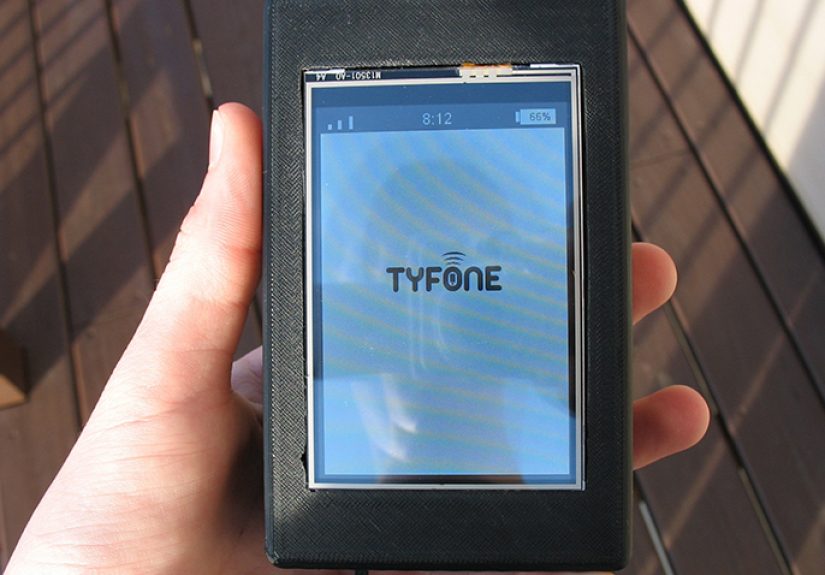
The answer is the TyTelli DIY smartphone, originally known as Tyfone, a handmade mobile device created by Tyler Spadgenske and submitted to the 2015 Hackaday Prize. It was not designed to defeat Apple, Samsung, or your cousin’s suspiciously cracked Android phone. It was built to prove that a real, working, programmable, open hardware-inspired phone could be assembled from accessible parts and documented in a way that teaches electronics, cellular communication, 3D printing, and Python programming.
That is what makes this project so interesting. It is not just a gadget. It is a lesson in how modern devices work when you peel away the glossy branding, the glue, the black-box software, and the marketing phrases that sound like they were generated by a caffeinated robot in a blazer.
What Is the Hackaday Prize DIY Smartphone?
The DIY smartphone featured as a Hackaday Prize entry is a complete homemade phone built around a Raspberry Pi A+, an Adafruit FONA GSM cellular module, a 3.5-inch PiTFT touchscreen, a Raspberry Pi camera module, a 1200 mAh battery, a boost converter, audio hardware, Wi-Fi, and a 3D-printed enclosure. In simple terms, it is a pocket computer that learned how to make calls and then proudly declared, “Look, Mom, I’m a smartphone.”
The project could make and receive calls, send and receive SMS messages, take photos, connect to Wi-Fi, upload images to Dropbox, check battery status, and run a custom Python-based mobile interface called TYOS. It did not run Android, and that was part of the charm. Rather than forcing a full commercial operating system onto hardware that was never intended to behave like a flagship phone, Tyler wrote custom software that controlled only what the device needed.
This makes the TyTelli less like a consumer product and more like a transparent classroom in phone form. Every component has a job. Every wire matters. Every design decision teaches something. And unlike a modern phone, where replacing a battery can feel like defusing a tiny adhesive-covered bomb, this device is visibly understandable.
Why This DIY Smartphone Still Matters
At first glance, a handmade smartphone from 2015 may seem outdated. After all, today’s phones have multi-camera systems, OLED screens, facial recognition, satellite emergency features, and enough processing power to make an old desktop computer hide in shame. But raw specs are not the point. The DIY smartphone project remains valuable because it explains the phone as a system.
A commercial smartphone hides complexity behind polished glass. The TyTelli exposes it. You can see the cellular module handling calls and texts. You can understand how the touchscreen talks to the Raspberry Pi. You can trace how the battery powers the device and why voltage conversion matters. You can modify the Python software instead of begging a locked app ecosystem for permission.
In the world of open hardware and maker culture, that transparency is powerful. It gives students, hobbyists, and engineers a way to learn by building. Instead of only reading about serial communication, UART, SPI, power management, camera interfaces, and 3D-printed enclosures, builders get to wrestle with those topics directly. And yes, sometimes “wrestle” means staring at a wire for 45 minutes before realizing it is plugged into the wrong pin. That, too, is education.
The Core Hardware Behind the TyTelli DIY Smartphone
Raspberry Pi A+: The Brain of the Phone
The Raspberry Pi A+ served as the main processing board. It handled the user interface, coordinated the connected modules, ran the Python-based software, and gave the project enough computing power to behave like a miniature Linux computer. The A+ was a smart choice because it was compact, relatively low-power, and equipped with GPIO pins for hardware expansion.
For a DIY phone, the Raspberry Pi is not just a processor. It is the project’s central nervous system. The screen, camera, Wi-Fi adapter, and cellular module all depend on it to keep the experience organized. In a commercial smartphone, these functions are integrated into dense custom boards. In the TyTelli, they are modular, visible, and easier to understand.
Adafruit FONA: The Cellular Muscle
The Adafruit FONA module gave the device its phone powers. It allowed the TyTelli to make voice calls, send SMS messages, receive texts, and work with a SIM card on GSM networks. It also included useful features such as onboard battery charging support and a real-time clock, which helped the Raspberry Pi keep time even when Wi-Fi was unavailable.
The FONA communicated with the Raspberry Pi over UART, which is one of the most common ways for microcontrollers and small computers to talk to modules. TYOS could send commands to the FONA to check battery level, manage calls, control SMS features, and retrieve time data. That makes the project a neat demonstration of serial communication in a real application rather than a dry lab exercise called “blink this LED and try to feel excited.”
PiTFT Touchscreen: The User Interface
The 3.5-inch PiTFT touchscreen gave the phone a visual interface. It was small by modern smartphone standards, but more than enough for menus, messages, call controls, and simple apps. The display communicated with the Raspberry Pi using SPI, a fast hardware interface often used for displays, sensors, and embedded peripherals.
Because the screen was resistive touch rather than modern capacitive glass, the experience was more practical than luxurious. It was not trying to win a beauty contest against an iPhone. It was trying to prove that a human could tap through a handmade phone interface and actually get things done. That is a very different and arguably more satisfying victory.
Camera, Wi-Fi, Battery, and Case
The Raspberry Pi camera module added photo and video capability. The project documentation describes a 5-megapixel camera that could take HD photos and upload images through Wi-Fi. A USB Wi-Fi adapter gave the phone internet access, while the FONA handled cellular communication.
Power came from a 1200 mAh lithium battery connected through the FONA, with a boost converter raising the voltage to 5V for the Raspberry Pi and display. That detail matters because portable electronics are not just about code and screens. They are also about power rails, current draw, charging circuits, heat, runtime, and the eternal maker question: “Why did it shut off the moment I touched it?”
The enclosure was 3D printed in two main parts, holding the Raspberry Pi, camera, FONA, speaker, microphone, antenna, display, and battery together. This is where the DIY smartphone becomes a real object rather than a pile of promising electronics. A case transforms a project from “interesting spaghetti” into something you can actually hold.
TYOS: A Phone Interface Written in Python
One of the most memorable parts of the project is TYOS, the custom Python software written for the TyTelli. The name sounds like it belongs on a tiny startup sticker, but its purpose was refreshingly practical. TYOS controlled the phone’s basic functions: calls, SMS, battery status, time, camera features, and simple menu navigation.
Technically, TYOS was not a full operating system in the way Android, iOS, or Linux distributions are operating systems. It was more of a custom application layer running on the Raspberry Pi. But for the project’s goals, that was enough. A DIY smartphone does not need a billion background services, three app stores, and a notification system designed to destroy your attention span. It needs to call, text, take pictures, and demonstrate how the pieces fit together.
Using Python also made the project approachable. Python is widely taught, readable, and friendly to beginners compared with lower-level languages. That means the software could function as a learning tool, especially for makers who wanted to modify the interface, add features, or understand how phone commands were being passed to the cellular module.
What the Project Teaches About Open Hardware
The TyTelli fits naturally into the open hardware conversation because it emphasizes documentation, modifiability, and accessible components. The project shared software, CAD files, component lists, diagrams, and build details. That matters because open hardware is not just about saying “you can build this.” It is about giving people enough information to actually build, study, modify, and improve the design.
For beginners, this kind of project can demystify consumer electronics. A smartphone stops being a sealed rectangle and becomes a collection of understandable subsystems: processor, modem, display, power, audio, storage, camera, enclosure, and software. That mental model is useful even if someone never builds the exact phone. It creates a foundation for embedded systems, product design, repair, and hardware entrepreneurship.
For advanced builders, the project raises deeper questions. How would you replace the 2G GSM module with a modern LTE or 5G-capable module? How would you design a custom PCB instead of stacking breakout boards? How would you improve battery life? What would it take to add secure messaging, GPS, Bluetooth, or a better camera? These questions show why the Hackaday community is so important: it turns curiosity into engineering momentum.
The Modern Challenge: Cellular Networks Have Changed
There is one big caveat for anyone inspired to build a DIY smartphone today: the cellular world has moved on. The original TyTelli used a GSM-based FONA module, which made sense at the time. But in the United States, 2G and 3G networks have largely been retired or reduced, and modern mobile service depends heavily on LTE, VoLTE, and 5G infrastructure.
That does not make the project useless. It simply means that a modern version would need a newer cellular module, carrier compatibility checks, proper antennas, updated power handling, and possibly more complicated audio integration. A current DIY smartphone would likely use an LTE modem module that supports voice over LTE, data, SMS, and the right regional bands.
This is where the project becomes even more educational. Building a phone is not only about connecting a modem. It also involves carrier rules, SIM support, antennas, certification, emergency calling expectations, power consumption, and radio-frequency compliance. The deeper you go, the more you appreciate why commercial phones are expensive and why hardware engineers deserve more snacks.
DIY Smartphone vs. Commercial Smartphone
A commercial smartphone is optimized for thinness, performance, durability, battery life, camera quality, carrier certification, app compatibility, and mass production. The TyTelli is optimized for learning, openness, repairability, and experimentation. Comparing the two purely by specs would be unfair, like comparing a homemade go-kart to a Formula 1 car and complaining that the go-kart lacks carbon-fiber aerodynamics.
But the DIY phone wins in areas that matter to makers. You can open it. You can understand it. You can modify it. You can replace components without melting glue or negotiating with proprietary screws. You can read the software. You can redesign the case. You can break it, fix it, break it again, and eventually call that process “iterative development.”
That repairable, modular spirit connects the project to broader right-to-repair conversations. Many modern devices are difficult to service because of adhesives, parts pairing, unavailable documentation, or restricted components. A DIY smartphone reminds us that electronics do not have to be mysterious. They can be designed in a way that invites learning instead of discouraging it.
Related DIY and Open Smartphone Projects
The TyTelli was not alone in the handmade phone universe. David Mellis, associated with the MIT Media Lab and Arduino community, built an open-source DIY cellphone using Arduino hardware, a GSM shield, a simple display, a wooden enclosure, and open design files. That project focused on the basics: calls, texts, a phone book, caller ID, and timekeeping.
Later, the ZeroPhone gained attention as another Hackaday Prize-related Raspberry Pi phone concept. Built around the Raspberry Pi Zero, it aimed for a low-cost, open-source mobile phone with a keypad, OLED display, modular expandability, and a hacker-friendly design. It shared the same philosophical DNA: phones should be understandable, repairable, and customizable.
The PinePhone pushed the open smartphone idea into a more polished Linux phone format, offering mainline Linux support, hardware privacy switches, and community operating system support. The Kite open hardware Android smartphone project explored another path, focusing on Android customization, 3D-printed enclosures, sensors, displays, and modular hardware.
These projects prove that “DIY smartphone” is not a single idea. It is a spectrum. At one end are educational phones that teach communication basics. At the other are open mobile platforms intended for Linux enthusiasts, privacy advocates, and hardware developers. The TyTelli sits in a sweet spot: simple enough to understand, complete enough to impress, and ambitious enough to make you wonder what else could be built on a kitchen table.
Could You Build a DIY Smartphone Today?
Yes, but with a few important updates. The original parts list is historically useful, but a builder in 2026 should not expect a 2G GSM module to behave like a modern carrier-ready phone in the United States. A practical modern build would start with a newer Raspberry Pi board or another single-board computer, an LTE modem module with VoLTE support, a compatible touchscreen, a camera, a carefully selected battery system, a proper antenna design, and updated software.
The software side could also evolve. Python remains a good choice for prototyping, but builders could use Qt, Flutter on embedded Linux, web-based interfaces, or lightweight Linux phone frameworks. A modern DIY smartphone might also include GPS, Bluetooth audio, encrypted messaging, USB-C charging, battery management, and a modular backplate for expansion.
However, the most important advice is simple: build for learning first. Do not expect your first handmade phone to replace your daily driver. Expect it to teach you why battery connectors are fragile, why antennas are fussy, why power management is a dark art, and why “it worked yesterday” is both a sentence and a lifestyle in hardware hacking.
Experience Notes: What Building a DIY Smartphone Feels Like
Working on a project like the Hackaday Prize Entry: A DIY Smartphone is less like assembling a normal kit and more like adopting a small electronic creature with opinions. At first, everything seems straightforward. You have a Raspberry Pi, a touchscreen, a cellular module, a battery, a camera, and a case. The plan looks clean on paper. Then reality arrives wearing safety goggles.
The first experience is usually physical layout. Components that look tiny online become awkwardly shaped in real life. A wire that seems flexible in theory suddenly refuses to bend where you need it. The battery wants to sit exactly where the speaker should go. The antenna wants breathing room. The touchscreen ribbon cable behaves like it has personal boundaries. This is when you learn that enclosure design is not decoration. It is engineering with spatial consequences.
The second experience is power. Portable electronics teach humility very quickly. A Raspberry Pi can be forgiving on a desk, but inside a handheld device every milliamp matters. The screen draws power. The modem draws power. The Wi-Fi adapter draws power. The camera draws power. Suddenly your “smartphone” has the battery life of a nervous fruit fly. That is when you begin thinking about sleep modes, voltage conversion efficiency, heat, cable length, and whether your boost converter is quietly judging you.
The third experience is communication between modules. The FONA speaks through serial commands. The display uses SPI. The camera uses its own interface. The Wi-Fi adapter depends on Linux support. Each part may work perfectly alone, then become moody when combined. Debugging becomes a detective story. Is the cellular module not responding because the baud rate is wrong, the power is unstable, the SIM is unsupported, the antenna is loose, or because Mercury is in retrograde? Usually it is the baud rate, but the antenna deserves suspicion.
The fourth experience is software design. A phone interface sounds easy until you try to build one. You need menus, contacts, call states, message history, error handling, battery display, touch input, camera controls, and enough visual feedback that the user does not feel like they are operating a microwave from 1997. TYOS is impressive because it narrowed the scope. It did not try to imitate a full smartphone operating system. It focused on what the hardware could realistically do.
The fifth experience is pride. When a handmade device places a call or sends a text, it feels absurdly satisfying. A commercial phone doing that is boring. A homemade phone doing that is magic with visible screws. You know exactly how many things had to work together for that message to leave your bench. The battery had to cooperate. The modem had to attach to the network. The Python code had to send the right command. The interface had to register your input. The antenna had to do invisible antenna things. Suddenly, a simple “hello” text feels like a moon landing.
The final experience is perspective. After building or studying a DIY smartphone, you never look at consumer electronics the same way again. You notice repairability. You notice modularity. You notice how much design effort goes into hiding complexity. You also gain respect for commercial engineering while becoming less willing to accept devices that are intentionally impossible to repair or understand.
That is the lasting value of the TyTelli. It is not the fastest phone, the thinnest phone, or the prettiest phone. It is a phone that teaches. It invites people to ask better questions: What is inside my device? Who controls it? Can I fix it? Can I modify it? Can I build something better? Those questions are the real prize.
Conclusion
The Hackaday Prize Entry: A DIY Smartphone is more than a nostalgic maker project. It is a compact demonstration of hardware curiosity, open design, and practical learning. Tyler Spadgenske’s TyTelli showed that a smartphone could be built from off-the-shelf components: a Raspberry Pi A+, an Adafruit FONA cellular module, a PiTFT touchscreen, a camera, a battery, Wi-Fi, Python software, and a 3D-printed case.
It also showed the limits and possibilities of DIY mobile hardware. The original design reflected the cellular networks and maker ecosystem of its time, while a modern version would require updated LTE or 5G-compatible components. Still, the project remains a brilliant example of what happens when hardware is made understandable. It encourages builders to learn, modify, repair, and question the sealed devices they use every day.
In a world of polished black rectangles, the TyTelli is a cheerful reminder that technology is not magic. It is parts, code, power, signals, mistakes, fixes, and persistence. Sometimes it is also a 3D-printed brick that can send a text message. And honestly, that is beautiful.