Table of Contents >> Show >> Hide
- The Commodore PET Was Built for the Dawn of Personal Computing
- When a Garbage Screen Is Bad News and Good News
- The Real Problem Was Not One Fault, But a Crowd
- When Digital Tools Reveal an Analog Problem
- What Made the Early Commodore PET Extra Tricky to Repair
- The Bigger Lesson About Assumptions
- How to Troubleshoot a Vintage Computer Without Fooling Yourself
- Why This Commodore PET Repair Still Matters
- Workbench Reflections: The Human Side of a Repair Like This
- SEO Tags
Vintage computer repair has a funny way of humbling people. You start with confidence, a screwdriver, and a very reasonable theory. Thirty minutes later, you are staring at a screen full of nonsense characters, questioning your life choices, your tools, and possibly electricity itself. The Commodore PET is especially good at this kind of drama. It looks sturdy, almost polite, like a machine that would never waste your time. Then it boots into visual soup and reminds you that old computers can still be world-class pranksters.
That is exactly why a tricky Commodore PET repair is such a good lesson in assumptions. On paper, the machine seems straightforward. The PET was one of the early ready-to-run personal computers, famous for packing a monitor, keyboard, cassette drive, and motherboard into one unmistakable wedge-shaped case. It helped make personal computing feel less like a science project and more like a real product. It also came from an era when parts, board layouts, and service approaches were very different from what modern repair habits expect. So when a PET fails, it often fails in ways that look obvious right up until they are not.
This is the heart of the story: one symptom suggested one likely cause, the likely cause was partly correct, the repair still did not fix the problem, and the real answer turned out to be a stack of faults hiding behind each other like misbehaving children pretending they were nowhere near the cookie jar. For anyone who loves retro computing, electronics restoration, or the glorious chaos of old hardware, this repair tale is more than entertaining. It is a master class in how not to let assumptions drive the bus.
The Commodore PET Was Built for the Dawn of Personal Computing
To understand why this repair became such a puzzle, it helps to understand what the Commodore PET actually was. When the PET arrived in 1977, it stood out because it was sold as a complete machine rather than a box of hope and loose parts. It had a built-in display, built-in cassette storage, built-in BASIC, and a design that looked more like office equipment than a hobbyist kit. In a market that was still figuring out what a “personal computer” should be, the PET felt refreshingly complete.
That completeness, however, came with quirks. Early PET models used unusual ROM and RAM chips that are now infamous among restorers. They were not the kind of parts you can casually pluck from a modern drawer full of generic replacements. They were specialized, aging, and in many cases failure-prone. Decades later, that matters a lot. Repairing one of these machines is not simply a matter of swapping a bad part for a common new one. Sometimes it requires adapters, replacement EPROMs, careful programming, and a willingness to treat every “simple fix” with suspicion.
The PET also occupies a sweet spot in computer history. It is simple enough that an experienced repairer can follow the logic of the system, but complex enough that a single weak byte, flaky signal, or tired chip can send the whole machine into wonderfully confusing behavior. In other words, it is the perfect teacher for anyone willing to learn patience the hard way.
When a Garbage Screen Is Bad News and Good News
One of the classic failure modes in old computers is the famous garbage screen. You power the system on, expecting some variation of a welcome banner, and instead the display fills with random characters, checkerboard patterns, or symbols that look like the machine is trying to communicate from another dimension. It is easy to see that and think, “Well, that’s catastrophic.” In one sense, yes. In another sense, it is oddly encouraging.
If a PET shows a screen full of junk, several important subsystems may still be alive. The monitor is working. Video memory may be working. The character generator may be working. The clock may be ticking. Power is at least present enough to produce display output. That does not mean the machine is healthy, but it does mean you are not starting from a dead, silent brick. In vintage repair, that counts as emotional support.
That was part of the trap in this kind of repair. A garbled display suggested that the PET was partly functional, which led to an early conclusion that the fault was probably in a small cluster of bad chips. That is a perfectly reasonable place to begin. The trouble starts when “reasonable” quietly turns into “certain.”
The First Assumption: It Must Be the ROM
With a PET that hangs before properly clearing the screen, faulty system ROMs are a very plausible suspect. The machine depends on those ROM chips for its startup code, memory tests, banner display, and BASIC environment. If one of them is corrupt or dead, the computer can stumble almost immediately. In this repair case, testing did reveal failed ROM chips, which seemed to confirm the theory. Great, right? Diagnose, replace, victory lap, maybe tea.
Not so fast.
The failed ROMs were replaced with adapter-based substitutes using more obtainable EPROM parts. This is common in vintage restoration because the original early PET ROM chips are awkward by modern standards. The replacement path sounded solid. The logic sounded solid. The confidence was solid. The outcome was not.
After the ROM replacements went in, the original symptom stayed put like an unwelcome houseguest. Same nonsense. Same failure to clear the screen. Same reminder that a correct diagnosis can still be incomplete.
The Real Problem Was Not One Fault, But a Crowd
This is where the repair story becomes truly educational. Once the “obvious” fix failed, deeper investigation showed that the PET was not suffering from a single dramatic villain. It had multiple bad parts at once. Two failed ROM chips were only part of the mess. Bad RAM chips were also involved, and not in a nice, tidy, one-and-done kind of way.
That matters because multiple failures create misleading symptoms. A dead ROM can mimic a bad CPU. Bad RAM can make good code look broken. A flaky replacement part can convince you the original diagnosis was wrong when the real issue is that both the original fault and the new fix are causing trouble at the same time. This is how experienced repairers end up muttering at the bench like detectives in a crime show, except with more EPROMs and fewer dramatic camera angles.
In the PET case, once additional RAM faults were identified and dealt with, the machine improved enough to boot further. That should have been the happy ending. Instead, it became the middle of the story. The machine could now do more, but what it did made very little sense. A simple BASIC program that should have printed a cheerful little message produced bizarre floating-point output instead. The boot banner could turn into gibberish. A strange checkerboard symbol showed up where it had no business being. This was progress, technically, but the rude kind.
Why Partial Success Can Be More Confusing Than Total Failure
There is something especially sneaky about a machine that mostly works. Total failure is often easier to reason about because it forces you into basic checks: power, reset, clock, CPU activity, address lines, and so on. But partial success tempts you into storytelling. “If it can do this, then that part must be good.” “If it boots this far, then the CPU must be fine.” “If the replacement ROM verifies, then it cannot be the ROM anymore.”
That kind of logic is useful right up until it becomes rigid. Old hardware loves edge cases. A marginal bit can pass one test and fail under timing stress. A chip can function well enough to get through startup, then fall apart during a specific routine. A board can work when cold, fail when warm, and then gaslight you by behaving perfectly while the probes are attached.
The PET repair demonstrates this beautifully. The system was executing code, but not always the right code. It was writing memory, but not always to the right place. It was alive enough to mislead the people trying to save it.
When Digital Tools Reveal an Analog Problem
One of the most interesting parts of this repair is that the investigation leaned on serious tools: an oscilloscope, a logic analyzer, chip testing, and even software disassembly to compare bus activity against what the code should have been doing. That is the kind of workflow that separates random chip-swapping from actual troubleshooting. It also produced one of the best lessons in the entire story.
The logic analysis showed something that made it look as if the 6502 processor was behaving incorrectly. Instructions appeared to be read, but execution went sideways. Addresses came out wrong. A bad CPU became a tempting explanation. If you have a vintage machine and a trace tells you the processor may be confused, it is very hard not to point a finger at the processor.
Except the processor was not the real problem.
The deeper answer was nastier and more educational: one replacement ROM had a weak or flaky programmed byte. In other words, the “fixed” part was introducing a subtle new failure. The data could appear one way to the instrument and another way to the CPU, likely because the issue involved timing or marginal voltage behavior rather than a neat, always-wrong digital value. That is a beautiful nightmare. The logic analyzer was helpful, but it did not tell the whole truth by itself.
This is the sort of moment that makes repair veterans nod knowingly. Electronics are not pure logic in the abstract. They are physical systems. Signals rise and fall over time. Voltage levels are not philosophical ideas; they are analog realities. A barely programmed bit, a weak output, a timing edge that arrives just late enough to matter, or a contested bus line can all produce symptoms that make digital reasoning alone look foolish. Vintage hardware repair is not just about what the bits are supposed to be. It is about whether the machine can actually see them clearly, at the right time, under real operating conditions.
What Made the Early Commodore PET Extra Tricky to Repair
Oddball Memory Parts
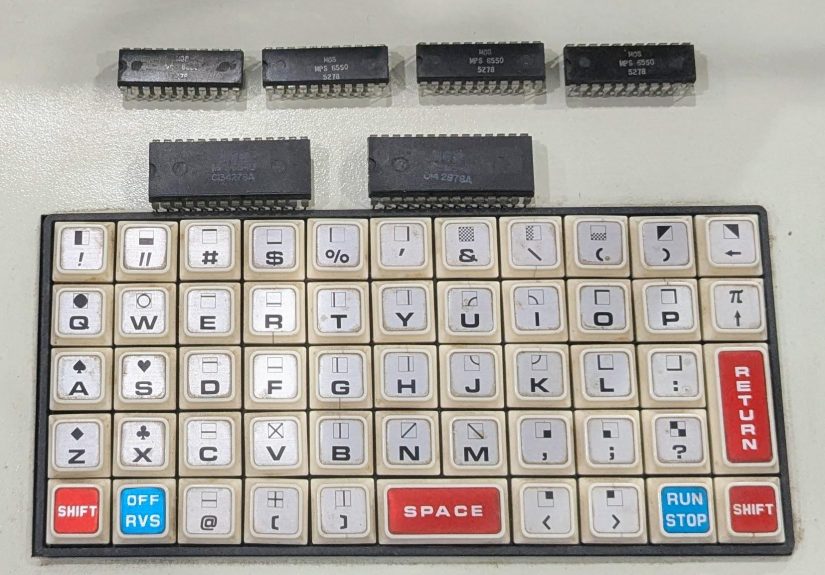
Early PET models are notorious because they used unusual 6540 ROMs and 6550 RAMs. Those parts are part of what gives the machine its historical flavor, and part of what gives restorers mild headaches. They are not as easy to source as later, more common memory devices, so repair often involves adapters or modern stand-ins. That creates more points where assumptions can sneak in. Was the original chip bad? Is the adapter correct? Was the replacement programmed correctly? Is the replacement timing compatible enough? “Installed” and “solved” are not synonyms.
Age-Related Instability
Even when a part was fine in 1978, time has had opinions. Sockets corrode. Pins oxidize. Thermal cycles stress solder joints. Traces age. A board can have one obvious bad chip and a second weaker chip just waiting for the attention spotlight to move elsewhere. That is one reason old machines often seem to reveal faults in layers. You fix the loud failure and expose the quiet one underneath.
The CRT Factor
Because the PET includes a built-in CRT display, repair also demands caution. The case may open like a car hood, which is charming, but the machine is not a toy. Vintage CRT systems can store dangerous voltages. Any discussion of PET repair should include the boring but vital reminder that curiosity is admirable and getting zapped by old display hardware is a terrible hobby.
The Bigger Lesson About Assumptions
The title lesson is bigger than one Commodore PET. It applies to nearly every kind of troubleshooting, whether you are fixing a retro computer, debugging software, chasing a car problem, or trying to figure out why your printer suddenly behaves like it holds a personal grudge.
Assumptions are useful because they help you form a starting hypothesis. Without assumptions, troubleshooting becomes random wandering. But assumptions become dangerous the moment they stop being temporary. The PET repair teaches several excellent rules.
First, a plausible fault is not necessarily the only fault. Two bad ROMs did not mean the machine only had ROM problems. The repair kept unfolding because the PET had multiple failures stacked together.
Second, a replacement part should never be treated as automatically good. This is one of the most painful lessons in electronics. New-to-you, tested-once, or freshly programmed parts can still be faulty, marginal, or incompatible enough to confuse the issue.
Third, “mostly works” does not mean “working correctly.” The PET could accept input and execute some routines, yet still corrupt behavior in spectacular ways. Partial operation is evidence, not proof.
Fourth, instruments are powerful, but they are not magic. Scopes, logic analyzers, and chip testers are wonderful. They also need interpretation. If the underlying issue is analog, intermittent, or timing-related, the readout can point you in the right direction without handing you the answer in a gift box.
Finally, repair is as much about method as intelligence. The people who solve tricky hardware problems are not usually the ones making the boldest guesses. They are the ones narrowing possibilities, checking every layer, confirming each repair step, and refusing to marry their first theory.
How to Troubleshoot a Vintage Computer Without Fooling Yourself
If this PET story has a moral for restorers, it is not “buy more test gear,” though test gear certainly does not hurt. The better moral is to build a repeatable process.
Start with the basics: verify power rails, confirm clock activity, check reset behavior, and inspect obvious physical issues such as corroded pins, broken sockets, or damaged traces. If the display is alive, ask what that tells you about the video path. If the CPU shows activity, ask whether it is meaningful activity. If memory is suspect, test it directly rather than assuming a symptom map from memory alone. If you replace a chip, verify the replacement independently before letting it become the foundation of your next conclusion.
It also helps to respect the machine’s original documentation and the community knowledge built around it. Vintage computers live on because enthusiasts document schematics, ROM images, repair guides, adapter boards, and known failure patterns. The PET community has done a tremendous amount of work in this area. That shared knowledge can turn an impossible restoration into a merely stubborn one.
And perhaps most importantly, keep your ego out of the loop. A repair bench is not a courtroom. You do not need your first theory to win. You need the machine to work.
Why This Commodore PET Repair Still Matters
There is a reason stories like this resonate beyond the small but enthusiastic world of retrocomputing. They show us how technology was built, how it fails, and how people learn by wrestling with it. A Commodore PET is not just a collectible box with a tiny screen and wonderfully weird keyboard. It is a snapshot of an era when personal computing was becoming real, affordable, and accessible to ordinary people.
Repairing one today is part engineering, part archaeology, and part therapy. You are dealing with old design choices, old parts, old manufacturing tolerances, and old software assumptions all at once. The challenge is not merely to replace what is broken. It is to understand what the machine is trying to do, what it is failing to do, and why your own assumptions may be making the path harder than it needs to be.
That is why a tricky Commodore PET repair is more than a neat workshop anecdote. It is a reminder that good troubleshooting is not about being instantly right. It is about staying honest when the evidence changes. Sometimes the ROM is bad. Sometimes the RAM is bad. Sometimes the replacement ROM is bad too, just to keep everybody humble. And sometimes the best repair lesson an old computer can teach is this: the machine is not trying to embarrass you, but it is perfectly willing to do so if you stop testing and start assuming.
Workbench Reflections: The Human Side of a Repair Like This
Anyone who has spent real time with old hardware knows that a repair like this is as much emotional as technical. There is a certain moment when you flip the power switch on a vintage machine and hear the familiar hum, the faint CRT buzz, and maybe the little click of life returning to a circuit that has been asleep for decades. It feels hopeful. Then the screen fills with junk and hope quietly puts its jacket back on.
The experience is strangely addictive because every clue feels meaningful. A single changed character on the display can seem like a breakthrough. A boot banner that almost appears can feel like the machine is trying to encourage you. You start negotiating with it. “Come on, just give me one clean startup.” Old computers are very good at giving you 80 percent of a miracle and 100 percent of a headache.
What makes the Commodore PET especially memorable is its physical presence. It does not look disposable. Opening the case feels like opening a piece of history. The layout invites investigation, but it also reminds you that everything inside is old enough to have developed personality. The board is not merely failing; it is expressing itself. Sometimes loudly.
Repairs like this also teach patience in a very practical way. You cannot bully a forty-plus-year-old computer into making sense. You have to slow down, observe, test, compare, and question your own certainty. The most dangerous sentence at the bench is usually something like, “Well, since that part is new, it can’t be the problem.” The second most dangerous sentence is, “I already checked that.” Vintage hardware loves both of those sentences because they create opportunities for embarrassment.
There is also real joy in the final turnaround. When the machine at last boots correctly, when the weird symbol disappears, when a simple BASIC command does what it is supposed to do, the satisfaction is disproportionate in the best possible way. You did not just replace parts. You untangled a story. You learned how the machine thinks, how it fails, and how your own assumptions nearly led you astray.
That is why people keep restoring machines like the PET. The result is not just a working computer. It is a deeper respect for design, diagnosis, and the kind of persistence that old electronics demand. The machine becomes more interesting after the repair than before it. And somewhere along the way, you become a little better too: a little less certain, a little more methodical, and much more suspicious of any problem that looks “obvious” in the first ten minutes.