Table of Contents >> Show >> Hide
- What Is the Instagram Emoji Slider?
- Where the Emoji Slider Shows Up (And Where It Doesn’t)
- How to Add the Emoji Slider to Your Instagram Story (Creators)
- How Viewers Use the Emoji Slider (Without Overthinking It)
- How Creators See Emoji Slider Results
- Best Practices: Make the Emoji Slider Work Harder
- Troubleshooting: “Why Don’t I See the Emoji Slider?”
- FAQ: Quick Answers About the Emoji Slider
- Conclusion: Use the Emoji Slider Like a Pro (And a Little Like a Gremlin)
- Experiences: What It’s Like Using the Emoji Slider in the Real World (The Extra Truthy Stuff)
- Experience #1: The “silent audience” suddenly becomes loud
- Experience #2: Emoji choice changes everything
- Experience #3: Placement is an engagement multiplier
- Experience #4: The slider is amazing for “soft market research”
- Experience #5: It’s a perfect “bridge” to the next action
- Experience #6: Expect “troll sliders” (and laugh)
- Experience #7: Consistency beats perfection
Instagram Stories are basically the internet’s most casual focus group. And the emoji slider is the
version that doesn’t require anyone to type a full sentence (a true gift to humanity).
With one swipe, your audience can tell you if they’re mildly interested or spiritually unwell with excitement.
In this guide, you’ll learn exactly how to use the emoji slider as a creator (posting it, customizing it, and checking results)
and as a viewer (voting without accidentally advancing to the next Story like it’s an Olympic sport).
What Is the Instagram Emoji Slider?
The emoji slider is an interactive sticker you can add to an Instagram Story (and sometimes to other formats, depending on features available to your account).
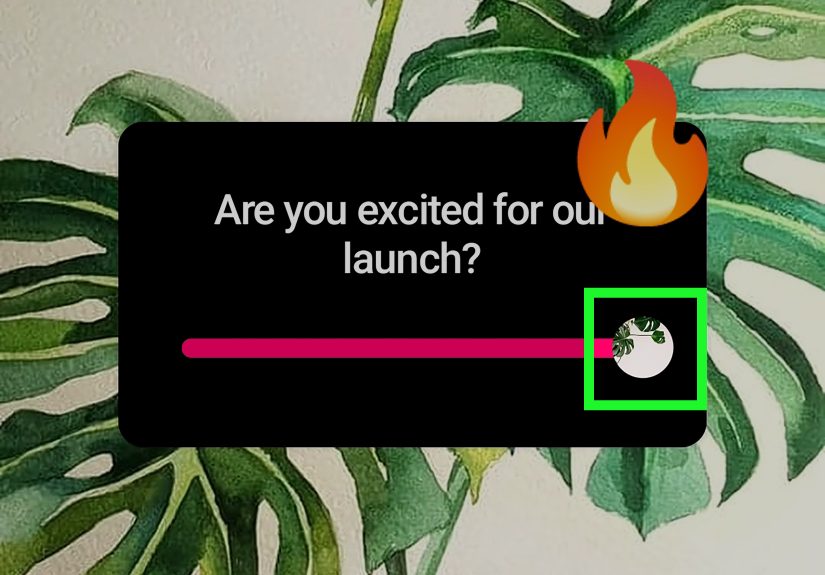
Instead of tapping “Yes/No” like a regular poll, viewers drag an emoji along a scale to show how much they agree, like, want, crave, approve, or fear whatever you posted.
As the emoji moves to the right, it usually grows largera tiny visual cue that says, “Yes, you are becoming more emotionally invested by the millimeter.”
Creators can use that feedback to measure sentiment, test ideas, and spark engagement without begging: “Thoughts???!!”
Where the Emoji Slider Shows Up (And Where It Doesn’t)
Most people use the emoji slider in Instagram Stories. If you can add stickers, you can usually add the slider.
Instagram occasionally expands sticker features to other placements (like Reels overlays in some eras or regions), but the most consistent home is still Stories.
Quick checklist before you panic
- Public or private account: either can use it, as long as the sticker is available.
- Business/Creator account: not required to post, but helpful for deeper insights.
- App version matters: features roll out and change. If you don’t see it, update first.
How to Add the Emoji Slider to Your Instagram Story (Creators)
Step 1: Create your Story
- Open Instagram and go to Stories (tap your profile picture with the “+” or swipe to the Story camera).
- Take a photo/video or upload one from your camera roll.
- Do any quick edits first: text, drawings, music, filterswhatever matches the vibe.
Step 2: Open the sticker tray
- Tap the sticker icon (it looks like a square smiley sticker).
- Scroll or use the search bar and type slider or emoji slider.
Step 3: Add and customize the slider
- Tap Emoji Slider.
- Type your prompt (keep it short; people are reading this while walking into a pole).
- Tap the emoji to change it. Pick one that matches what you’re asking.
- Tap through style options (if available) to adjust the look (font/color treatment may vary by app version).
Step 4: Place it where thumbs can actually reach it
Drag the sticker to position it. Pinch to resize. Pro tip: avoid placing it too close to the very bottom where
Instagram’s UI livesnothing kills engagement like a sticker hidden behind a “Send message” bar.
Step 5: Post it (strategically)
- Your Story: best for broad feedback.
- Close Friends: best for honest feedback from your “inner circle” (and your most chaotic supporters).
Creator examples that work ridiculously well
- Product hype: “How excited are you for this drop?” + 🔥
- Taste test: “Rate this sandwich situation” + 🤤
- Confidence check: “How nervous should I be?” + 😬
- Fit check: “Is this outfit a yes?” + 😍
- Travel tease: “How badly do you want to be here?” + 🏝️
How Viewers Use the Emoji Slider (Without Overthinking It)
Step-by-step for viewers
- Open the Story with the emoji slider.
- Press and drag the emoji left or right along the bar.
- Release when you’ve picked your level of enthusiasm (from “meh” to “I would sell a kidney for this”).
What happens after you vote?
Typically, Instagram will show you a result view after you voteoften including an average response and your own position.
(Exact screens can vary, but the general idea is: you vote, then you get a quick “here’s the vibe” snapshot.)
Is your vote public?
Your response isn’t broadcast to everyone as a named badge on the Story itself. But the creator can usually see who responded and the strength of their response
in the Story’s viewer/insights area. So yes: your friend will know you were at 2% excitement for their new hobby. Choose kindness. Or choose chaos. That’s between you and your conscience.
How Creators See Emoji Slider Results
You posted the slider. People dragged the emoji. Now the question is: Did they love it, or were they politely scrolling?
How to check results while the Story is live
- Open your Story.
- Swipe up (or tap the viewer list area).
- Look for the slider’s results panel showing overall sentiment (often an average) and individual responses.
What you can learn from the results
- Instant temperature check: Is the audience excited, confused, or emotionally unavailable today?
- Content direction: High excitement = make a follow-up. Low excitement = pivot or explain better.
- Audience segmentation: Who consistently responds strongly? Those are your warm leads for deeper engagement.
Pro move: turn slider votes into conversations
If someone slides all the way right (maximum enthusiasm), they’re basically raising their hand. That’s your cue to:
ask a follow-up question, offer a link, or invite them to reply to the Story. Engagement stickers aren’t just metricsthey’re conversation starters.
Best Practices: Make the Emoji Slider Work Harder
1) Write prompts that are impossible to ignore
The best prompts are clear, emotional, and easy. “Do you like this?” is fine.
“How obsessed are you with this?” is better. “Rate this chaos” is best-in-class.
2) Match the emoji to the emotion
Your emoji is the “scale label.” A 🔥 implies hype. A 😬 implies nervousness. A 🤤 implies hunger.
A 💀 implies “I’m laughing, but I’m also not okay.” Choose wisely.
3) Make it thumb-friendly
- Keep it away from the bottom UI zone.
- Use contrast: if your background is busy, add a simple text block behind the prompt or choose a clearer placement.
- Don’t make it microscopic. Your audience is not required to squint for you.
4) Use it as a “soft CTA”
People love a low-effort action. The slider is less commitment than a DM, less pressure than a quiz, and more fun than staring silently.
Use it when you want participation without friction.
5) Pair it with a follow-up Story
The emoji slider works best when it leads somewhere. If excitement is high, post:
“Okay, you’re into ithere’s the behind-the-scenes.” If excitement is low, post:
“Tell me what you’d rather see next.”
6) Test timing, topics, and formats
Try the same style of slider on different days and compare completion rate and sticker interactions.
You’ll learn quickly what your audience actually cares about (and what they only pretend to care about to be polite).
Troubleshooting: “Why Don’t I See the Emoji Slider?”
Common reasons (and fixes)
- Your app is outdated: update Instagram in the App Store/Google Play.
- Feature rollout: some stickers appear gradually by region/account.
- Sticker tray clutter: use the sticker search bar and type “slider.”
- Cache/app bugs: force close, restart your phone, log out/in, or reinstall as a last resort.
If you still can’t find it
Don’t assume you’re cursed. Instagram regularly experiments with features, and sticker availability can vary.
If you’re posting for a brand, keep a backup plan: Poll sticker, Questions sticker, or a quick “Reply with an emoji” prompt.
FAQ: Quick Answers About the Emoji Slider
Is the emoji slider the same as a poll?
Not exactly. A poll is discrete choices (A vs. B). The emoji slider is a rangeit’s about intensity.
Think of it as “how much,” not “which one.”
Can I use any emoji?
Usually, yes. Instagram suggests common emojis, but you can typically choose from the full emoji library.
If you can text it, you can probably slide it.
Do viewers have to type anything?
Nope. That’s the magic. Slide, release, move on. It’s the snack-sized version of feedback.
Does the emoji slider help engagement?
It can. Interactive stickers often increase actions taken on your Story (taps, replies, interactions).
But the key is relevance: ask something people actually have feelings about.
Conclusion: Use the Emoji Slider Like a Pro (And a Little Like a Gremlin)
The Instagram emoji slider is simple: creators post it, viewers drag it, and everyone pretends it’s casualeven though it’s secretly data.
Use it to gauge excitement, test ideas, and start conversations that feel natural instead of salesy.
The best part? It’s fun. And on social media, fun is basically a growth strategy with better lighting.
Experiences: What It’s Like Using the Emoji Slider in the Real World (The Extra Truthy Stuff)
Let’s talk about what actually happens when you start using the emoji slider regularlybecause the instructions are easy,
but the human behavior is where it gets interesting.
Experience #1: The “silent audience” suddenly becomes loud
A lot of followers watch Stories like they’re spying from behind a curtain. No replies, no DMs, no likesjust vibes.
The emoji slider is often the first thing that gets them to interact, because it feels safe. They don’t have to write words.
They don’t have to be funny. They don’t have to commit to a “Yes” that you’ll screenshot and use against them in court.
They can just slide to 63% excitement and continue eating cereal.
Experience #2: Emoji choice changes everything
Try asking the exact same question with two different emojis and you’ll see the psychology shift.
“How do you feel about this announcement?” with 😍 tends to invite positivity.
With 😬 it invites honesty (and sometimes mild panic).
With 💀 you’ll get dramatic responses, even if the announcement is “I bought new socks.”
People read emojis like mood labels, so your emoji basically “frames” the answer before anyone touches the slider.
Experience #3: Placement is an engagement multiplier
Put the slider too high and people miss it. Put it too low and Instagram’s UI tries to fight your sticker like it’s defending the realm.
Put it in the natural thumb zone (middle-lower area but not at the bottom) and you’ll often see more interaction.
Also: if your background is chaoticbusy video, tiny text, 14 GIFs dancingyour slider becomes visual wallpaper.
Clean backgrounds and clear prompts tend to get cleaner engagement.
Experience #4: The slider is amazing for “soft market research”
If you sell anythingproducts, services, content, even ideasthe emoji slider can act like a low-stakes research tool.
“How interested are you in a beginner tutorial?” + 🤓
“How badly do you want a discount code?” + 🤑
“How do you feel about this new color?” + 🎨
You’re not collecting scientific data, but you are learning what your audience leans toward.
And because it’s quick, you can test multiple angles across a week without exhausting people.
Experience #5: It’s a perfect “bridge” to the next action
The best results come when you treat the emoji slider as step one, not the whole story.
For example:
- Step 1: Post a teaser photo and ask “How excited are you?”
- Step 2: Post the reveal in the next Story frame.
- Step 3: Add a link sticker, a DM prompt, or a “question box” for follow-ups.
This sequence works because the slider warms people up. Once they interact once, they’re more likely to interact again.
It’s like cracking open the door to participationwithout making it weird.
Experience #6: Expect “troll sliders” (and laugh)
Some people will always slide to 0% just to be dramatic. Some will always slide to 100% because they are joy incarnate.
Don’t overinterpret the extremes unless you see a consistent pattern across many viewers.
Look for trends, not one-off chaos. Social media is a party, not a lab.
Experience #7: Consistency beats perfection
If you use the emoji slider once a month, it’s a novelty. If you use it weekly, it becomes a habit your audience recognizes:
“Oh, this is where I get to participate.” That familiarity helps engagement.
The trick is to keep prompts varied so it doesn’t feel like the same recycled question in a different outfit.
Bottom line: the emoji slider is simple on the surface, but it’s powerful because it aligns with how people actually behave on Stories
fast, casual, low-commitment, and mostly operated with one thumb while doing something else.
Use it to make participation easy, and your audience will often surprise you with how much they’re willing to say… without saying a word.